Appearance
Skip to contentBuild a patch
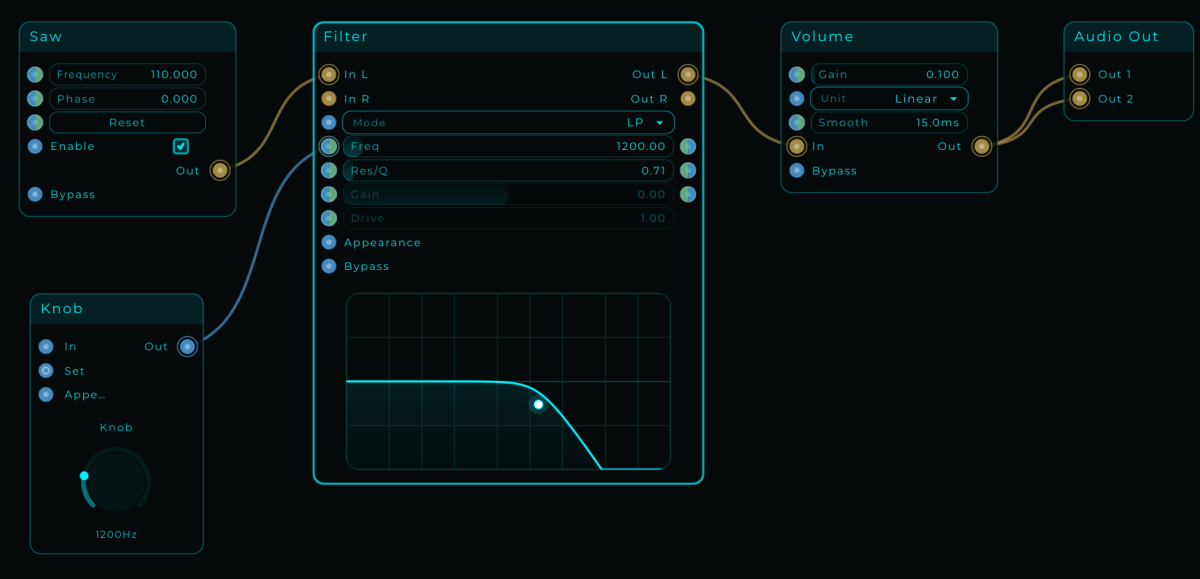
A few nodes. A sound you can shape. Follow the cables from Saw to Audio Out.Understand the connections A short path
Find the detail
MNodes documentation
Build a patch
you understand.
Play and build instruments, audio effects and MIDI tools. Start with a guided patch, or look up the node you need.
Still setting up? Install MNodes and choose your audio device.
Start here
A short path
to your own patch.
Follow these guides in order, or start where you feel comfortable. Each one gives you something to try.
- The big pictureGet to know MNodesHome, Library, the graph and the Front Panel: see how they fit together.
- About 15 minutesBuild your first patchMake a tone, shape it with Filter, and put a Knob on your Front Panel.
- No MIDI keyboard neededPlay your first synthAdd notes and an envelope. Use the on-screen keyboard to hear it respond.
Keep building
What do you want to do?
- Find your way aroundShow panels, navigate the graph and use the Inspector.
- Work with nodesAdd, resize and edit nodes. Save a setup you want to reuse.
- Connect signalsUnderstand Audio, CV, MIDI, Data and hybrid pins.
- Build a Front PanelArrange the controls you want to play.
- Save and share a projectKeep variations and package the resources that travel with them.
- Use MNodes in your DAWRoute audio and MIDI, sync transport and automate controls.
Reference
Find the detail
you came for.
Use Search in the top bar to find a node, a command or a topic anywhere in the manual.
Explore more
Ideas, devices and tools.
Find something to play
Organize your devices in the Library, find community projects in the Hub, or try a new combination in the Lab.
Make it your own
Bring in your plugins, create control artwork, or connect Claude to the documentation and patch tools.