
Appearance
Widgets
Widgets give a patch controls and displays: a Knob changes a number, a keyboard sends MIDI, and a Text widget shows a value. They work in the graph and can also appear on the Front Panel.
Beyond Widget Nodes
Some processing nodes also offer Add to Front Panel in their header menu. For example, a Filter editor or Oscilloscope display can sit beside your controls. See Node Bodies in the Front Panel.
Make a Knob control a parameter
Start with a patch that already makes sound, such as Your first patch. In that patch, Saw feeds Filter, then Volume and Audio Out.
- Add Widget Knob from the Node Palette. Select its node and open the Inspector.
- Set Min to
200, Max to5000, Default to1200and Value to1200. These are frequencies in hertz, matching Filter's Freq input. - Connect the Knob's Out pin to Filter's Freq input. Turn the Knob in the graph: the cutoff should change and the sound should become darker or brighter.
- Right-click the Knob's header → Add to Front Panel. Show the lower editor from the graph toolbar, unlock it and arrange the control.
- Lock the panel and turn the control there. It is the same Knob, with the same value and connection.
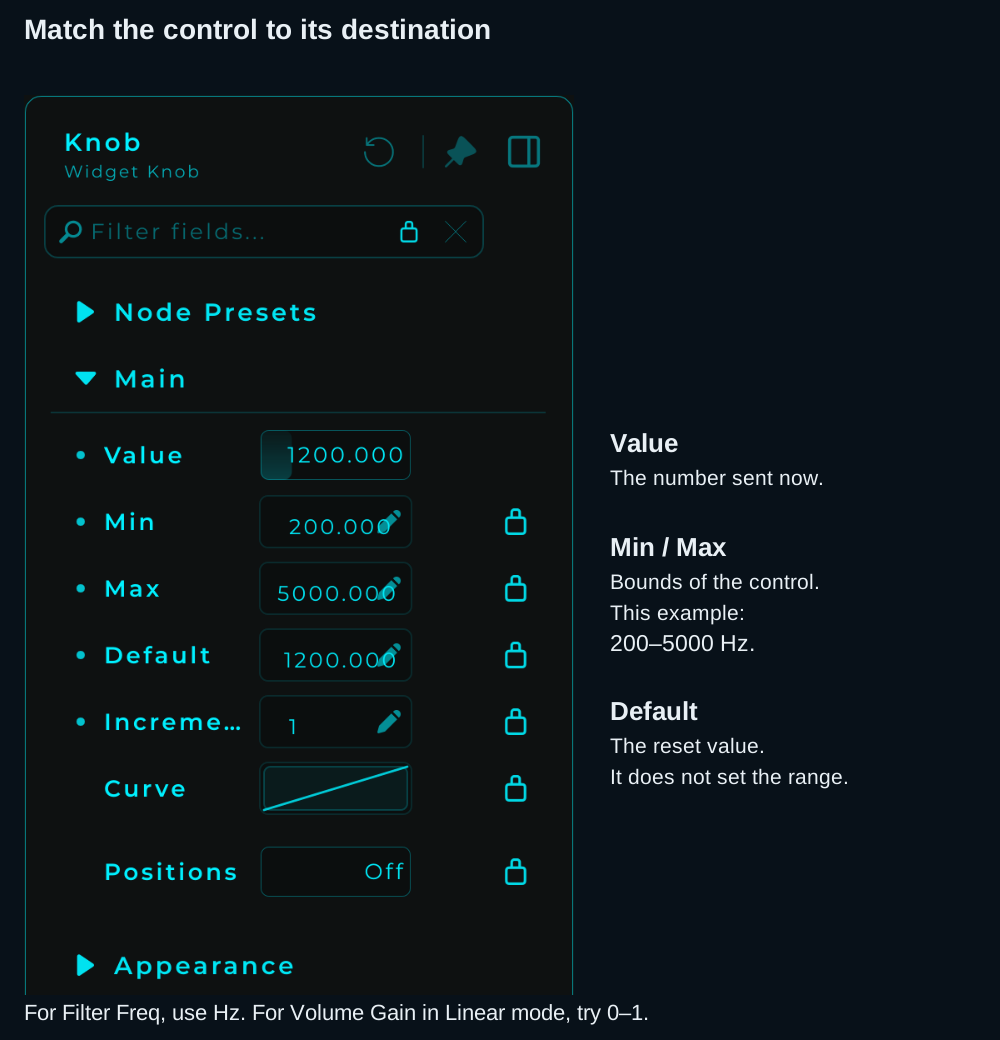
Set the range to match the destination. Adding a unit label changes the display; it does not convert the value.
| Destination | Example Knob range | What the number means |
|---|---|---|
| Filter Freq | 200–5000 | Frequency in Hz |
| Volume Gain | 0–1 | Linear gain: 0 is silent, 1 is unchanged |
Do not use the frequency range for Volume. Check the destination's parameter description before choosing the bounds. For reset, snapping and display options, see the Knob reference.
Widget Types
Controls
| Widget | Outputs | Description |
|---|---|---|
| Slider (V) | Float (Data) | Vertical slider for continuous values |
| Slider (H) | Float (Data) | Horizontal slider for continuous values |
| Knob | Float (Data) | Rotary control |
| XY Pad | X + Y (Data) | Two-dimensional control surface |
| Button | Event (Data) | Momentary trigger. Fires an event when pressed |
| Toggle | Bool (Data) | On/off switch |
| ComboBox | Int (Data) | Dropdown selection |
| RadioGroup | Int (Data) | Mutually exclusive buttons |
| Keyboard (Keymap) | MIDI | Piano keyboard: outputs MIDI notes |
Display
| Widget | Inputs | Description |
|---|---|---|
| Text | String (Data) | Display or edit text |
| Image | File | Display an image file |
| Sample View | Sampler node ID (Data) | Shows the sample selected in a Sampler; connect the Sampler's Sample View output |
| Sampler | MIDI and sample files | Sample playback with a zone editor and audio outputs |
Shapes
| Widget | Description |
|---|---|
| Square | Square shape with fill color |
| Rectangle | Rectangle shape |
| Circle | Circle shape |
| Triangle | Triangle shape |
| Hexagon | Hexagon shape |
| Line | Line element |
| Arc | Arc/curve element |
| Polygon/Shadow | Custom polygon with shadow |
Special
| Widget | Description |
|---|---|
| MIDI Drag Exporter | Drag MIDI clips out of MNodes into your DAW |
| Appearance Changer | Dynamically change visual properties of other widgets |
Widget Properties
The Inspector changes with the selected widget. Value controls can have a range, reset value, display units and response settings. Text, Image and shape widgets instead expose properties relevant to their content and appearance.
- Min / Max set a value control's bounds; Default sets its reset value.
- Prefix / Suffix add display text such as
Hz; they do not scale or convert the output. - Appearance controls the look and panel geometry.
- Expose to DAW, where supported, publishes the control's value for host automation. It does not expose every appearance setting.
- The parameter padlock excludes that parameter from randomisation and States capture/recall. This is separate from locking the Front Panel layout.
Position and Size (Pos X / Pos Y / Size Width / Size Height)
The Inspector's Appearance section includes Pos X and Pos Y fields that hold the widget's position on the Front Panel, in pixels, and Size Width and Size Height fields that hold its size.
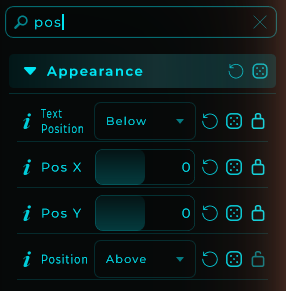
- Live both ways: dragging, resizing or nudging a widget updates the fields live, and editing the fields moves and resizes the widget on the panel.
- Whole pixels: all four step in whole pixels. The smallest size is 10 x 10.
- Modulatable: they also appear in an Appearance Changer and accept the node's Appearance input (e.g.
{"panelX": 120, "panelY": 40, "panelW": 90, "panelH": 90}), so a widget's position and size can be modulated or animated like any other appearance value. - Randomiser: position and size are excluded from the appearance randomiser, and from a pasted look, by default. Unlock them in the Inspector to include them.
Copy Size / Paste Size
To give several widgets the same dimensions, right-click one on the Front Panel and choose Copy Size, then right-click another and choose Paste Size. Select more than one widget first and the paste applies to the whole selection (the menu says how many). A size fits any widget, so it can be copied from one type onto another, and locked widgets are left alone.
Using Widgets in the Graph
Widgets appear as nodes in the graph with output pins. Connect them to any compatible input:
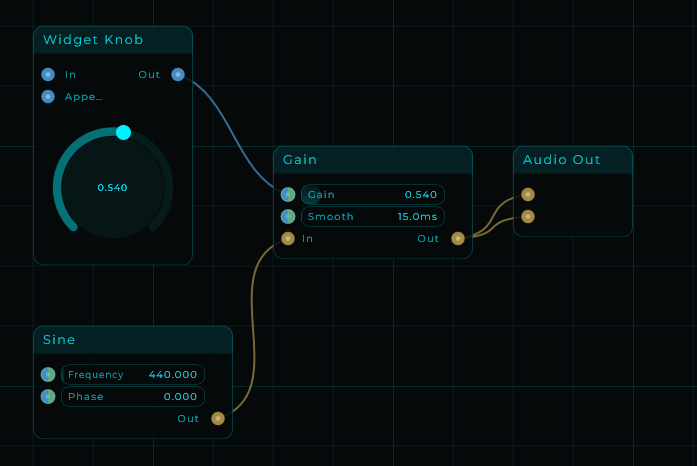
In this example, a Widget Knob controls the Gain parameter of a Volume node. The Knob's Data output is connected to that input, allowing real-time control from the Front Panel.
Linked Widgets
To make one value control drive another, connect the first control's Out to the second control's In input in the graph. Use compatible ranges: a 0–1 source will not sweep a 20–20000 destination across its full range without mapping.
This connection is directional. Changing the second control does not automatically update the first, and connecting both directions is not a way to make a shared value. For one control driving several parameters, branch its output to each destination and map the range separately where needed.
If the control does not do what you expect
| Symptom | Check |
|---|---|
| It appears on the panel but changes no sound | Its output still needs a graph connection to the intended parameter |
| Dragging moves the whole widget | Lock the Front Panel before operating the control |
| Most of its travel sounds the same | Check the destination's units and the control's range |
| It jumps back after you turn it | Check for an incoming In connection, a States recall or an active DAW automation lane |
| The shape or image has no value range | It is a display/decorative widget; use a value control to drive the parameter |