
Appearance
Your first patch
Build a sound you can hear, shape and control. Start with three nodes, add a filter, then put a Brightness knob on your own front panel.
SawFilterVolumeAudio Out
Prefer to explore first? Download the finished patch. It makes a continuous tone as soon as audio is running. Start with your listening volume low; set the Volume node's Gain to 0 to silence it.
Before you start
- Install MNodes, then open the standalone app. On Home, click New project, then An empty project to open a blank graph directly. Return to Home with View → Home.
- In Settings → Audio / MIDI, choose the audio device and outputs you listen through. Audio setup has the details.
- Start with an empty graph. If a project is already open, save it before returning to Home and creating An empty project.
You can also follow along in a DAW: load MNodes as an instrument and make sure its track is audible. The DAW manages your audio device. This patch generates its own tone, so you do not need to play a note or start a MIDI clip.
1. Make your first sound
Right-click an empty part of the graph to open the Node Palette. Make sure Nodes is enabled in its selector, search for Saw, and click the result. Repeat for Volume and Audio Out. Arrange them from left to right.
Each node has a job: Saw creates a repeating waveform; Volume controls its level; Audio Out sends it out of MNodes.
Before connecting the last cable, set these values. Click a node to see its parameters in the Inspector; expand the node to see its controls on the graph.
| Node | Parameter | Set it to |
|---|---|---|
| Saw | Frequency | 110 Hz |
| Saw | Enable | On |
| Volume | Unit | Linear |
| Volume | Gain | 0.10 |
Make these three connections. Drag from the small output circle to the matching input circle. Compatible pins light up while you drag.
| From | To |
|---|---|
| Saw Out | Volume In |
| Volume Out | Audio Out Out 1 |
| Volume Out | Audio Out Out 2 |
The pins on the left of Audio Out are labelled Out 1 and Out 2 because they feed your host's output channels. Sending the same mono signal to both puts the tone in both speakers.
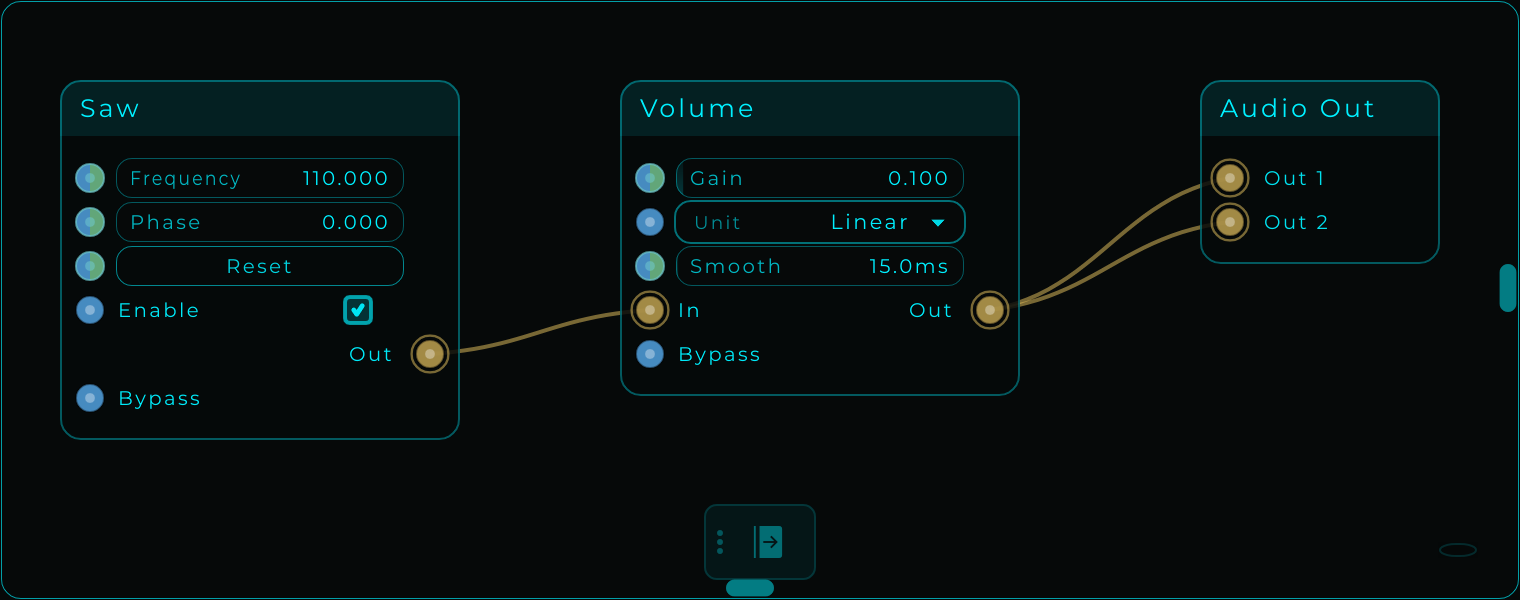
Listen for this
A steady, buzzy low tone. It keeps playing without MIDI. Changing Frequency changes the pitch; changing Gain changes the level.
First tone · Saw at 110 Hz
Set Gain = 0 to stop the tone, then return it to 0.10 to continue. If you hear nothing, use the quick checks below.
Download this stage: First tone
2. Shape its brightness
Add a Filter between Saw and Volume. Double-click the cable from Saw → Volume to remove that connection. Leave Volume connected to both Audio Out pins.
Connect Saw Out → Filter In L, then Filter Out L → Volume In. We use one channel through the filter, then send it to both speakers at the end. Leave Filter's In R and Out R unconnected for this lesson.
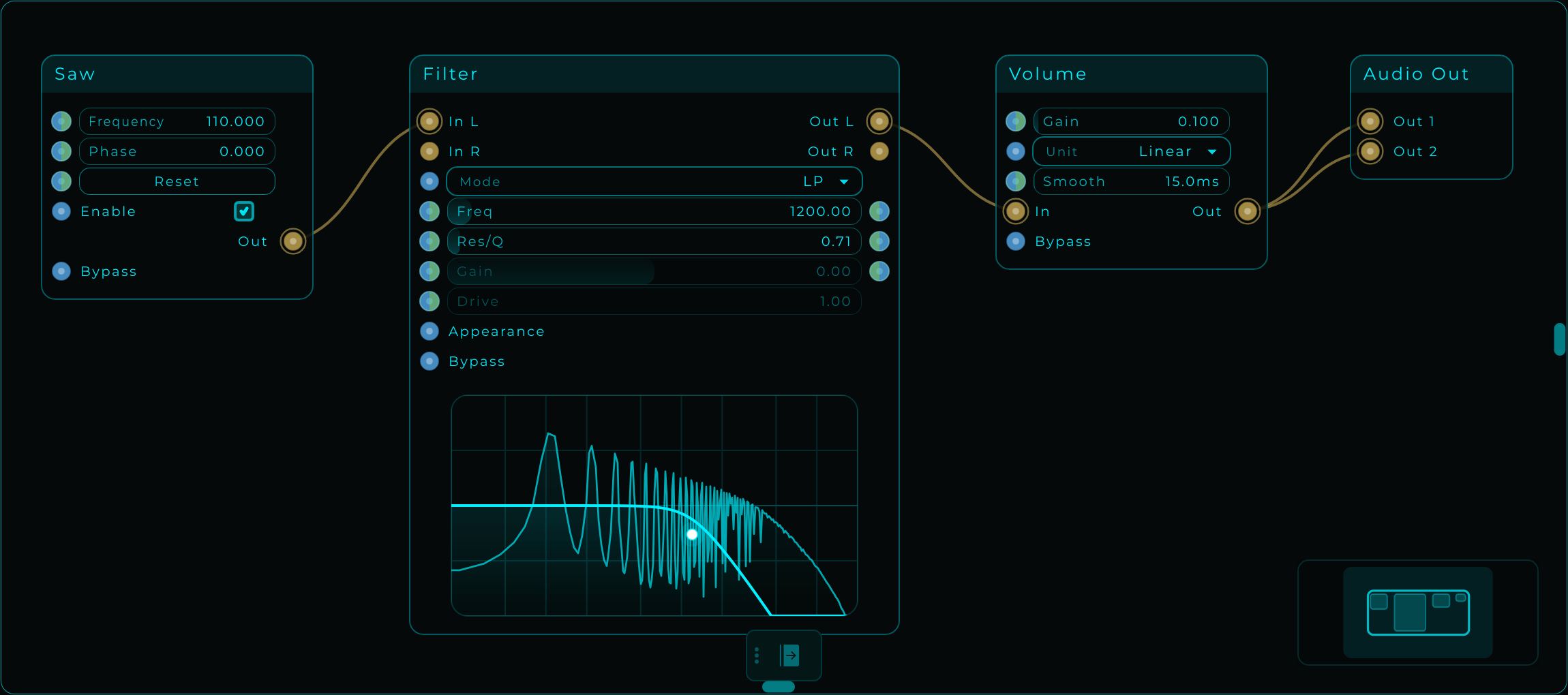
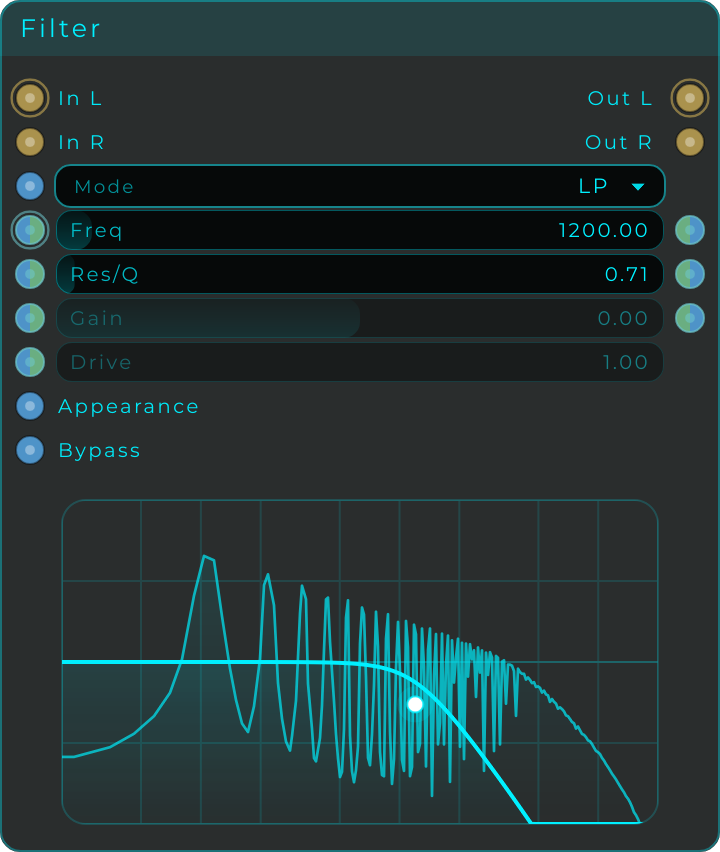
Set Mode = LP, Freq = 1200 Hz, and Res/Q ≈ 0.71. Leave the other controls at their defaults.
LP means low-pass: low frequencies pass through while higher frequencies are reduced. Lower the cutoff to 300 Hz for a darker sound; raise it to 4000 Hz for more buzz and brightness. The note stays the same.
We chose Saw because it contains many harmonics: frequencies above the basic note. The filter removes some of those harmonics, making its effect easy to hear.
Check your result
Move Filter's Freq, not Saw's Frequency. You should hear brightness change without changing the note.
300 Hz cutoff · darker
4000 Hz cutoff · brighter
Download this stage: Shape the sound
3. Make a Brightness knob
Add Widget Knob from the Node Palette. Right-click it, choose Rename Node…, and name it Brightness.
Select it and set these values in Inspector → Main. Set Max before Min, because a new knob starts with a range of 0 to 1.
| Parameter | Value | Why |
|---|---|---|
| Max | 5000 | Brightest cutoff in this example |
| Min | 200 | Darkest cutoff in this example |
| Value | 1200 | Match the filter's starting cutoff |
| Default | 1200 | Value to return to when resetting |
| Increment | 1 | Change in whole Hz |
Connect Brightness Out → Filter Freq. Use the input pin on the left of Filter's Freq row; the pin on the right is an output.
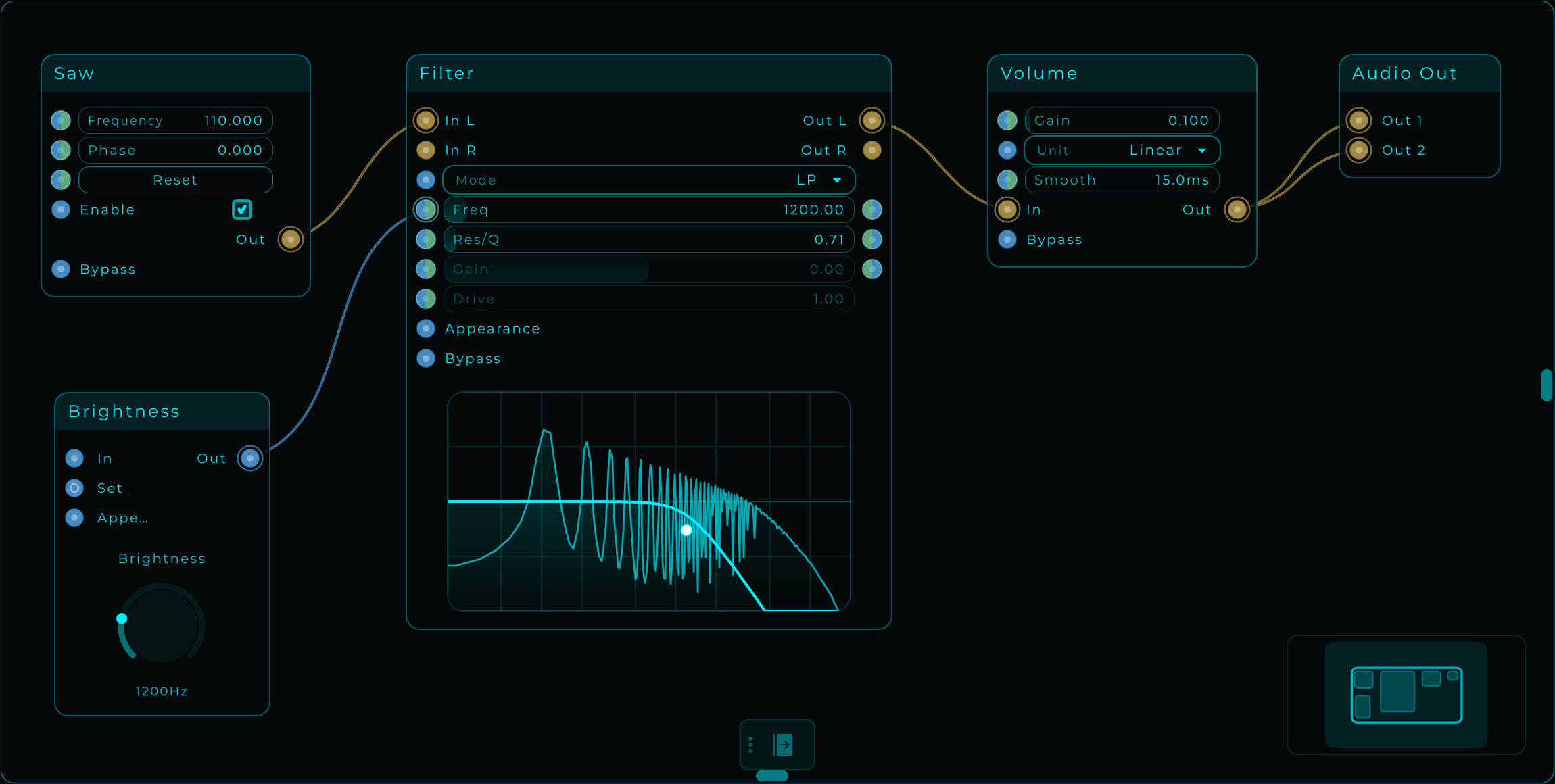
Turn the knob. The filter's Freq value and response curve should follow it. If the sound becomes very dark and barely changes, check the range: 0–1 is too small for a cutoff measured in Hz.
4. Put it on your front panel
The Front Panel is the face of the instrument you are building: a canvas for the knobs, buttons and other controls you want to use while playing. You choose which controls appear there and arrange them yourself.
In this patch, the graph holds Saw → Filter → Volume → Audio Out and the connections. The Front Panel will show just Brightness, so you can change the tone from one clear control. It is another view of the same knob: its value, range and connection to Filter stay linked to the node in the graph.
Open the Front Panel
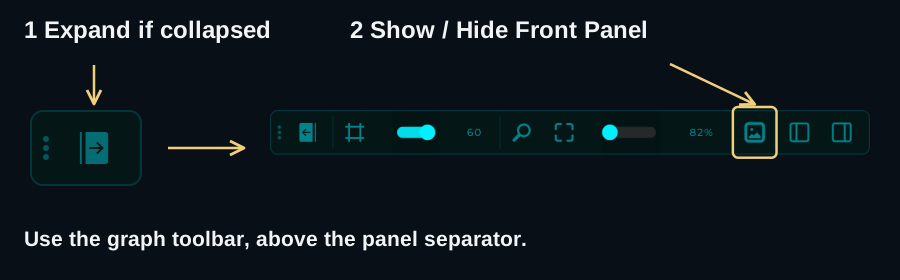
- Find the floating toolbar inside the graph. If it is collapsed, click its Expand / Collapse arrow to reveal the buttons.
- Click Show / Hide Front Panel in that graph toolbar, highlighted below. This shows the Front Panel editor beneath the graph. If it is already showing, leave the button on; clicking it again hides the editor.
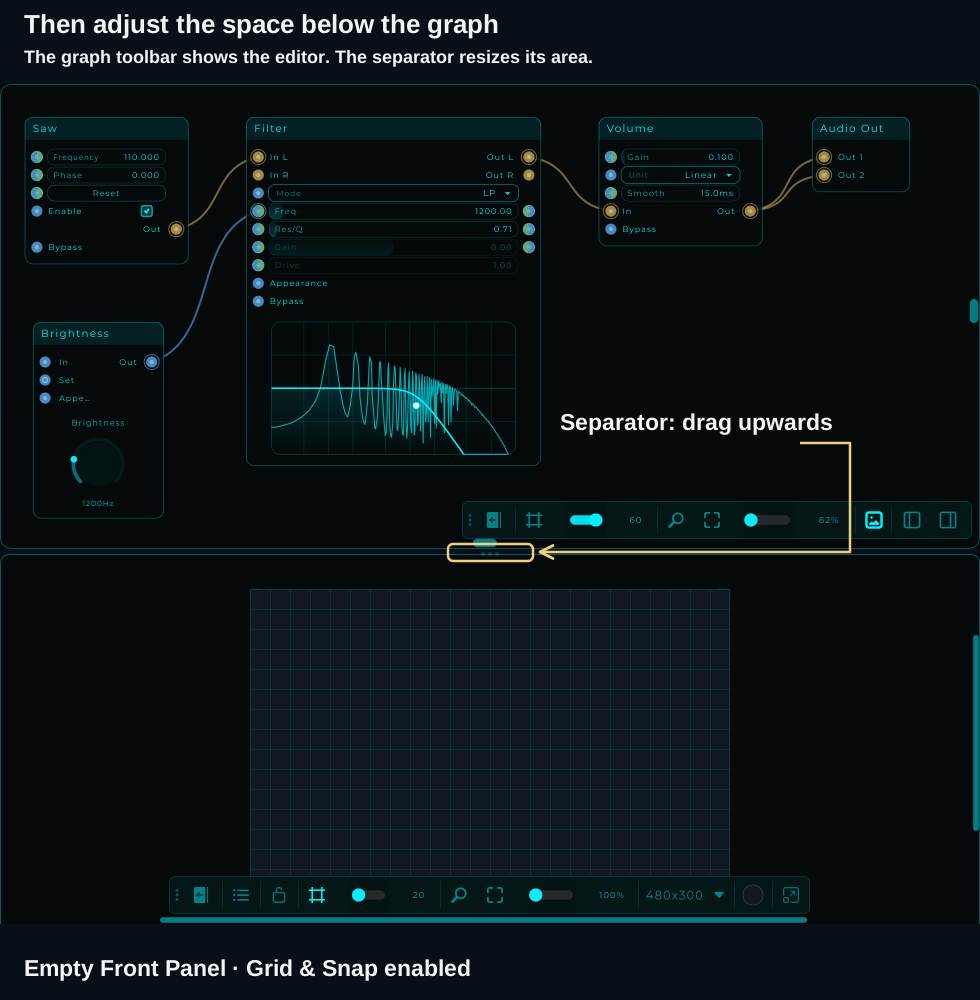
- Once the editor is shown, drag the horizontal separator between the graph and the Front Panel upwards if its area is too short. The button controls whether the editor is shown; the separator adjusts its height.
- The Front Panel starts empty because you have not added Brightness yet. With the panel unlocked and Grid & Snap enabled, you see the grid; with the grid off, you see a plain canvas. There is no welcome text inside it.
Add the Brightness knob
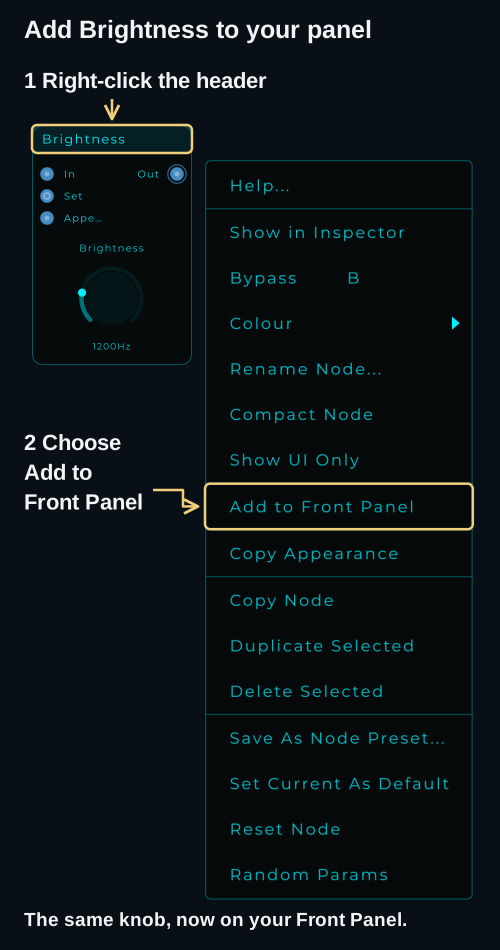
The quickest way is through the node's right-click menu:
- In the graph, right-click the header of Brightness, the bar displaying the node's name.
- Choose Add to Front Panel.
- Look in the Front Panel: the knob should now appear there. The Brightness node also stays in the graph, with its cable still connected to Filter's Freq input.
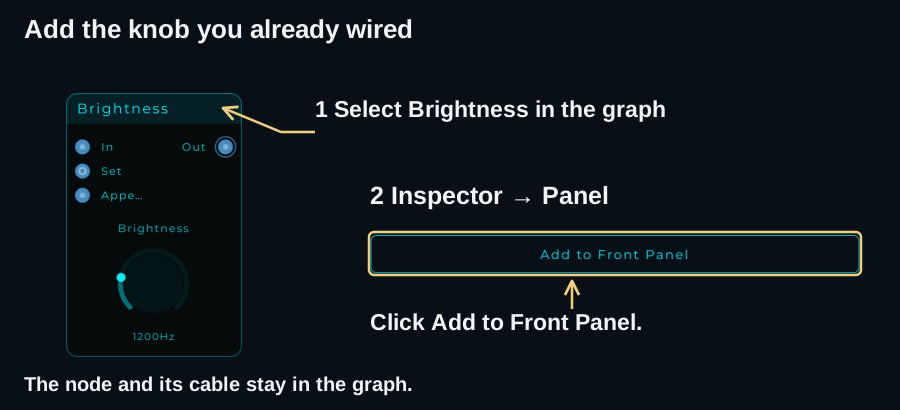
Alternative using the Inspector: select Brightness in the graph, then click Add to Front Panel in Inspector → Panel, as shown below. If the Inspector is hidden, open View → Panels → Show Inspector.
If the button or menu says Remove from Front Panel, the knob has already been added. Leave that option alone. If you cannot see the knob, right-click an empty part of the Front Panel and choose Zoom to Fit to bring its controls into view.
Place it and adjust its size
The panel has two kinds of interaction: unlocked lets you arrange controls; locked lets you use them to change the sound.
- Find the padlock in the Front Panel toolbar and unlock it. If the toolbar is collapsed, use its Expand / Collapse button to reveal the controls. You can also right-click empty canvas and choose Unlock Panel if that option is shown.
- Click the knob on the Front Panel to select it. A frame with small resize handles appears around the widget.
- Drag inside that frame to move the knob to a comfortable position on the canvas.
- Drag a corner handle to make it larger or smaller. This changes its size on the panel; the 200–5000 Hz range you set in step 3 stays the same.
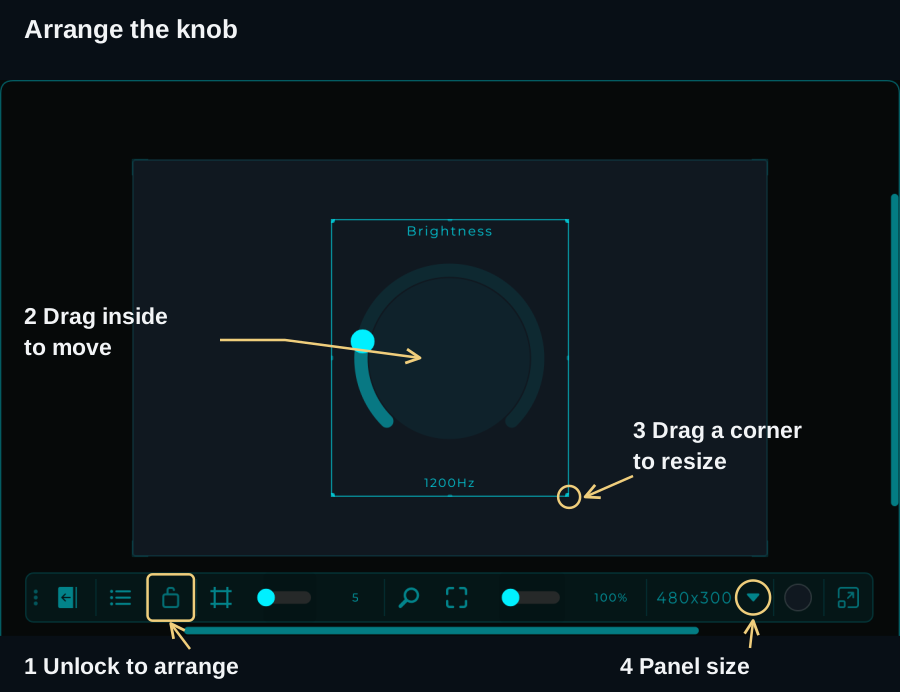
To match the example's canvas size, click the small arrow beside the panel dimensions in the toolbar (4 in the image), choose Custom…, enter Width 480 and Height 300, then click OK. Centre the knob by dragging it. These dimensions are optional; choose a size that is comfortable to use. Fit to view in the toolbar adjusts the view if the canvas does not fit on screen.
Lock the layout and try it
Click the padlock again to lock the panel, then click and drag the knob up and down. It now changes the Brightness value while staying in place. You can keep the graph visible: Filter's Freq should follow the knob, and the sound should become darker or brighter.
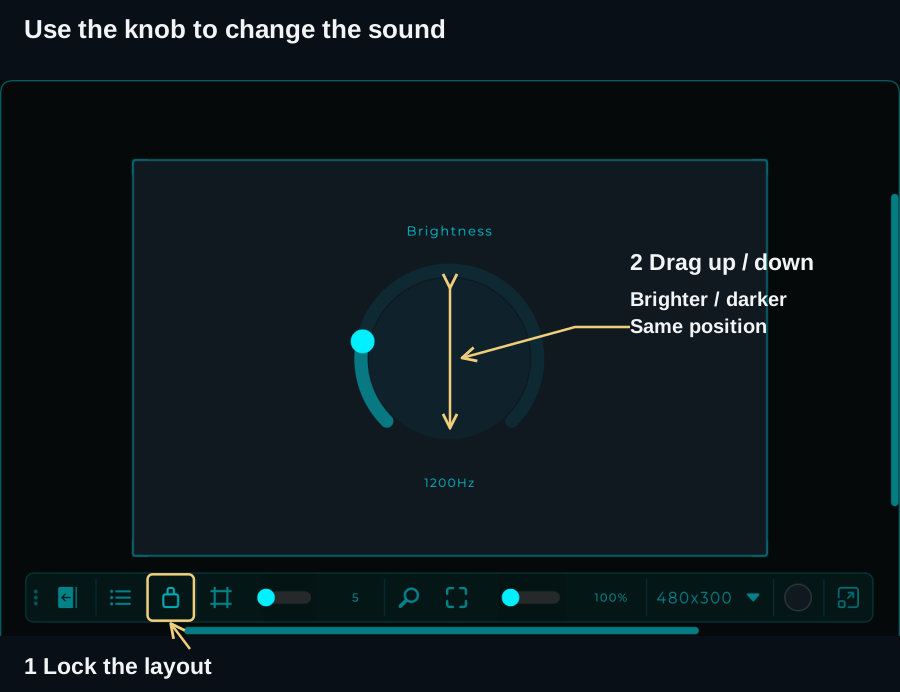
If dragging moves the whole knob instead of changing its value, the panel is still unlocked. If you want to change the knob's Min, Max or Default later, select its node in the graph and use Inspector → Main, as in step 3. The panel control uses those same settings; there is no second knob to configure or cable to connect.
5. Save it and make it yours
Choose File → Save As…, give the patch a name such as My first patch, and save it as a .mnprt. Use Ctrl/Cmd + S to save later changes. If you started from a downloaded example, Save As keeps your version separate.
To open an example, download it and use File → Open…, or drag the .mnprt onto the graph. Save your current work before replacing it.
Try one change at a time: set Saw to 220 Hz for a higher note, then use Brightness to find a tone you like. Return Volume's Gain to 0 when you finish listening.
If something does not work
| What you notice | What to check |
|---|---|
| No sound | Saw's Enable is on; Volume is Linear, Gain 0.10; all audio cables are connected. In standalone, check the selected audio output. In a DAW, check the track's mute and routing. |
| Sound in only one speaker | Volume Out must connect to both Out 1 and Out 2 on Audio Out. |
| Adding Filter silenced the patch | Use In L and Out L. Start with LP, Freq 1200, Res/Q 0.71. |
| Brightness barely changes anything | Set knob Max = 5000, then Min = 200. Its Out must go to Filter's Freq input, not an audio pin. |
| I cannot find the Front Panel | Expand the graph toolbar and enable Show / Hide Front Panel. Once shown, drag the separator upwards if the panel area is too short. |
| The Front Panel is visible but I cannot see Brightness | Right-click the header of Brightness in the graph and choose Add to Front Panel. If it is already added, right-click empty panel canvas and choose Zoom to Fit. |
| Turning the knob moves the widget | The Front Panel is unlocked. Lock it to perform. |
| The tone continues after releasing a key or stopping the DAW | Expected: this is a free-running oscillator. Set Volume Gain = 0 to stop. MIDI-controlled notes and envelopes come later. |
Where to go next
- Connections & Wiring: learn how Audio, Data, CV and MIDI differ.
- The Front Panel: add more controls and arrange your own instrument.
- MIDI and Poly Modules: move from a continuous tone to notes you can play.