
Appearance
The Front Panel (Control Surface)
The Front Panel is the surface you play: knobs, sliders, keyboards, meters and other controls laid out for your patch. The graph behind it still makes and processes the sound.
Overview
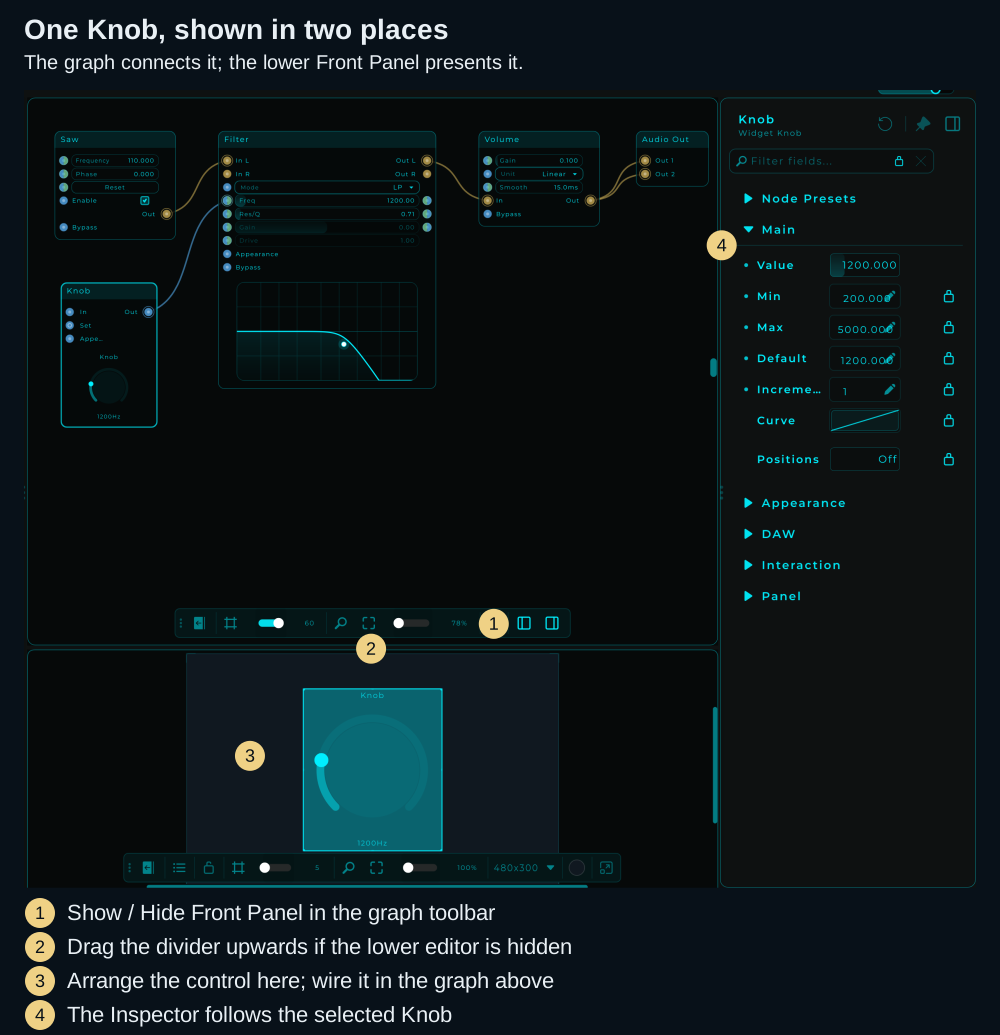
Adding a node to the Front Panel shows its control in a second place. It does not duplicate the node or connect it to anything. A Knob must still be wired to a parameter in the graph before turning it can change that parameter.
Open the editor
- Open the project in Edit mode so you can see the graph.
- Expand the floating graph toolbar if it is collapsed, then click Show / Hide Front Panel.
- The editor appears below the graph. If it looks hidden, drag the horizontal divider upwards to give it room.
A new panel can be empty, with only its grid showing. That is the place to arrange your controls; it is not a missing patch.
Put your first control on it
- In the graph, right-click the header of a Knob and choose Add to Front Panel. The Inspector's Panel section offers the same action.
- Unlock the panel with its own toolbar. Select the control, drag it into position and resize it by its handles.
- Lock the panel and turn the Knob to use it. Its value changes in the graph too.
For a complete example with sound and annotated menu screenshots, follow Add the Knob. For choosing a range and wiring it, see Widgets.
Panel lock and Edit / Perform mode
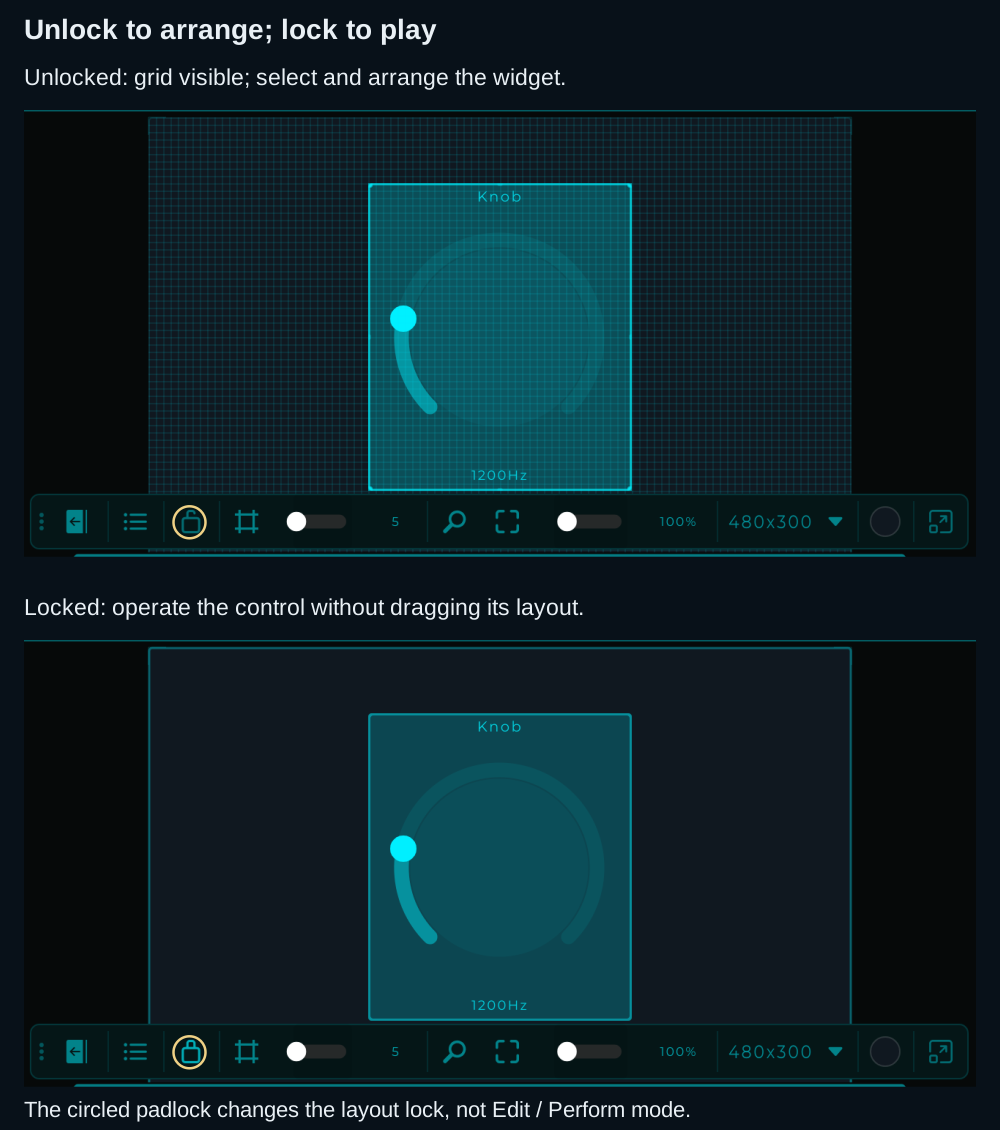
The panel lock controls whether you arrange widgets or use them. It is separate from the project's Edit / Perform workspace mode.
| Panel state | Purpose |
|---|---|
| Unlocked | Select, move, resize and arrange widgets |
| Locked | Operate the controls and patch panel jacks without moving the layout |
Use Lock / Unlock in the Front Panel toolbar, or Ctrl + click an empty area of that panel. Locking the panel leaves the graph and Inspector open: you can try your controls while still editing the patch.
Perform mode
When a project opens in Perform mode, the Front Panel fills the whole window and the top bar stays out of sight, so nothing gets between you and the controls. To bring the bar back, move the mouse to the MNodes logo in the top-left corner (or tap it on a touch screen): the bar slides in over the panel, then slides away again when left alone. Edit mode keeps the regular bar always visible.
In Perform, the menu under the MNodes logo has Home, Open... and Save. Save (Ctrl+S, Cmd+S on Mac) is for a project changed while it is played, such as a Rack Canvas whose modules were added, moved or removed in Perform, or a panel whose cables were repatched.
Navigating the Front Panel
Panning the canvas
Move the whole panel (frames and their content) around so you can bring any element to the centre and focus on it. There are two gestures, the same as the graph:
- Hold the middle mouse button and drag.
- Hold Space and left-drag.
Both work from anywhere, including over a widget (these gestures are reserved for panning, so they never grab the widget under the cursor), at any zoom, and even while the panel is locked (panning only moves the view, never your layout). The panel starts centred, and Zoom to Fit / 100% recentre it.
Nudging widgets
With one or more widgets selected, the arrow keys move them by exactly one panel pixel for pixel-perfect alignment. Hold Shift with an arrow key for a bigger 10-pixel step to cover ground quickly. Each press is a single undo step, and locked widgets never move, even when they are part of the selection. The panel takes keyboard focus as soon as you click a widget or the canvas, so you can select and then nudge right away. Nudging is disabled in Perform mode and while the whole panel is locked.
Front Panel Toolbar
A floating toolbar at the bottom of the Front Panel. Like the graph toolbar, you can drag it to reposition and collapse/expand it.

| # | Button | Description |
|---|---|---|
| 1 | Drag handle (dots) | Drag to reposition the toolbar |
| 2 | Expand / Collapse | Show or hide the toolbar buttons |
| 3 | Layers | Show or hide the Layers palette. Lights up while the palette is visible |
| 4 | Lock / Unlock | Lock the panel layout to operate controls and plug patch cables; unlock it to arrange widgets |
| 5 | Grid & Snap | Toggle the grid overlay. When enabled, widgets snap to the grid for easy alignment |
| 6 | Grid Size (slider + number) | Adjust grid spacing (5 to 80 pixels) |
| 7 | Zoom 100% (magnifying glass) | Reset zoom to 100% |
| 8 | Fit to View (expand arrows) | Auto-fit all widgets into the viewport |
| 9 | Zoom Level (slider + %) | Adjust zoom (15% to 500%) |
| 10 | Panel Dimensions (e.g., 800x600) | Shows the current panel size in pixels |
| 11 | Panel Size (dropdown arrow) | Choose from preset panel resolutions |
| 12 | Background Color (circle swatch) | Click to change the panel background color |
Both toolbars (Graph and Panel) can be collapsed to save space by clicking the expand/collapse button, and repositioned by dragging the grip handle.
The grid is drawn over the widgets, so it stays visible while you are placing something next to what is already there. Right-click the panel background and untick Grid In Front to put it back behind them. Either way it is only drawn while the panel is unlocked, so a finished panel looks the same.
Detach the Front Panel
While editing, the Front Panel can pop out into its own floating window. This is handy with two monitors: the node graph fills the main window on one screen while the panel sits on the other. Use the detach button at the right end of the Front Panel toolbar, or View → Detach Front Panel.
The window remembers its position and size, and closing it (or running the command again) brings the panel back into the main window. Perform mode always uses a single window, so the command is available while editing only.
The detached window has its own Inspector on the right. Select a widget to inspect its node, drag the Inspector's edge to resize it, or toggle it with Ctrl/Cmd + I or the View menu. Its width is remembered separately from the main window's Inspector.
For extra windows during a performance, see the Show Panel pin in Modules: each Module can open its own front panel in its own window, which is how a Perform patch gets more than one window on screen.
Available Widgets
| Widget | Description |
|---|---|
| Slider (V/H) | Vertical or horizontal slider for continuous values |
| Knob | Rotary control for parameters |
| Button | Trigger an event |
| Toggle | On/off switch |
| ComboBox | Dropdown selection |
| RadioGroup | Mutually exclusive choice buttons |
| XY Pad | Two-dimensional control (e.g., filter freq + resonance) |
| Text | Display or edit text values |
| Image | Display an image file |
| Shapes | Square, Rectangle, Circle, Triangle, Hexagon, Arc, Line, Polygon |
| Keyboard (Keymap) | Piano keyboard for playing notes |
| Sample View | Waveform display |
| Sampler | Sample playback instrument |
| MIDI Drag Exporter | Drag MIDI clips out of MNodes |
See the full Widget reference for details on each widget type.
Adding Widgets to the Front Panel
There are two ways to add a widget to the Front Panel:
- Right-click the header of a supported node in the graph and select Add to Front Panel
- Select the widget node, open the Inspector → Panel section, and add it from there
Once added, use the toolbar to unlock the Front Panel to position and resize the widget. Adding it to the panel preserves its graph wiring and value.
Node Bodies in the Front Panel
Supported nodes such as Filter and Oscilloscope can also put their visual editors or displays on the panel. You can keep a response curve or a waveform beside the controls that affect it. Check the node's header menu for Add to Front Panel; the available appearance settings depend on the node.
TIP
You do not need a separate display widget when the node already offers the editor or meter you want on the panel.
Widget Parameters
Select a widget and use the Inspector to configure it. The properties depend on its type; a Knob can offer these settings, while an Image or a shape has different controls:
- Min / Max / Default values
- Step size for discrete steps
- Prefix / Suffix labels (e.g., "Hz", "dB", "%")
- Color customization
- Expose to DAW for supported controls; see Automation
Connecting Widgets
Widgets have output pins in the graph that you connect to other nodes:
- A Knob outputs its current value as Data
- A Button outputs an event
- A Keyboard outputs MIDI notes
- An XY Pad outputs two values (X and Y)
Patch cables on the panel
Jack In and Jack Out put real sockets on the front panel, and the cable you plug between them is not a picture of a connection. It is the connection: the same edge you would have drawn in the graph. Wire two jacks together in the graph and the cable appears on the panel; plug a cable on the panel and the edge appears in the graph. There is only one connection, seen from two places.
That is what turns a front panel into a rack you can repatch by hand, during a set, without opening the graph at all. For a whole modular rack of modules you can add, move and patch on the panel, use a Rack Canvas.
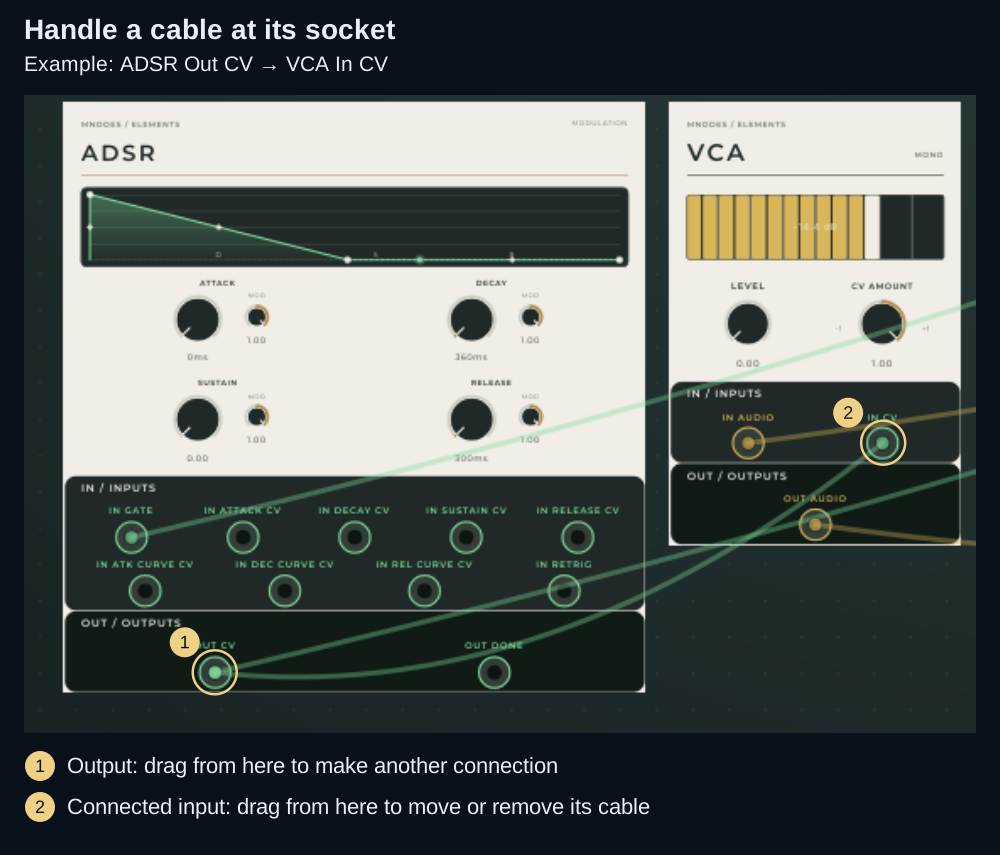
This Rack Canvas example puts each module's controls and jacks on the same surface. Ordinary Front Panels use the same cable gestures once locked.
- Lock the panel to patch. While the panel is unlocked, a click on a jack selects it and a drag moves it, like any widget. In Perform, patching always works, and the jacks on a Rack Canvas take cables even while the panel is unlocked.
- Drag from a Jack Out to a Jack In to plug in a cable. An output feeds as many cables as you like.
- An input takes one cable. A new cable let go on a busy input takes the place of the old one.
- Drag from a Jack In that has a cable to move its cable to another input, or let go away from the jacks to pull it out. Right-click a jack to disconnect its cables.
- A cable is handled by its jacks, never by its middle, so it never gets in the way of the knobs it lies across.
- Cables are drawn faint until you point at a jack, so the controls under them stay easy to read.
- Each socket has a Type (Audio, CV, MIDI or Data), and only sockets of the same type can be joined. Every change to the cables is one step of Undo.
Everything about patch cables is in Patch Cables: the rules, what happens to a cable in each case, normalled CV inputs, colours, cables between modules, States and presets, Perform and troubleshooting.
Layers Palette
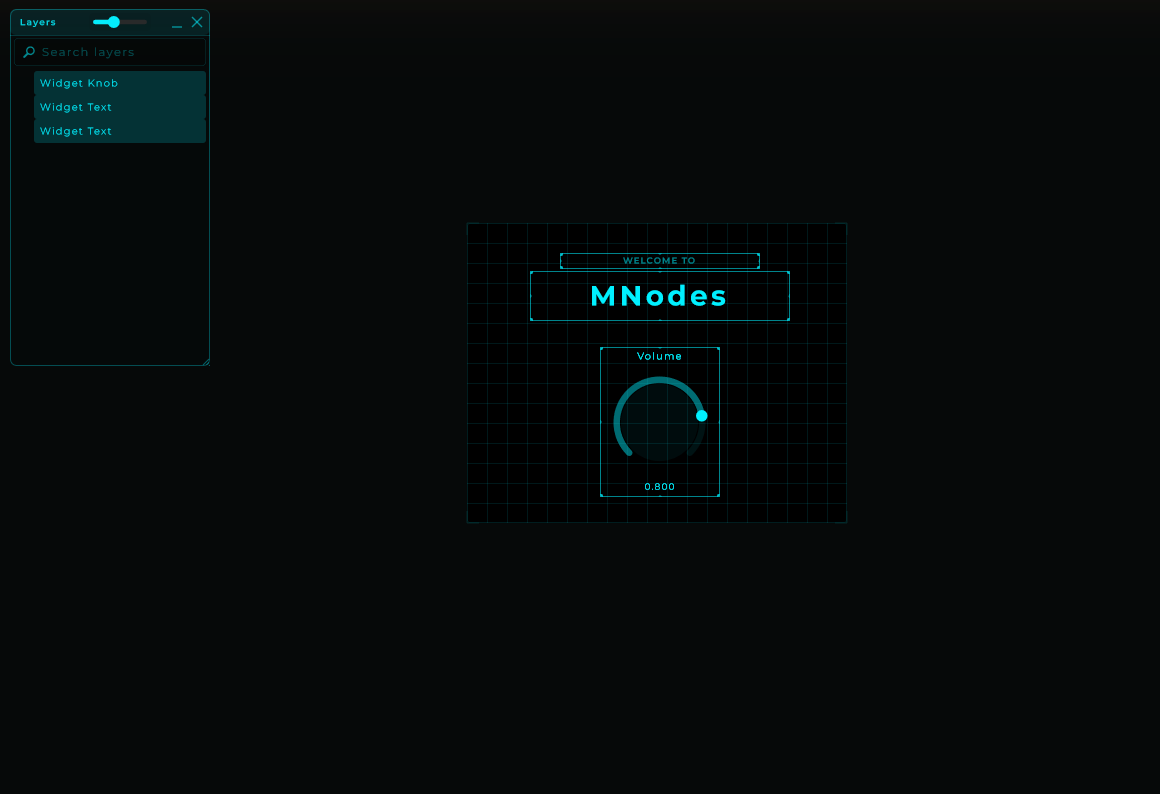
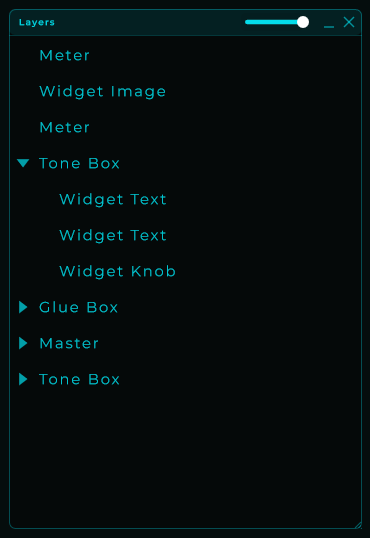
A floating "Layers" panel that lists every widget on the Front Panel as a hierarchical tree, similar to the Layers panel in Figma or design tools. It is available in Edit mode for both the rack Front Panel and the module Front Panel, and stays out of the way in Perform mode.
Showing & hiding
Open and close the palette from View → Layers Palette in the menu bar. The check mark next to the entry shows whether it's currently visible.
The palette also has its own header buttons:
_minimizes it to just the header (keeps the position so you can re-expand quickly).Xcloses it. Reopen from the View menu when you need it again.
Position, size, visibility and minimized state are remembered between sessions.
Reading the tree
Each row represents a widget that lives on the current Front Panel. Items higher in the list are drawn on top of items below. Children appear indented under their parent and render on top of the parent (Figma-style layer order).
The header has a small slider that controls the height of the rows. The font size scales with it, so you can pack more widgets into a small palette or make the names easier to read on a big display. The scrollbar uses your theme color.
Selecting
The selection is shared between the canvas and the palette tree:
- Click a row to select that widget on the canvas.
- Click a widget on the canvas to highlight it in the tree.
- Ctrl (or ⌘) + click toggles a single item.
- Shift + click selects a range, in the same top-to-bottom order shown in the tree.
- Selecting a parent visually highlights its children too: moving the parent moves them as a group.
The selection also stays in sync with the Graph view: selecting a widget in the Layers palette will also select its node in the graph and vice versa.
Reordering and grouping (drag-drop)
Drag a row in the palette to:
- Reorder between siblings: drop on the gap between two rows.
- Reparent: drop directly on top of another item to make it a child.
- Move to root: drop on the empty area at the bottom of the tree.
Multi-selection is supported: select several rows and drag them as a block. The order between them is preserved at the destination. If you select a parent and one of its children, only the parent is moved explicitly: the child travels with it via the cascade so the hierarchy stays intact.
A single Undo (Ctrl/⌘ + Z) reverts a whole drag-drop transaction.
Cascades from the parent
When a widget has children, operations on the parent cascade to the entire subtree:
- Move: dragging the parent on the canvas drags every child by the same offset.
- Resize: scaling the parent scales each descendant proportionally (Figma "scale tool"-style).
- Duplicate / Delete: clones or removes the whole subtree.
- Z order: bringing the parent to front raises the entire subtree.
Children that are locked individually still follow the parent in cascades unless the parent itself is locked too.
Lock with inheritance
Lock a widget to protect it from being moved, resized, reparented, duplicated or deleted. Locking propagates to descendants: if you lock a parent, the whole subtree behaves as locked even if the children don't have their own lock flag set.
A small lock icon appears at the right edge of locked rows. On unlocked rows, the icon shows tinted only on hover so the tree stays clean. Click the icon to toggle the lock for that row, or use the Lock entry in the right-click menu for the current selection.
Rename
Rename a widget by double-clicking its row, or via right-click → Rename, or by pressing F2. The change writes back to the underlying node title, so it shows up everywhere the title is displayed (graph node, inspector, etc.). Press Enter to confirm or Esc to cancel.
Right-click menu
| Action | What it does |
|---|---|
| Rename | Inline edit the node title (also F2). |
| Locate in Panel | Briefly flashes the widget on the canvas and scrolls it into view, so you can find it among many. |
| Duplicate | Clones the selection (and any children) with a slight offset (also Ctrl/⌘ + D). |
| Delete | Removes the selection. Cascades to children but respects locked items (also Delete / Backspace). |
| Bring to Front | Move to the top of its sibling group. |
| Send to Back | Move to the bottom of its sibling group. |
| Lock / Unlock | Toggle the lock on the current selection (also Ctrl/⌘ + L). |
Front Panel State
Front Panel layout (widget positions, sizes, background color, view settings, parent/child hierarchy and lock flags) is saved as part of the preset file, separate from the graph state. The Layers palette's own position, size and visibility are kept per-app so they survive across DAW sessions.
TIP
A States node can snapshot each widget's Visible state: recalling a state restores which controls are shown or hidden on the panel, so one state can show one bank of controls and another state a different one. To keep a widget's visibility out of states, lock its Visible parameter with the inspector padlock.