
Appearance
MNodesHub
Hub is the online catalogue inside MNodes. Library is the content already on your computer. A Hub item can be a complete project, a collection, or a reusable part such as a Module; that determines what you do after installing it.
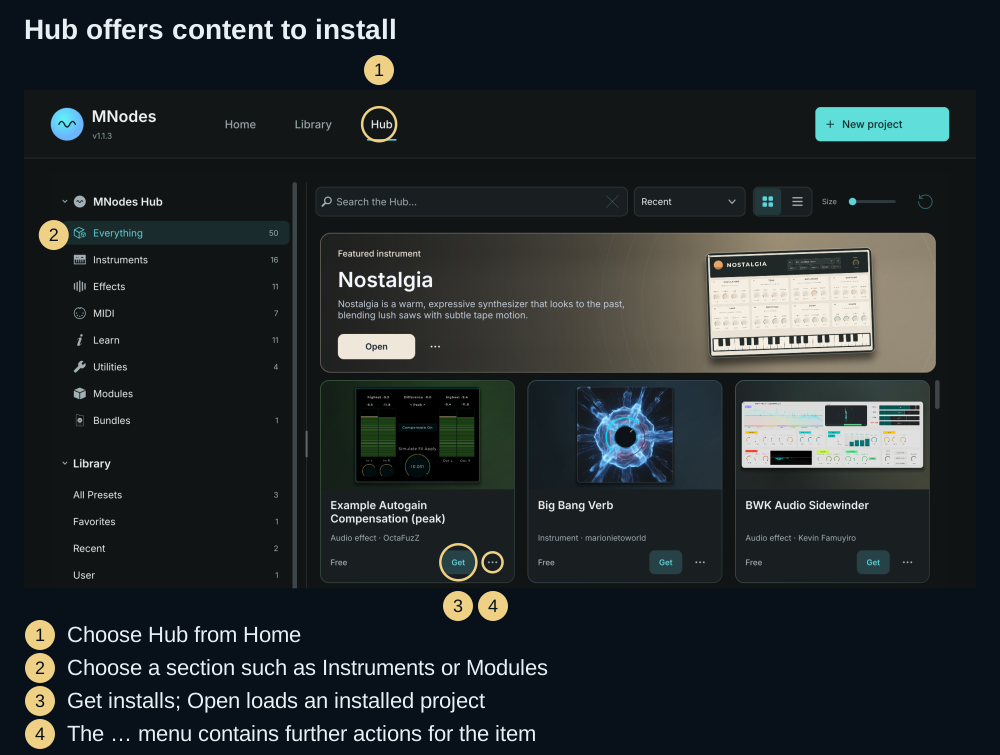
Opening the Hub
Open Home → Hub. From the editor, you can also click the preset name and choose a section under MNodes Hub in the browser's left rail.
Choose Everything, Instruments, Effects, MIDI, Learn, Utilities, Modules or Bundles. These browse online content. The Library, Favorites, Recent and Collections entries farther down the rail browse local content.
Browsing
Use Search and the section filters to narrow the results, then switch between Cards and List or adjust Size above them. Open an item's information to read its description and check what kind of content it contains before installing it.
The featured item highlights one entry from the catalogue. Cards show the action currently available, such as Get or Open, with further actions under …. Artwork and catalogue contents can change; use the item's name and type to identify it.
Downloading
- Find an item and read its information.
- Use Get when offered. If the item requires an account or purchase, follow the item's account/web flow first.
- Wait for the download and installation to finish. Follow the status shown on the card; an installed project offers Open.
- Find the installed content according to its type:
| What you installed | What to do next |
|---|---|
| Project / preset | Click Open, or load it from Library |
| Project collection / bundle | Browse its installed projects in Library |
| Module or Module Pack | Open the editor's Modules explorer and insert one into a patch |
| Subgraph | Find it in the Explorer's Subgraphs view and add it to a patch |
A Module marked Downloaded has been installed for reuse; it does not need to open as a complete project. Rack-ready Modules also appear in a Rack Canvas's module browser.
Use the card's … menu for additional item actions, including downloading an installed item again when offered. Save your own variation of a downloaded project before relying on a replacement download to repair the original.
Your local library
After installation, use Library to organise projects, add Favorites and create Collections. Modules and Subgraphs live in their corresponding library folders and Explorer views. See Preset Library for folder settings and missing-file recovery.
An installed project can be used from its local file without browsing Hub again. Downloading, refreshing the online catalogue and obtaining missing online content need a connection.
Sharing your work
Prepare the file before opening the MNodesHub website:
| Share | Prepare |
|---|---|
| A complete project with samples and images | Save, then File → Collect All & Export… to make a .mnprtz |
| One reusable Module with its resources | Collect & Export Module… to make a .mnmodpack |
| A collection of Modules | File → Create Module Pack…, then Export Pack… |
Use the website's account and submission flow to upload your work. See your account and sharing Module Packs for the related steps.
A preset can store a hosted plugin's state without including that plugin's installation. If your project uses external plugins, identify them in its description so the recipient can set up the same dependencies.
Tips
| Problem | Try this |
|---|---|
| The catalogue looks empty | Clear Search and section filters, check the connection, then reopen Hub |
| A download failed | Read the item's status and retry when the connection is available |
| Download finished, but nothing opened | Check the item's type: a Module belongs in the Modules explorer |
| A local project cannot find a sample | Check whether its author supplied a collected bundle; reinstalling MNodes does not recreate an omitted file |
| You want to keep a modified sound | Use Save As… and give your variation its own name |