
Appearance
The Interface
The editor brings together the patch, the controls you play, and the tools for changing them. This guide shows where each part lives and how to bring it back when it is hidden.
If you see a finished instrument with knobs and keys, you may be in Perform mode. Move the pointer to the MNodes logo at the top left, open its menu, then choose Open in Edit Mode. The same menu switches back with Open in Perform Mode.
Still on Home? Choose New project → An empty project to reach a blank editor. What is MNodes? explains the other starting points.
Layout Overview
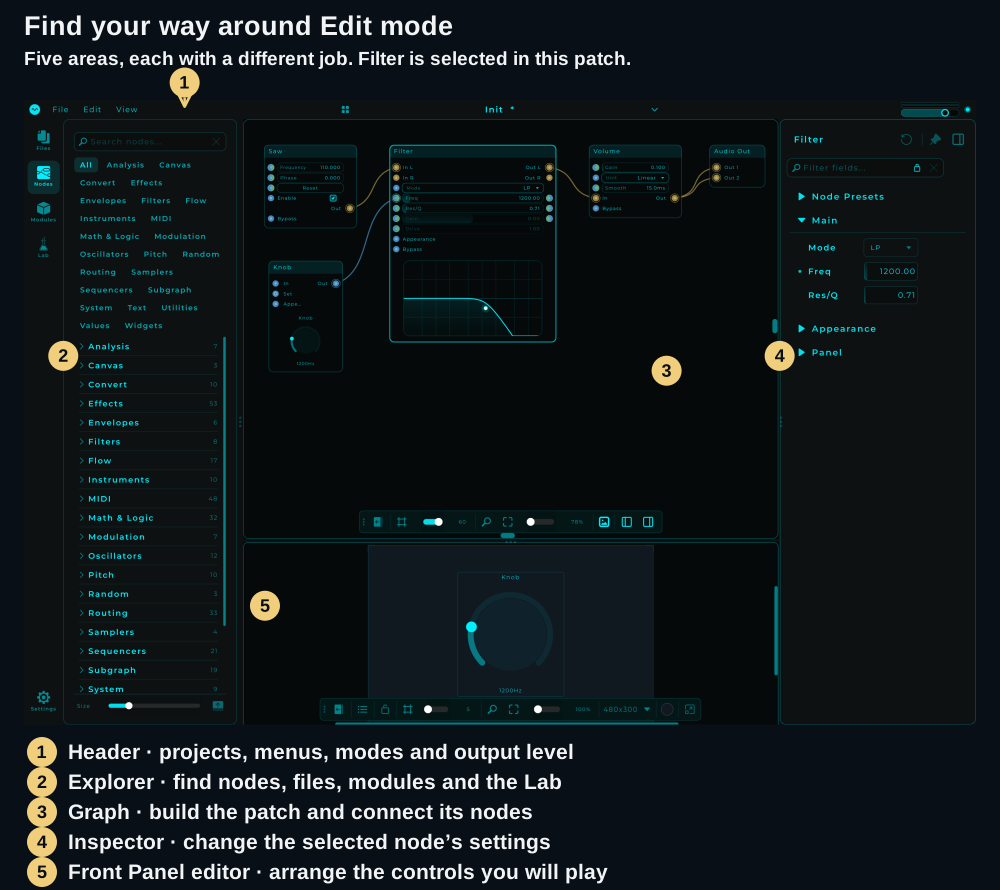
| Area | What you do there |
|---|---|
| 1 · Header | Save or open projects, browse presets, switch modes and reach settings |
| 2 · Explorer | Find files, node types, reusable modules and the Lab |
| 3 · Graph | Add nodes, connect their pins and follow the signal path |
| 4 · Inspector | Edit the selected node's parameters and appearance |
| 5 · Front Panel editor | Arrange the controls people will use to play your patch |
Try selecting Filter in your own patch. The Inspector should show Filter's settings. Selecting another node changes those settings, unless the Inspector is pinned to a particular node.
Show or recover a panel
The graph toolbar has separate buttons for the Front Panel, Explorer and Inspector. Hover over an icon to see its name. If only the small collapsed toolbar is visible, use its Expand / Collapse arrow first.
You can also use View → Panels:
| To show… | Menu command | Default shortcut |
|---|---|---|
| Left sidebar | Show Explorer | Ctrl/Cmd + Alt + E |
| Right sidebar | Show Inspector | Ctrl/Cmd + I |
| Front Panel below the graph | Show Front Panel | Ctrl/Cmd + Alt + P |
For the Front Panel, click Show Front Panel first, then drag the horizontal separator upward to give it room. Dragging a separator does not enable a hidden panel. A new project's panel can be empty; controls appear after you add them. Follow Add your first Front Panel control for the complete sequence.
Drag the vertical separators to resize the sidebars. Clicking the active Explorer section in the left icon strip also hides or shows that sidebar.
Header / Toolbar
The header at the top of the editor is separate from the floating toolbar inside the graph.
- File opens and saves projects. Use Save As to give a new patch its own name.
- Edit includes Undo, Redo, Copy and Paste.
- View opens Home, shows panels and changes the workspace view.
- Preset name and arrows let you browse projects. Click the name to open the Preset Browser; see Preset Library.
- MNodes logo opens the mode switch, preset information, Settings… and About.
- Master output controls adjust the overall listening level and show the output meter.
In Perform mode, the header appears over the Front Panel when you move to the logo. Its logo menu also provides Home, Open… and Save.
Graph Canvas
This is where you build the patch. A node's header identifies it; its controls change how it works; its pins connect it to other nodes. Drag a node by its header to move it without adjusting a control inside it.
Navigation
These are the default gestures. Settings → Shortcuts lets you change the mouse wheel behaviour, pan button and key assignments. Ctrl means Control on Windows; use Cmd on macOS.
| To… | Do this |
|---|---|
| Pan around the graph | Middle-button drag, or hold Space and drag with the left button |
| Scroll | Use the mouse wheel or trackpad scroll |
| Zoom | Ctrl/Cmd + wheel, trackpad pinch, or the toolbar's zoom controls |
| Scroll horizontally | Shift + wheel |
| Select a node | Click its header |
| Add or remove a node from the selection | Shift + click its header |
| Select an area | Drag a selection box from empty canvas |
| Select all | Ctrl/Cmd + A |
| Add a node | Right-click empty canvas to open the Node Palette |
| Delete the selection | Delete or Backspace |
If you set the wheel to Zoom in Settings, Ctrl/Cmd + wheel does the opposite and scrolls. Click outside a text field before using graph shortcuts. See Keyboard Shortcuts for the full list and Connections & Wiring for cable gestures.
MiniMap
The minimap gives you an overview of a large patch. Click it to move to another area. Show or hide it from View → Show Mini Map.
If you lose the nodes off-screen, click empty canvas to clear the selection, then use Fit to view on the graph toolbar. With a selection, Fit focuses on those nodes.
Graph Toolbar
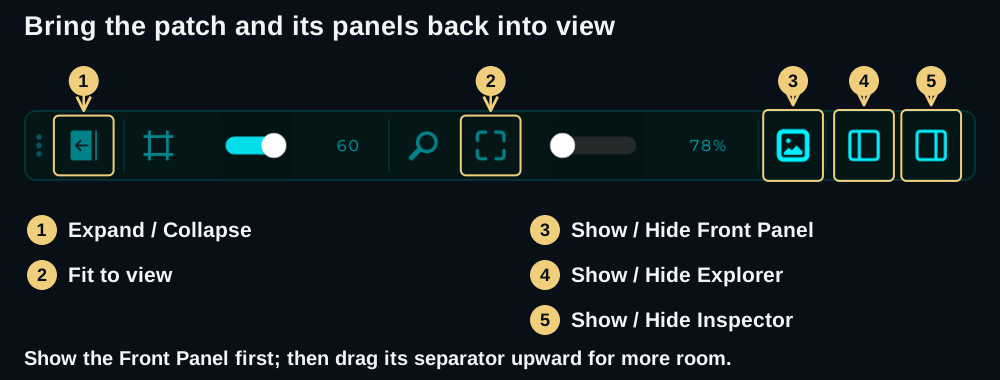
From left to right, the toolbar provides a drag handle, Expand / Collapse, Grid & Snap, grid size, Zoom 100%, Fit to view, zoom level, and the three panel visibility buttons.
Use the grip at the left to move the toolbar. Grid & Snap helps align nodes as you arrange them. Zoom 100% returns to the original scale; Fit to view frames the selection, or the whole patch when nothing is selected.
Drag and drop onto the graph
You can drop a project file onto the editor to load it, or drop an audio file onto the graph or a compatible sample control. Preset bundles and Factory packs can also be imported by dropping them onto the editor.
Dropping a .mnLook or .hbLook file applies its appearance settings. Applying a look is one undo step, so Ctrl/Cmd + Z reverts it.
Explorer Panel (Left)
Use the labelled icons down the left edge to choose a section:
| Section | Use it for |
|---|---|
| Files | Browse folders, keep file/folder favorites and audition audio with the preview player before dragging it into a patch |
| Nodes | Browse the built-in node types and drag one onto the graph |
| Modules | Find installed reusable modules, rack modules and saved subgraphs |
| Lab | Generate a playable instrument or FX chain from flavour tags |
Modules groups content into collections. Use All, Modules, Rack or Subgraphs to narrow the content, then search across the library. A collection's magnifier searches inside that collection. See Modules, Subgraphs and The Lab for their workflows.
To open a complete project, use the preset name in the header or Home → Library. The Modules explorer is for building blocks you add to a patch.
Inspector Panel (Right)
Select a node to see its settings. Expand a section to reach its controls, or use the search field at the top to find a parameter by name. For example, select Filter and type freq to find its frequency control.
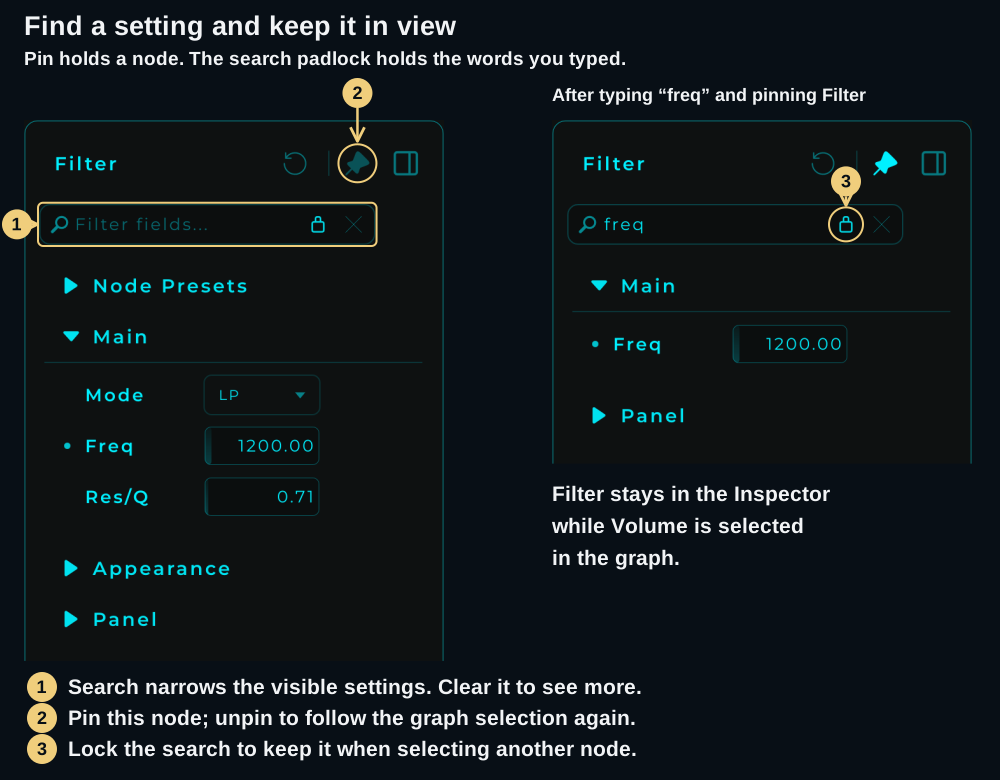
The sections depend on the node. You may see Node Presets, its main parameters, Appearance, DAW, Interaction and Panel. For example, a Filter and a Knob have different main settings.
Keep a node or keep a search
There are three different controls worth distinguishing:
| Control | What it keeps |
|---|---|
| Pin in the Inspector header | The current node stays in the Inspector while you select other nodes. Unpin to follow the selection again. |
| Padlock beside the search | The search term stays when you select another node. Unlock it to clear the search on each new selection. It starts locked. |
| Lock on a parameter row | That parameter is excluded from randomization and States capture/recall. You can still change it manually. |
Parameter rows may also offer Randomize and Reset. Hover over the icons before using them. The row lock appears only for parameters that States can capture; it is not present on every field.
If expected controls seem to be missing, clear the search first. If the Inspector keeps showing the previous node, check its header pin. When the Inspector follows the selection, clicking empty canvas clears its search too.
Node Palette
Right-click empty graph space, then type the name of the node you want. Right-clicking a node's header opens that node's own menu instead.
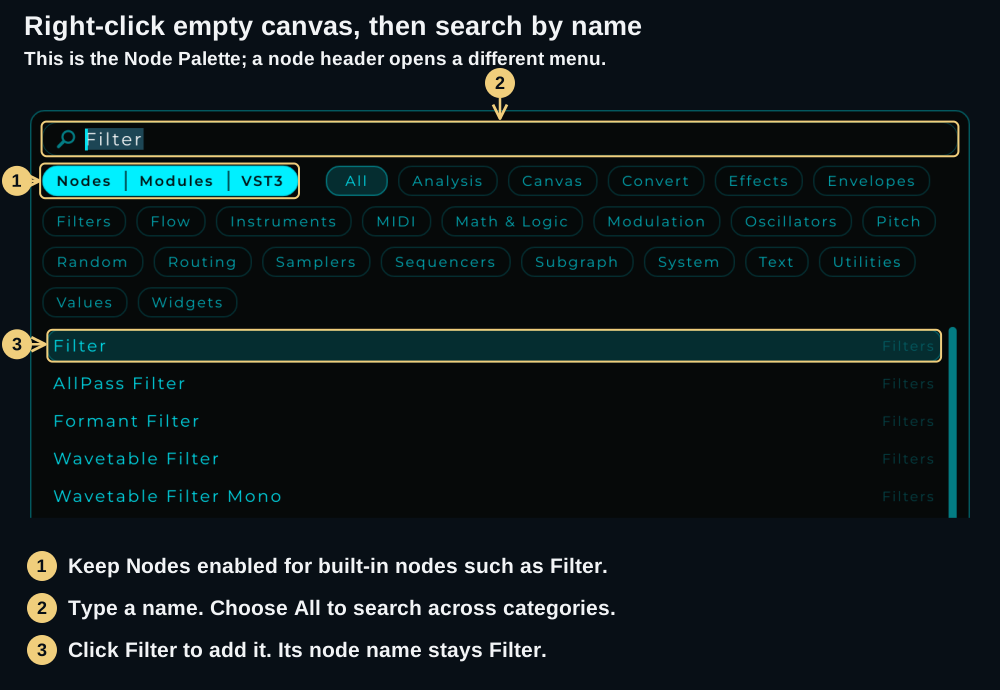
- Choose the content to include with Nodes, Modules and VST3. These switches control which kinds of result appear.
- Type a name and leave All selected, or choose a category to narrow the results.
- Click a result to place it in the graph where you opened the palette. Press Esc to close it without adding anything.
Search also recognises synonyms: vca can find Volume, and adsr can find envelopes. Results keep the original node names. Exact name matches come before synonym matches. See the Node Reference for each node's controls and pins.
Home Panel
View → Home returns to the current Home screen, with Home, Library, Hub and New project navigation. It gives you a place to play an installed device, find a project or start building. The Show Home on startup option is at the bottom of Home.
See the illustrated Home walkthrough for the new layout and project templates.
Front Panel (Control Surface)
The Front Panel holds the controls used to play your patch. In Edit mode, you can show its editor below the graph, move controls and adjust their layout. In Perform mode, the panel becomes the playing surface.
To add an existing control, right-click its node header → Add to Front Panel. In the panel editor, unlock the layout to position or resize controls; lock it again to use them without moving them.
View → Show Only Front Panel gives the panel the workspace while staying in Edit mode. View → Detach Front Panel opens it in another window while you edit. If the graph has disappeared, check Show Only Front Panel as well as your Edit/Perform mode.
Start with the first-panel walkthrough, then see The Front Panel for more layout tools.
Settings
Open Settings… from the MNodes logo menu, or click Settings at the bottom of the left icon strip. Settings opens in a movable window. Use Audio / MIDI for standalone device setup, Appearance for the look, and Shortcuts for keys and mouse gestures. See Settings.
Ready to use the workspace? Build Your first patch, or continue with Working with Nodes.