Appearance
Creator FAQ
MNodes is built around a simple idea: what you make with it is yours. This page answers the most common questions from people who want to share or sell the instruments, effects, sequencers and patches they build in MNodes.
Have an instrument, effect or utility ready for someone else? Start by choosing what they should receive. A complete project opens as a patch; a Module is a reusable part they add to their own graph.
| You want to… | Start here |
|---|---|
| Send a working creation to another MNodes user | Choose the file and collect its resources |
| Explain how to install and play it | What the recipient needs |
| Sell through your own channels | Selling your creations |
| Publish a free creation on MNodesHub | Sharing for free |
New to building? Start with Subgraphs, Modules and the Front Panel.
The short version
- Everything you build in MNodes is 100% yours.
- Sell it through your own channels, at any price. MNodes takes no fees or royalties.
- Your brand, front and center. You never have to show the MNodes name anywhere.
- Use content you can distribute. Read the rules for factory content and other creators' work below.
Prepare a creation to share
Which file should I deliver?
| What you are sharing | File to deliver | What the recipient does |
|---|---|---|
| A complete project with its samples and images | .mnprtz — Save, then Collect All & Export… | Use File → Import Presets…, then load the project from Library |
| One reusable Module with its resources | .mnmodpack — Collect & Export Module… | Install the pack, then insert the Module from the Modules explorer |
| A collection of Modules | .mnmodpack — File → Create Module Pack… → Export Pack… | Install the pack and browse its Modules in the Modules explorer |
A plain .mnprt stores a project, but external files can still live elsewhere on your computer. A plain .mnmod stores a Module; .mnsubgraph stores a Subgraph. Use the collected formats above when the recipient needs your samples, images or other supported resources too. See the full format reference.
A project bundle and a Module Pack both run inside MNodes. Exporting either one does not make an independent plugin; see VST3 export.
Pack a complete project
- Give the project a useful name and description. Arrange its Front Panel so the recipient can find the main controls.
- Save the latest changes with Ctrl/Cmd + S.
- In Edit mode, choose File → Collect All & Export….
- Choose the destination for the
.mnprtzfile and wait for the export result. - Test the exported copy before sharing it. Import it in a separate test setup, ideally on another computer, and check that the controls and resources work there too.
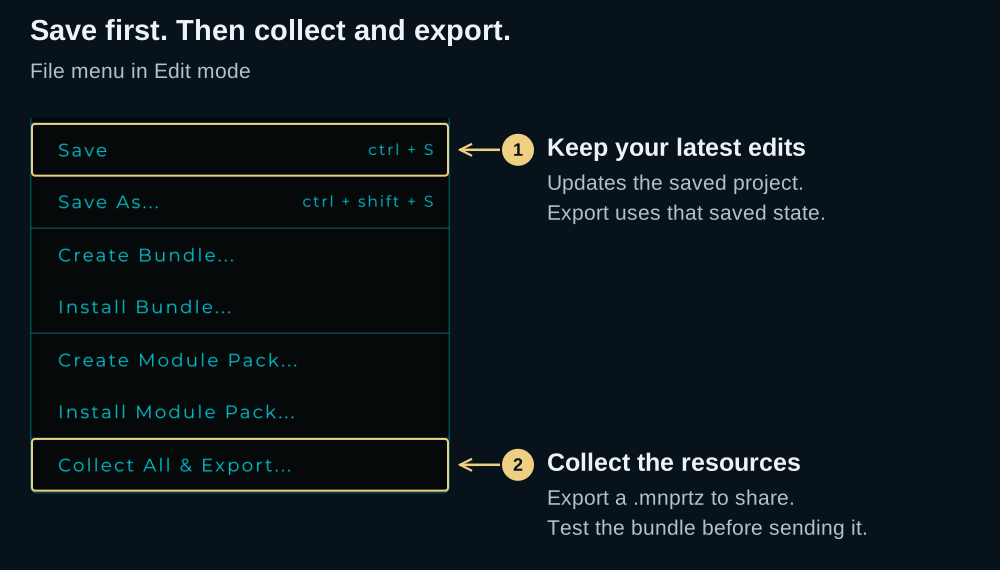
Save before collecting. The exporter uses the last saved project state. A successful export is not a substitute for saving your latest edits.
Keep referenced files available while exporting. The collector gathers supported resources reported by the patch, including resources inside containers. It does not install a hosted plugin on the recipient's computer. For the detailed workflow, see sharing a project with its resources and Rack Canvas dependencies.
Pack a reusable Module
For a Module in the graph, right-click its header → Collect & Export Module…. Complete the Save Module form, then choose where to write the .mnmodpack. From the Modules explorer, the same export command works on a saved Module.
For several Modules, use File → Create Module Pack…, add the Modules and the pack's name, author, description and artwork, then choose Export Pack…. A Module Pack can contain one Module or a collection; tell the recipient which they are getting.
The recipient can use File → Install Module Pack…, then find the installed content in the Modules explorer. Include a small example project if the Module needs a particular signal path to demonstrate it. See Module Packs for the complete process.
What should I include with the download?
Give the recipient a short description they can act on:
- What it is: an instrument, audio effect, MIDI tool or reusable Module.
- How to open it: name the file and the relevant import command from the table above.
- How to try it: send MIDI notes, feed it audio, or use a specific control on its panel.
- Requirements: the MNodes version you tested, any external plugins, and any resources supplied separately.
- Where to get help: your support contact and a note describing the main controls.
For example: “A stereo delay Module. Install the .mnmodpack, insert it from Modules, connect an audio source to its inputs and its outputs to Audio Out, then raise Mix. Requires MNodes; no external plugins.” Adapt the instructions to the actual ports and controls of your creation.
Selling your creations
Can I sell the instruments and effects I build?
Yes. Patches, presets, subgraphs, modules and full devices you build in MNodes are your work, and you are free to sell them on your own website, on stores like Gumroad or Payhip, or through any channel of your own. It works just like artists selling preset packs or sample libraries for other instruments. Note that the MNodesHub itself hosts free content only for now, so selling happens through your own channels.
How much does MNodes take?
Nothing. Zero percent, no fees, no royalties, no registration. When you sell through your own channels, every cent is yours. This is a commitment, not a launch promo.
Do I need permission or a special license?
No. If you own MNodes, you can sell what you build with it. Formal creator terms will arrive as the platform grows, but the heart of them is already decided and public: your work is yours, royalty-free.
What do my customers need?
They need MNodes: your creations are files they load and play inside it. A practical tip: put "requires MNodes" clearly on your product page and link to marionietoworld.com/mnodes so your customers know exactly what to get.
State the MNodes version you tested and whether your creation needs MIDI notes, audio input or a DAW setup. A Module also needs to be placed and connected inside a patch; a complete project can already provide those connections.
If you use Plugin Host, list the external VST3 plugins and versions. The recipient needs those plugins installed and any licenses they require: saving plugin state in your patch does not include their installers or licenses. Test on each operating system you claim to support.
Can I use my own brand? Do I have to credit MNodes?
Your brand, fully. Put your name and logo on the panel, on your site and in your marketing. You are not required to mention MNodes anywhere: not on the interface, not on the box, not in the fine print. If you choose to add a "Built with MNodes" note, I appreciate it, but it is never a condition.
The one limit goes the other way: don't use the MNodes name or logo as your own branding, and don't present your product as official or endorsed by MNodes. Factual mentions like "requires MNodes" or "Built with MNodes" are always fine.
What counts as factory content?
The presets, samples and devices that ship with MNodes, plus the content I distribute as official packs. Use factory content freely in your music and your own projects. What you cannot do is redistribute it inside products, free or paid: don't resell it as it ships, and don't embed factory samples or presets in devices or packs you distribute. Building with the nodes themselves is of course always fine: they are the software, not content. Everything you build yourself is yours to sell.
Can I sell content made by other creators?
No. You can only sell work that is yours. Content made by other creators, free or paid, from the Hub or anywhere else, stays under its creator's terms: reselling it, repackaging it or passing it off as your own without their permission is not allowed. Anyone who does that assumes every claim, cost and legal consequence personally; MNodes is not a party to it.
Can I export my creation as a VST3 plugin?
Not yet. MNodes Export is planned for VST3 only. It will turn a device you made into a VST3 plugin under your own name, one your customers install and use without having MNodes. AU, CLAP and AAX are not planned.
It will be a separate paid edition, not part of MNodes itself, and it is not finished: there is no release date and nothing to buy yet, so please do not plan a product launch around it. Until it ships, your creations are MNodes devices: they run inside MNodes, and MNodes is the plugin.
How do I protect what I sell?
Today, selling MNodes creations works like selling preset packs: you deliver files, and there is no copy protection layer. There is no built-in licensing system for creator products either (no serial keys, no activation limits): distribution and delivery are entirely in your hands. Most creator businesses in audio run perfectly well this way. Better packaging and protection for paid creations is an area I am actively working on.
Who is responsible for what I sell?
You are. When you sell your creations, the sale is between you and your customer: MNodes is the tool your product runs in, but your product, its quality, its marketing and its support are yours, and so is the legal responsibility for them. In the same way, content you get from other creators is their responsibility, not MNodes'. This is the industry norm: the same applies when you sell presets or sample packs for any other instrument.
Sharing for free
Where can I share free creations?
Use MNodesHub to share free creations. Browse and install content inside MNodes; use the website's submission flow to publish your own. Prepare and test the file first, then add a description, requirements and an image that shows the recipient what they are getting.
Publishing on the Hub is governed by the Content Submission Agreement. See Your MNodes Account for the account workflow.
Are there limits on the Hub?
The normal operational ones. Uploads must follow the Content Submission Agreement and are moderated (anything that breaks it can be removed at any time), and each account currently includes 2 GB of Hub storage for its published content. Operational details like these can evolve as the platform grows. The commitments on this page (yours, royalty-free, white-label, 0% on your own channels) are the part that does not change. If selling directly on the Hub ever becomes an option, it will have its own terms.
The music you make
Do I owe anything for music made with MNodes?
No. Music and audio you produce with MNodes, including with factory content, is 100% yours, royalty-free, for personal and commercial use.
What's next for creators
I am building toward a bigger future for MNodes creators: better ways to package and protect your work, and ways for your creations to reach far more people. Announcements will come in their own time. Two things are already locked in and will not change:
- Selling through your own channels stays 0% fee.
- Your work stays yours: royalty-free and white-label.
Questions about something not covered here? MNodes is made by one person, and you can reach me directly: mario@marionietoworld.com.