
Appearance
Parameter Automation
DAW automation lets your host record and replay a control's movement. In MNodes, expose a supported widget's value, then use your DAW's automation lane for that parameter. Internal CV modulation is a separate path inside the patch.
Exposing Parameters
Try this with the Knob from Widgets, already wired to Filter's Freq:
- Load the patch in MNodes Instrument or MNodes FX inside your DAW.
- Select the Knob in the graph or on the Front Panel.
- In the Inspector, expand DAW and turn on Expose to DAW. If the Inspector is long, search its fields for
Expose to DAW. - Open your DAW's automation parameter list for this MNodes instance and select that control.
- Draw a short movement in the lane and play it. The Knob should follow, and its graph connection should change Filter's cutoff.
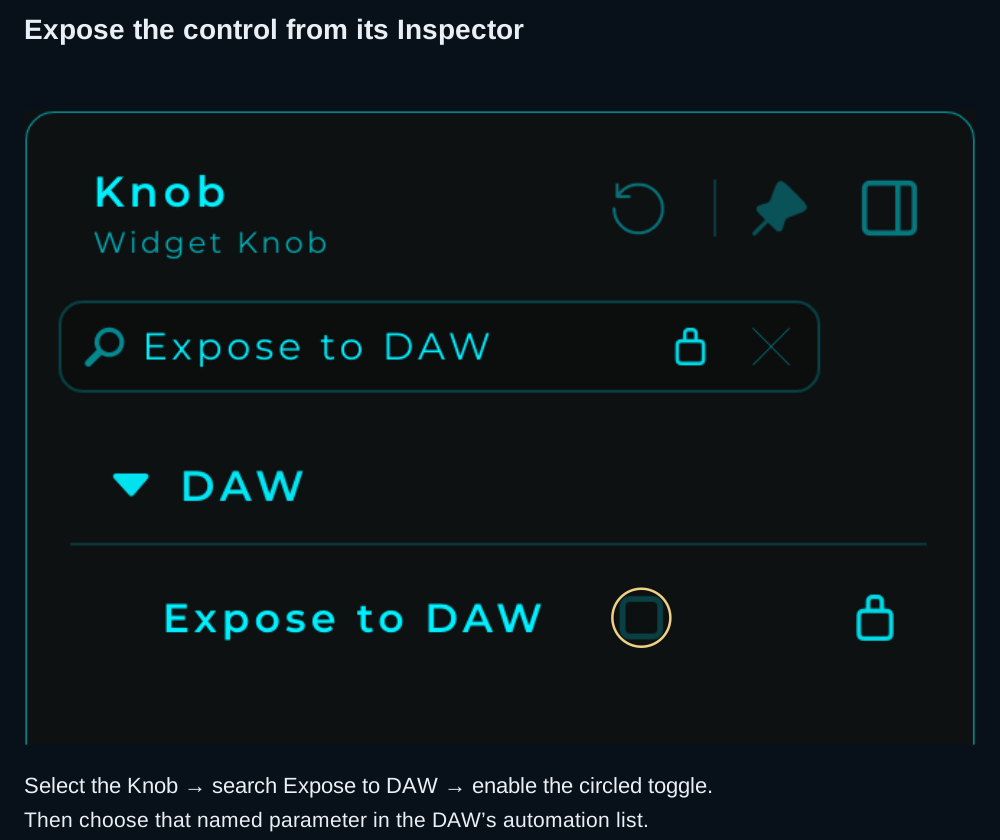
Search narrows the Inspector to the setting you need. Exposing a control publishes its value; it does not create its connection to Filter.
The host parameter name includes the widget's display name and a slot number, such as Knob [1]. The number depends on the free slots in your project. Two-axis controls can publish separate X and Y parameters.
You do not have to place the widget on the Front Panel to expose it. The panel is useful for playing the control; the automation binding belongs to the node.
Generated controls
Patches generated by The Lab with Generate Front Panel enabled can arrive with their panel controls already exposed. Check the Inspector before adding another control for the same job.
Automation Slots
Each MNodes instance provides 128 slots. Enabling Expose to DAW assigns the next available slot or slots automatically; disabling it frees that control's binding. An XY Pad uses two slots, so 128 slots does not always mean 128 widgets.
Deleting an exposed node removes its binding. A duplicated node starts unexposed: enable the copy explicitly if you want a separate host parameter.
Once a DAW session contains automation, keep its exposed controls and bindings stable. Removing a control or reusing its slot can change what an existing lane addresses. Save the MNodes project and the DAW session after setting up the controls and lanes.
Recording Automation
The names of Write, Touch, Latch and Read modes depend on your DAW. For a short first pass:
- Enable the host's automation recording mode for the MNodes track.
- Start playback and move the exposed Knob. If dragging moves the widget's layout, lock the Front Panel first.
- Stop, then leave the host in its automation Read mode.
- Play the same section again without touching the Knob. Confirm both its movement and the sound change.
- Save the DAW session. The host stores the automation timeline; a standalone
.mnprtis not a copy of that timeline.
Automatable Parameters
Supported value controls include Knob and slider values, Toggle states, selections and XY Pad axes. The Inspector's Expose to DAW option identifies a control that offers this feature. It does not make every parameter of every node, or every appearance property, a host parameter.
To automate a processing parameter, use a supported control wired to that parameter. Check its range and units first: a host lane sweeps the control's configured range.
When a Knob Does Not Follow the DAW
| What you see | Check |
|---|---|
| The control is absent from the automation list | Expose to DAW is enabled on the intended node and you are viewing the correct MNodes instance; refresh the host's parameter list |
| The lane moves but the sound does not | The Knob is connected to the intended input, with a suitable range |
| Manual movement overrides playback | Re-enable automation Read in the host after the manual override |
| The value jumps at playback start | Check other lanes, host initial values, incoming widget connections and States recalls |
| The lane controls something different after editing the patch | Check whether an exposed node was deleted or its slot reused |
| No slot is available | Disable exposure on controls you no longer need; multi-axis widgets need more than one slot |
If a problem remains, include the DAW name/version, the MNodes project and a short description of the expected movement in your support report. Settings → General provides the support log folders.
Internal Modulation
Use Data or CV connections when the movement belongs to the patch itself:
| Source | Typical job |
|---|---|
| Knob | Set a value manually or from a DAW lane |
| LFO | Repeat a modulation cycle |
| Envelope | Shape a value while a note is held and released |
| Voice Velocity | Give each Poly Module voice a value from its note |
An internal CV connection needs a CV-capable destination. A hybrid parameter receiving a CV stream follows that stream while connected, so automating its stored value may not change what you hear. See hybrid pins before combining the two.