
Appearance
Envelopes
An envelope is a value that changes over time, usually rising and falling smoothly between 0 and 1. You patch that moving value into something you want to animate: volume, the brightness of a filter, pitch, or anything else you'd like to move on its own. Most of these nodes step through stages such as attack (the rise), hold, decay (the fall to a held level), sustain (the held level), and release (the fade back down), and they react when you "play" a note or send them a trigger. One of them instead listens to incoming audio and follows how loud it is, and another lets you draw your own free-form shape point by point. Every envelope sends its moving value out of its Out pin at audio rate (updated very finely, sample by sample). The note-driven and trigger-driven envelopes (Envelope, Trig Envelope, AHD Envelope, and Multi Envelope) also copy that exact same shape onto a separate CV pin right next to it, so you can plug it straight into a control input without any extra step. The Envelope Follower is the odd one out: it has only its audio Out pin and no separate CV output.
Envelope Follower
Listens to incoming audio and follows how loud it is over time, turning that loudness into a smooth rising-and-falling value. The Threshold lets you ignore the quieter parts so it reacts mainly to the loudest moments, like the punch at the start of a drum hit.
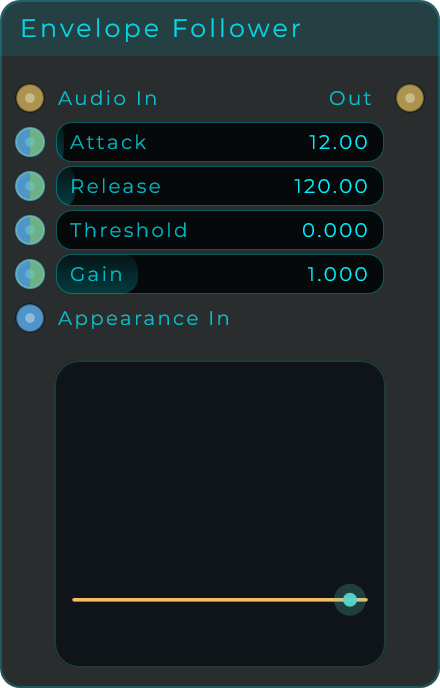
| Parameter | Range | Default | Description |
|---|---|---|---|
| Attack | 0.1 - 500 ms | 12 ms | How quickly the follower rises as the input gets louder |
| Release | 1 - 2000 ms | 120 ms | How quickly the follower falls as the input gets quieter |
| Threshold | 0.0 - 0.98 | 0.0 | Input level to ignore before the follower responds, so it focuses on peaks |
| Gain | 0.0 - 4.0 | 1.0 | Scales the output level. The result is clamped to the 0 to 1 range |
Inputs: Audio In, plus Attack, Release, Threshold and Gain (all CV-capable). Outputs: Out (the tracked envelope, 0 to 1, at audio rate).
Envelope
The classic ADSR envelope, named after its four stages: Attack (rise), Decay (fall to a held level), Sustain (the held level), and Release (fade back down). It comes with adjustable curve shapes and works with MIDI. Turn the Gate on to start it: it rises, falls to the sustain level, and holds there. Turn the Gate off and it fades back to zero. You can also drive the gate from a keyboard: pressing a key opens the gate and releasing it closes the gate, and if you hold several keys at once the gate stays open until you let go of the last one.
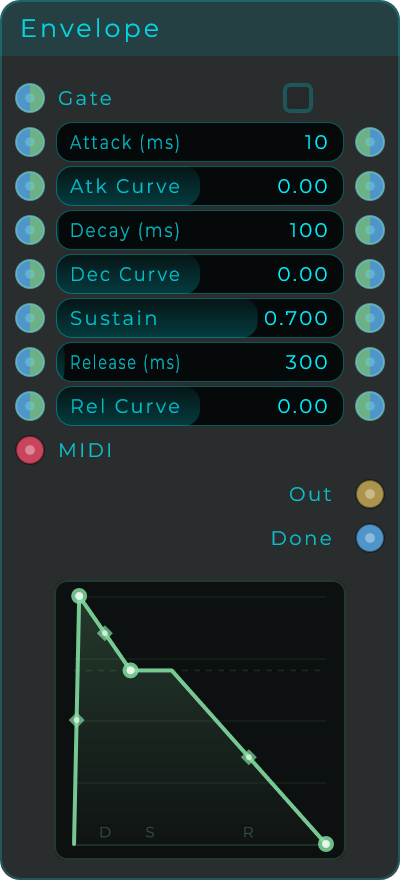
| Parameter | Range | Default | Description |
|---|---|---|---|
| Gate | On / Off | Off | On starts the attack stage, off triggers the release |
| Attack | 0 - 10,000 ms | 10 ms | Time to rise from zero to full level after the gate opens. 0 ms is an instant attack |
| Atk Curve | -4.0 - 4.0 | 0.0 | Bends the attack shape. Negative is fast then eases in, positive is slow then accelerates, 0 is linear |
| Decay | 1 - 10,000 ms | 100 ms | Time to fall from the peak down to the sustain level |
| Dec Curve | -4.0 - 4.0 | 0.0 | Bends the decay shape |
| Sustain | 0.0 - 1.0 | 0.7 | Level held while the gate stays open |
| Release | 1 - 10,000 ms | 300 ms | Time to fall back to zero after the gate closes |
| Rel Curve | -4.0 - 4.0 | 0.0 | Bends the release shape |
The Attack, Decay, Sustain and Release values also appear on their own output pins, so you can read them or pass them along to other nodes.
Inputs: Gate, Attack, Atk Curve, Decay, Dec Curve, Sustain, Release, Rel Curve (all CV-capable), plus a MIDI input. Outputs: Out (envelope, 0 to 1, at audio rate), CV (the same value as a pure CV signal), Done (fires an event when the envelope returns to idle), plus per-parameter outputs for Attack, Atk Curve, Decay, Dec Curve, Sustain, Release and Rel Curve.
Trig Envelope
A simple one-shot envelope: give it a trigger and it rises from 0 to 1 (attack), then immediately falls back to 0 (release). There is no held middle stage. Trigger it again while it is still moving and it starts the rise over from wherever it currently is. Great for percussive sounds, plucks, and quick bursts of movement.
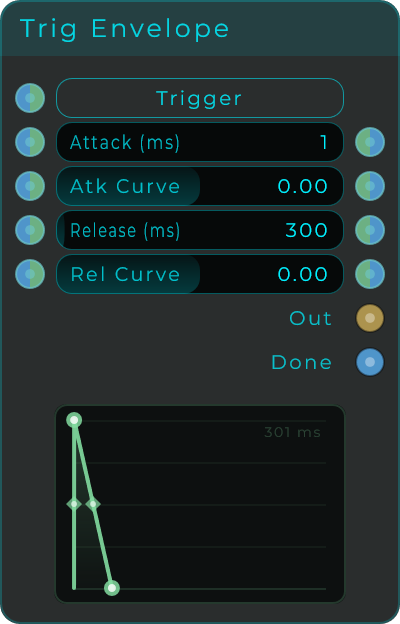
| Parameter | Range | Default | Description |
|---|---|---|---|
| Attack | 0 - 10,000 ms | 1 ms | Time to rise to full level. 0 ms is an instant attack |
| Atk Curve | -4.0 - 4.0 | 0.0 | Bends the attack shape. Negative is fast start, positive is slow start, 0 is linear |
| Release | 1 - 10,000 ms | 300 ms | Time to fall back to zero |
| Rel Curve | -4.0 - 4.0 | 0.0 | Bends the release shape |
Inputs: Trigger (button, event, or rising-edge CV), Attack, Atk Curve, Release, Rel Curve (all CV-capable). Outputs: Out (envelope, 0 to 1, at audio rate), CV (the same value as a pure CV signal), Done (fires an event when the envelope finishes). Attack, Atk Curve, Release and Rel Curve are also available on their own output pins.
AHD Envelope
A trigger-driven envelope with three stages: Attack (rise), Hold (stay at the top), and Decay (fall back down). There is no held sustain stage and no gate. Give it a trigger and it rises to full level, stays there for the hold time, then falls back to zero. Trigger it again while it is moving and it starts the rise over from wherever it currently is. Handy for percussive sounds that need a bit of body, like snares, plucks, and stabs.
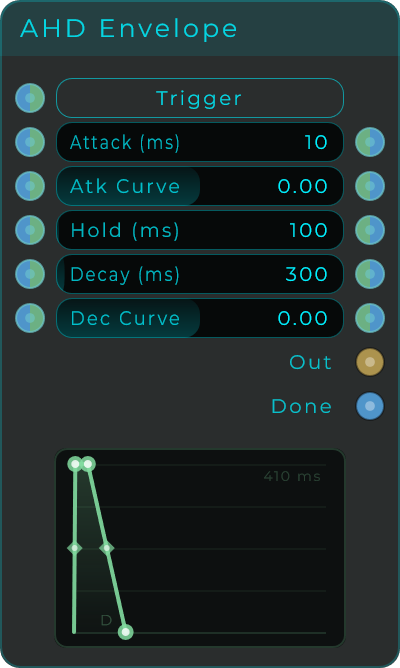
| Parameter | Range | Default | Description |
|---|---|---|---|
| Attack | 0 - 10,000 ms | 10 ms | Time to rise from zero to full level. 0 ms is an instant attack |
| Atk Curve | -4.0 - 4.0 | 0.0 | Bends the attack shape. Negative is fast start, positive is slow start, 0 is linear |
| Hold | 0 - 10,000 ms | 100 ms | Time held at full level before the decay starts. 0 skips the hold |
| Decay | 1 - 10,000 ms | 300 ms | Time to fall back to zero after the hold |
| Dec Curve | -4.0 - 4.0 | 0.0 | Bends the decay shape |
Inputs: Trigger (button, event, or rising-edge CV), Attack, Atk Curve, Hold, Decay, Dec Curve (all CV-capable). Outputs: Out (envelope, 0 to 1, at audio rate), CV (the same value as a pure CV signal), Done (fires an event when the envelope returns to idle). Attack, Atk Curve, Hold, Decay and Dec Curve are also available on their own output pins.
Multi Envelope
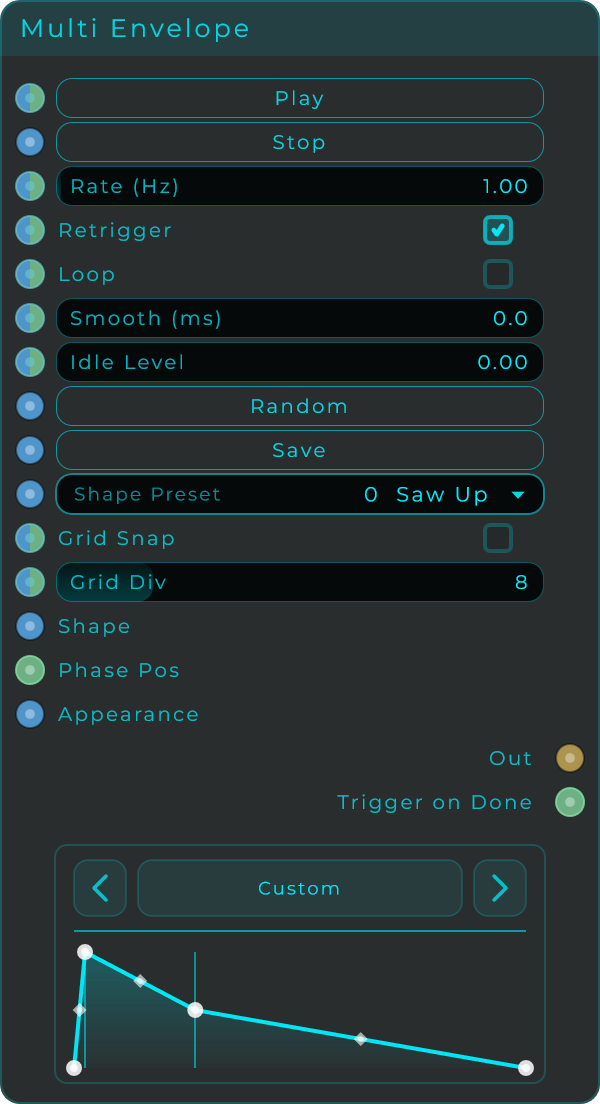
A draw-your-own envelope with up to 32 points, for shapes that go well beyond the usual attack-decay-sustain-release. Build your own curve by adding and moving points, give each segment between points its own bend, and play it back at a speed you choose, with optional looping. Press Play to start and Stop to pause and settle to the idle level. With Retrigger on, every Play starts again from the first point; with it off, Play picks up from wherever Stop left off. The node also comes with a library of ready-made shapes you can browse.
| Parameter | Range | Default | Description |
|---|---|---|---|
| Rate | 0.01 - 100 Hz | 1.0 Hz | Cycles per second. 1 Hz is one second per cycle, lower is slower |
| Retrigger | On / Off | On | When on, every Play restarts from the first point. When off, Play resumes from the paused position |
| Loop | On / Off | Off | When on, loops back to the start after the last point |
| Smooth | 0 - 100 ms | 0 ms | Crossfade time at the loop point. 0 is an instant jump |
| Idle Level | 0.0 - 1.0 | 0.0 | Output level when stopped or idle |
| Shape Preset | Choice | Saw Up | Select a built-in, global or project shape |
| Grid Snap | On / Off | Off | Shows a time grid in the editor and snaps point movement to it |
| Grid Div | 2 - 32 | 8 | Number of grid subdivisions used by the editor |
Buttons: Play (start playback), Stop (pause and fall to the idle level), Random (generate a random shape), Save (store the current shape as a custom preset).
Editing: click empty space to add a point, right-click a point to remove it, drag points to set level (vertical) and time (horizontal), and drag the diamond handles to bend each segment. Minimum 2 points, maximum 32.
Inputs: Play, Stop, Rate, Loop, Smooth, Retrigger, Idle Lvl, Random, Shape (a serialized shape string, for example from the Shape Presets node), Phase Pos (overrides playback position from 0 to 1 and bypasses Play, Stop, Rate and Loop), Preset, Grid Snap and Grid Div. Outputs: Out (envelope, 0 to 1, at audio rate), CV (the same value as a pure CV signal), Trigger on Done (a short pulse when the envelope finishes, when not looping).
Shaping segments
Curve values run from -4 to 4. Negative values bend the line so it starts fast and ends slow (a logarithmic curve), positive values bend it so it starts slow and ends fast (an exponential curve), and 0 keeps it a perfectly straight line.
Shape Presets
A little library node that hands ready-made envelope shapes to the Multi Envelope node. It carries 52 built-in shapes (saws, triangles, pulses, percussive hits, bounces, musical swells, and more) plus any of your own shapes you've saved, either app-wide or just for this project. Pick a shape and wire its output into the Multi Envelope's Shape input.
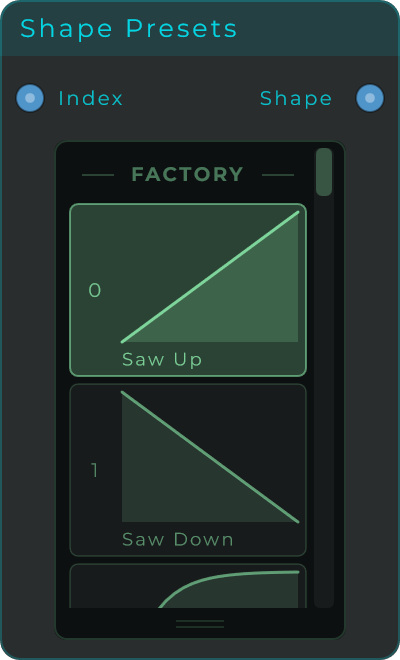
You don't save your own shapes here. You create and store them with the Multi Envelope's Save button, and they then show up in this node's list.
| Parameter | Range | Default | Description |
|---|---|---|---|
| Shape | Choice | Saw Up | The selected shape, chosen from the built-in, global and project shapes |
Inputs: Index (select a shape by index number or by name; an event re-emits the current shape). Outputs: Shape (the selected shape as a serialized string, ready for a Multi Envelope's Shape input).