
Appearance
Sequencers
Sequencers turn time into music: notes, rhythms, on/off pulses and movement that repeat in patterns. The nodes on this page do two jobs. Clock nodes keep the beat. They send out short "go" pulses (triggers), a smooth 0-to-1 ramp that shows where you are inside each beat (the phase), and a running count of beats you can pass on to other nodes. Sequencing nodes take that timing and turn it into a value for each step, into on/off pulses, or use the step number to pick and route values. Combine them with a Transport or Clock to build anything from a simple beat divider to a full pattern machine that follows your DAW (your music software).
CV OnChange
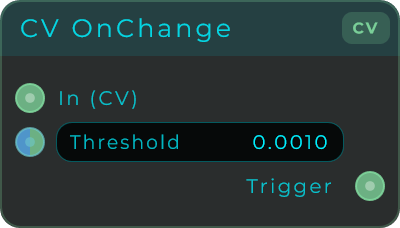
Keeps an eye on an incoming control signal and fires a short pulse whenever the value moves by more than the Threshold amount. Use it to turn smooth, continuous movement, like a turning knob or a wandering random signal, into separate on/off events.
| Parameter | Range | Default | Description |
|---|---|---|---|
| Threshold | 0 - 1 | 0.001 | Minimum change needed to fire a trigger. Lower is more sensitive; 0 triggers on any change. |
Inputs: In (CV to watch), Threshold (modulates the threshold). Outputs: Trigger (a short pulse, 1.0 for about 32 samples, then 0.0).
Clock
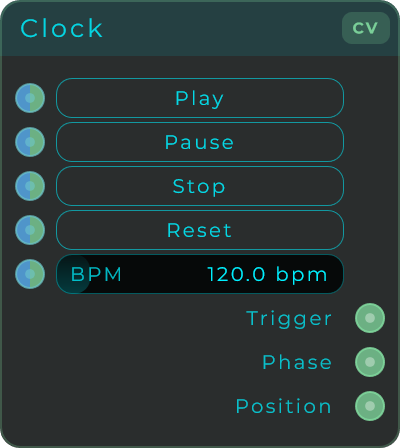
A beat clock with its own tempo and its own play, pause and stop buttons. It runs on its own, separate from your DAW, so reach for it when you want to be the one starting and stopping the beat for your sequencers and tempo-locked patches.
| Parameter | Range | Default | Description |
|---|---|---|---|
| Play | Event | n/a | Starts or resumes the clock. |
| Pause | Event | n/a | Stops the clock but keeps the current phase and position. |
| Stop | Event | n/a | Stops the clock and rewinds to the beginning. |
| Reset | Event | n/a | Returns phase and position to zero. |
| BPM | 1 - 999 | 120 bpm | Clock tempo. One beat is a quarter note. |
Inputs: Play, Pause, Stop, Reset, BPM (all can also be driven from other nodes). Outputs: Trigger (a pulse at the start of each beat), Phase (0-to-1 ramp over one beat), Position (continuous beat count).
Clock Bank
A Clock with every rhythm at once. Besides the beat, it sends pulses every 2, 4, 8 and 16 beats, 2, 4, 8 and 16 times per beat, triplets, dotted notes and bars, plus a Trigger and a Gate at a note length you choose, with swing. It keeps its own tempo like the Clock, or follows the song in your DAW, and it tells you when playback jumps, so a sequence can start over in step.
Needs: screenshot of the Clock Bank node on the graph.
| Parameter | Range | Default | Description |
|---|---|---|---|
| Play | Event | n/a | Starts or resumes the clock, while Source is Internal. |
| Pause | Event | n/a | Stops the clock but keeps its place, while Source is Internal. |
| Stop | Event | n/a | Stops the clock and rewinds to the beginning, while Source is Internal. |
| Reset | Event | n/a | Returns to the beginning without stopping, while Source is Internal. |
| BPM | 1 - 999 | 120 bpm | The tempo while Source is Internal. One beat is a quarter note. |
| Source | Internal, DAW | Internal | Internal runs on the node's own tempo. DAW follows your DAW's tempo, position, loops and time signature, and stays stopped where there is no DAW, as in the standalone app. |
| Swing | 50 - 75 % | 50 % | Pushes every second eighth note later. 50 is straight. Phase and Position stay straight. |
| Gate Width | 1 - 99 % | 50 % | How long Gate stays open in each Division. |
| Division | 64 Bars - 1/128 | 1/4 | The note length Trigger and Gate follow, dotted (D) and triplet (T) lengths included. |
Inputs: Play, Pause, Stop, Reset, BPM, Source, Swing, Width, Division (all can be driven from other nodes, and a CV plugged in follows the signal). Outputs: Trigger (a pulse at every Division), Phase (0-to-1 ramp over one beat), Position (continuous beat count), Running (1 while it runs), Gate (open for Gate Width in every Division), Reset Out (a pulse when playback starts on a beat or jumps: a rewind, a seek, a loop starting over), Tempo (the BPM it runs at), Bar (a pulse at every bar), /16, /8, /4 and /2 (a pulse every 16, 8, 4 and 2 beats), x1, x2, x4, x8 and x16 (1, 2, 4, 8 and 16 pulses per beat), x3, x6 and x12 (3, 6 and 12 pulses per beat, the triplets), 1/4 D, 1/8 D and 1/16 D (dotted notes).
When playback starts or jumps between two pulses, the outputs wait for the next one instead of firing at once. Pause and Stop close every gate.
CV Probability
Lets each gate through or holds it back, by chance. Every gate that comes in goes out whole, either through Pass or through Reject, and Chance sets how likely Pass is. The choices come from a Seed, so the same Seed repeats the same run of choices every time, and Reset starts that run again. Put it after a clock to thin out a rhythm, or send Pass and Reject to two different sounds.
Needs: screenshot of the CV Probability node on the graph.
| Parameter | Range | Default | Description |
|---|---|---|---|
| Chance | 0 - 1 | 0.5 | How likely each gate is to pass: 0 never, 1 always. |
| Seed | 1 - 65535 | 1 | Picks a repeatable run of choices. |
Inputs: Trigger (the gates, as CV), Reset (starts the choices over), Chance, Seed. Outputs: Pass (the gate, when it passes), Reject (the gate, when it is held back), Decision (1 after a pass, 0 after a reject, held until the next gate).
For Data messages instead of gates, use Probability.
Random Loop
A loop of random values that plays one step per clock pulse, like a sequencer that writes its own pattern. Mutation lets it change a little as it plays, Lock keeps a loop you like exactly as it is, and New rolls a new one. The loop is saved with your patch, so a melody or a movement you found by chance is still there next time.
Needs: screenshot of the Random Loop node on the graph, driven by a Clock Bank.
| Parameter | Range | Default | Description |
|---|---|---|---|
| Reset | Event | n/a | Rewinds the loop, so the next clock plays its first step again. |
| New | Event | n/a | Makes a new loop, even while it is locked. |
| Length | 1 - 32 | 8 | How many steps the loop plays before it starts over. |
| Mutation | 0 - 1 | 0.1 | How likely each step is to get a new value as it plays. 0 repeats the loop exactly. |
| Lock | Evolve, Locked | Evolve | Locked keeps the loop exactly as it is. |
| Seed | 1 - 65535 | 1 | Picks a repeatable set of random values. |
Inputs: Clock (the pulses that move it on, as CV), Reset, New, Length, Mutation, Lock, Seed. Outputs: CV (the value of the current step, 0 to 1), Bipolar (the same value from -1 to 1), Step (which step is playing, counted from 0), End (a pulse on the last step), Trigger (a pulse on every step).
Recalling a State or a preset brings back the loop it saved, from its first step.
CV Trigger Pulse
A button you press to send out a short pulse. Tap it on the front panel to fire an envelope, move a sequencer forward a step, or just test a patch by hand. You can also feed it an external signal to pass a pulse straight through. A handy way to make a gate or a one-off event yourself.
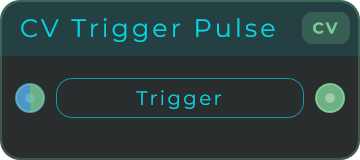
Inputs: Trigger (an external trigger; a rising edge emits a pulse. The button on the node does the same by hand). Outputs: Out (a short CV pulse).
CV Random Trig
Every time it gets a trigger, it picks a new random value inside a range you set and holds onto it until the next trigger arrives. Press the button by hand, or feed it a clock or trigger. Great for random melodies, random gates, or surprise movement that always lands right on the beat.
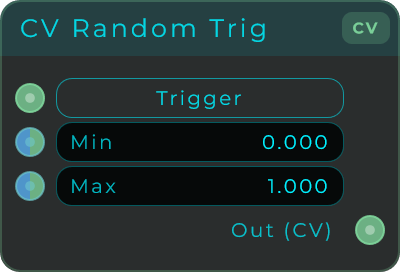
| Parameter | Range | Default | Description |
|---|---|---|---|
| Min | unbounded | 0.0 | Lowest value the random output can reach. |
| Max | unbounded | 1.0 | Highest value the random output can reach. |
Inputs: Trigger (an event; a rising edge picks a new random value. The button on the node does the same by hand), Min, Max. Outputs: Out (the held random CV value).
Position Cycle
Takes a running beat count and turns it into a 0-to-1 ramp that repeats over and over, plus a short pulse every time the ramp jumps back to zero. You decide how many times it repeats per beat, which makes it a flexible way to drive sequencers, LFOs and gates from a Clock or Transport.
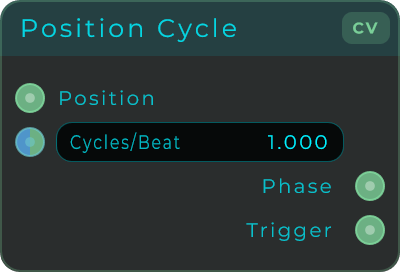
| Parameter | Range | Default | Description |
|---|---|---|---|
| Cycles/Beat | 0.001 - 256 | 1.0 | How many full phase cycles happen per beat. 0.5 = one cycle every two beats, 1.0 = one per beat, 4.0 = a sixteenth-note rate. |
Inputs: Position (continuous beat position, usually from Clock or Transport), Ratio (the modulation pin that drives the Cycles/Beat rate; the slider is named Cycles/Beat). Outputs: Phase (repeating 0-to-1 ramp), Trigger (a pulse each time the phase restarts from 0).
Slider Sequencer
A step sequencer with a slider for each step, so every step holds its own value. Draw out melodies, slow-moving curves or sweeps across a parameter, then play them back. It can run on its own, follow your DAW's play position, or be driven by an outside position or ramp. Each step also has its own gate length (how long it stays on before it drops back down).
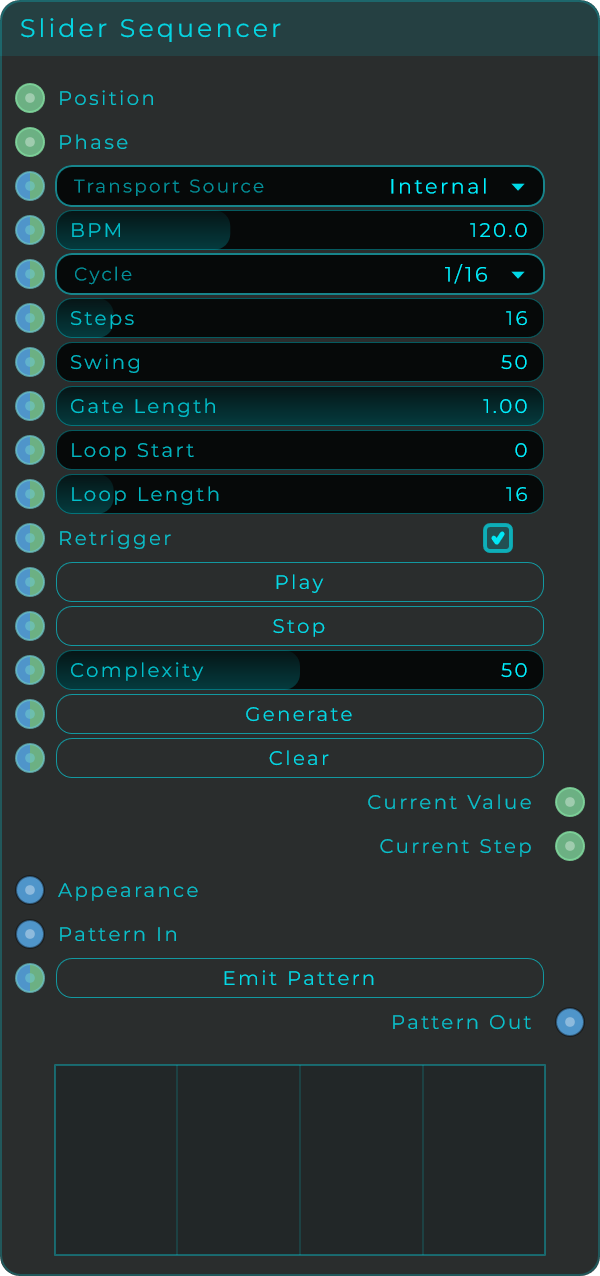
| Parameter | Range | Default | Description |
|---|---|---|---|
| Transport Source | Internal / Transport (DAW) / External Position / External Phase | Transport in plugin, Internal in standalone | Where the sequencer gets its timing. |
| BPM | 20 - 300 | 120 | Tempo used in Internal mode. |
| Cycle | musical divisions (64 Bars to 1/128) | 1/16 | Length of one step. |
| Steps | 1 - 128 | 16 | Number of steps in the pattern. |
| Swing | 50 - 99 | 50 | Delays every second step for a shuffle feel. 50 is straight. |
| Gate Length | 0 - 1 | 1.0 | How much of each step the value is held before dropping to 0. |
| Loop Start | 0 - 127 | 0 | First step of the loop. |
| Loop Length | 1 - 128 | 16 | Number of steps in the loop. |
| Retrigger | on / off | on | In Internal mode, restarts the sequence from the start on Play. |
| Play | Event | n/a | Starts the sequence (Internal mode). |
| Stop | Event | n/a | Stops the sequence (Internal mode). |
| Complexity | 0 - 100 | 50 | Amount of variation used when generating a random pattern. |
| Generate | Event | n/a | Fills the steps with a generated pattern. |
| Clear | Event | n/a | Clears all steps. |
| Emit Pattern | Event | n/a | Sends the current pattern out of the Pattern Out pin. |
Inputs: Position, Phase, Transport Source, BPM, Cycle, Swing, Gate Length, Steps, Loop Start, Loop Length, Retrigger, Generate, Complexity, Play, Stop, Clear, Pattern In, Emit Pattern, Appearance. Outputs: Current Value (the active step's value), Current Step (the active step index), Pattern Out (the full pattern as data).
Toggle Sequencer
A step sequencer where each step is a simple on or off switch. Build patterns of pulses and gates for drums, rhythms or step-by-step logic. Just like the Slider Sequencer, it can run on its own, follow your DAW's play position, or be driven by an outside position or ramp.
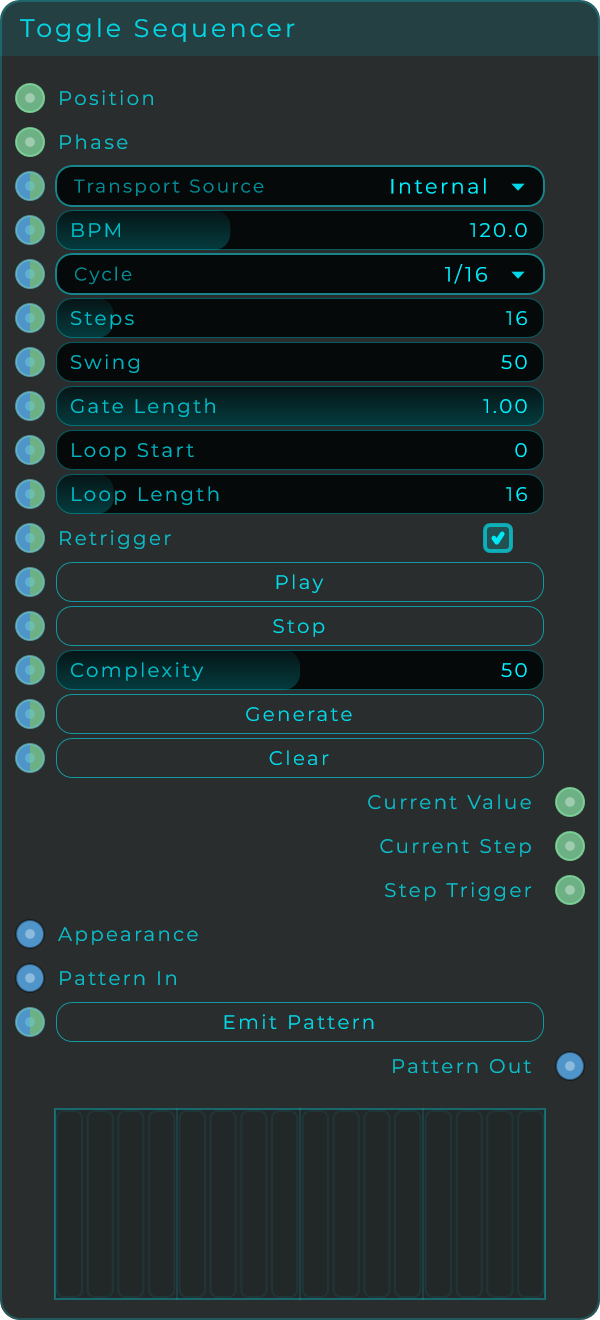
| Parameter | Range | Default | Description |
|---|---|---|---|
| Transport Source | Internal / Transport (DAW) / External Position / External Phase | Transport in plugin, Internal in standalone | Where the sequencer gets its timing. |
| BPM | 20 - 300 | 120 | Tempo used in Internal mode. |
| Cycle | musical divisions (64 Bars to 1/128) | 1/16 | Length of one step. |
| Steps | 1 - 128 | 16 | Number of steps in the pattern. |
| Swing | 50 - 99 | 50 | Delays every second step for a shuffle feel. 50 is straight. |
| Gate Length | 0 - 1 | 1.0 | How much of each active step stays high before dropping to 0. |
| Loop Start | 0 - 127 | 0 | First step of the loop. |
| Loop Length | 1 - 128 | 16 | Number of steps in the loop. |
| Retrigger | on / off | on | In Internal mode, restarts the sequence from the start on Play. |
| Play | Event | n/a | Starts the sequence (Internal mode). |
| Stop | Event | n/a | Stops the sequence (Internal mode). |
| Complexity | 0 - 100 | 50 | Amount of variation used when generating a random pattern. |
| Generate | Event | n/a | Fills the steps with a generated pattern. |
| Clear | Event | n/a | Clears all steps. |
| Emit Pattern | Event | n/a | Sends the current pattern out of the Pattern Out pin. |
Inputs: Position, Phase, Transport Source, BPM, Cycle, Swing, Gate Length, Steps, Loop Start, Loop Length, Retrigger, Generate, Complexity, Play, Stop, Clear, Pattern In, Emit Pattern, Appearance. Outputs: Current Value (1 or 0 for the active step), Current Step (the active step index), Step Trigger (a pulse when an active step begins), Pattern Out (the full pattern as data).
Phase To Step
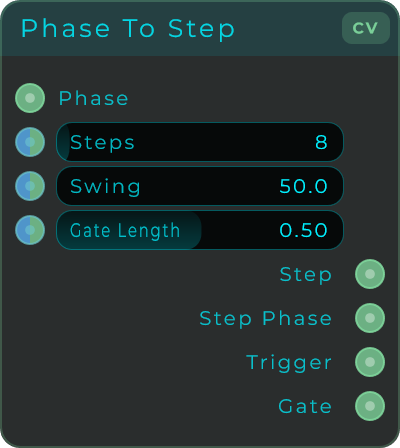
Takes a 0-to-1 ramp, splits it into a number of equal steps, and tells you which step you are on right now. Feed it any ramp, from Position Cycle, Transport, or even an LFO, and you get back a step number that can drive sequencers and gate patterns. Add a little swing for groove.
| Parameter | Range | Default | Description |
|---|---|---|---|
| Steps | 2 - 128 | 8 | Number of steps the phase is divided into. |
| Swing | 50 - 99 | 50 | Delays the second step in each pair. 50 is straight timing. |
| Gate Length | 0 - 0.99 | 0.5 | Fraction of each step the Gate stays high. Caps at 0.99 so steps stay separated. |
Inputs: Phase (0-to-1 ramp, wrapped automatically), Steps, Swing, Gate Length (all modulatable). Outputs: Step (current step number, 0 to Steps-1), Step Phase (0-to-1 ramp within the step), Trigger (pulse at each step boundary), Gate (high for the configured portion of each step).
Position Cycle Musical
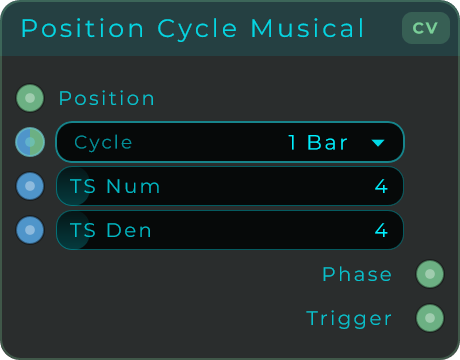
Just like Position Cycle, but instead of typing a free number you pick the cycle length from a menu of musical note values. It takes a running musical position and turns it into a ramp locked to bars, beats, and dotted and triplet values, with a short pulse each time the ramp restarts. Perfect when you want cycles that stay in perfect time with your DAW.
| Parameter | Range | Default | Description |
|---|---|---|---|
| Cycle | 64 Bars down to 1/128 (31 musical lengths, including dotted and triplets) | 1 Bar | Musical length of one phase cycle. |
| TS Num | 1 - 32 | 4 | Time signature numerator (the 4 in 4/4). |
| TS Den | 1 - 32 | 4 | Time signature denominator (the 4 in 4/4). |
Inputs: Position (continuous musical position, from Transport), Cycle, TS Num, TS Den. Outputs: Phase (0-to-1 ramp at the selected cycle), Trigger (pulse on each cycle wrap).
Step Select
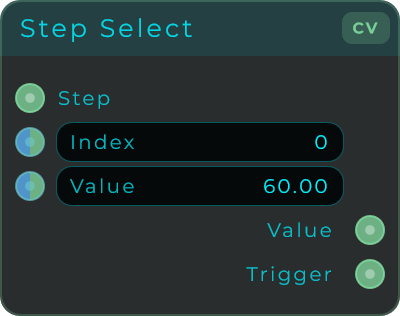
Sends out a value you choose, along with a short pulse, but only when the incoming step number matches its target Index. The rest of the time it sends out 0. Because it stays quiet whenever the step does not match, you can line up several Step Select nodes on one sequencer to give each step its own value.
| Parameter | Range | Default | Description |
|---|---|---|---|
| Index | 0 - 1024 | 0 | The step to match against the incoming Step. |
| Value | unbounded | 60.0 | The value sent out when Step matches Index. |
Inputs: Step (the incoming step index), Index, Value. Outputs: Value (the value when matched, 0 otherwise), Trigger (a pulse on the rising edge of a match).
Slider Pattern Step
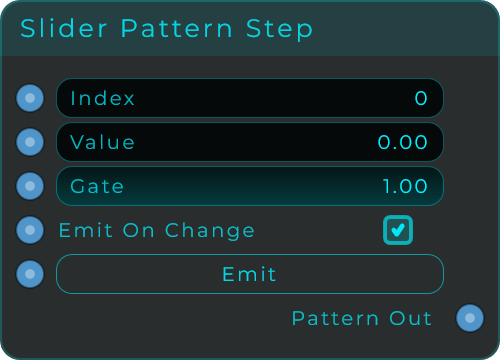
Builds a tiny package of data describing one step's value and gate, ready to send into the Slider Sequencer's Pattern In or into a Pattern Step Accumulator. Use it to set or automate single steps from somewhere else in your patch.
| Parameter | Range | Default | Description |
|---|---|---|---|
| Index | 0 - 127 | 0 | Which step this patch targets. |
| Value | 0 - 1 | 0.0 | Slider value for the step. |
| Gate | 0 - 1 | 1.0 | Gate length for the step, carried as pattern metadata. |
| Emit On Change | on / off | on | When on, edits auto-send the patch. |
| Emit | Event | n/a | Re-sends the current one-step patch. |
Inputs: Index, Value, Gate, Emit On Change, Emit. Outputs: Pattern Out (one-step pattern JSON).
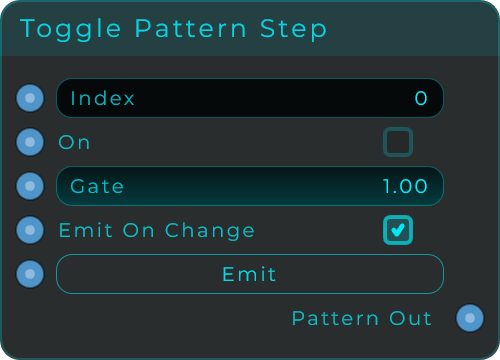
Toggle Pattern Step
The on/off version of Slider Pattern Step. It builds a tiny one-step package of data with the step set to either 0 or 1, ready for the Toggle Sequencer's Pattern In or a Pattern Step Accumulator.
| Parameter | Range | Default | Description |
|---|---|---|---|
| Index | 0 - 127 | 0 | Which step this patch targets. |
| On | on / off | off | Step state. Non-zero becomes 1, zero becomes 0. |
| Gate | 0 - 1 | 1.0 | Gate length for the step. |
| Emit On Change | on / off | on | When on, edits auto-send the patch. |
| Emit | Event | n/a | Re-sends the current one-step patch. |
Inputs: Index, On, Gate, Emit On Change, Emit. Outputs: Pattern Out (one-step pattern JSON).
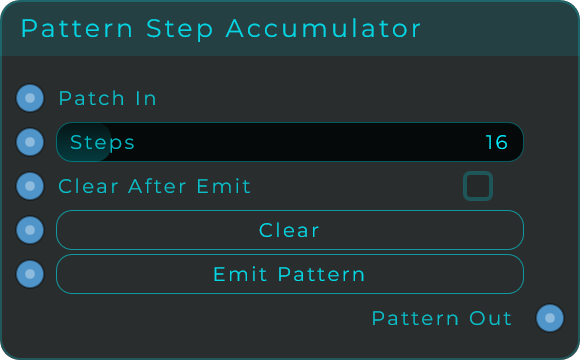
Pattern Step Accumulator
Gathers up one-step packages by their step number and puts out one complete pattern. Feed it from Slider Pattern Step or MIDI Pattern Step nodes, build up a whole sequence one step at a time, then send the finished result to a sequencer. It only collects and sends back the fields that show up in the incoming packages.
| Parameter | Range | Default | Description |
|---|---|---|---|
| Steps | 1 - 128 | 16 | Length of the accumulated pattern. |
| Clear After Emit | on / off | off | When on, clears the buffer after emitting the full pattern. |
| Clear | Event | n/a | Clears the accumulated pattern buffer. |
| Emit Pattern | Event | n/a | Outputs the full accumulated pattern. |
Inputs: Patch In (one-step patch JSON), Steps, Clear After Emit, Clear, Emit Pattern. Outputs: Pattern Out (the full accumulated pattern as data).
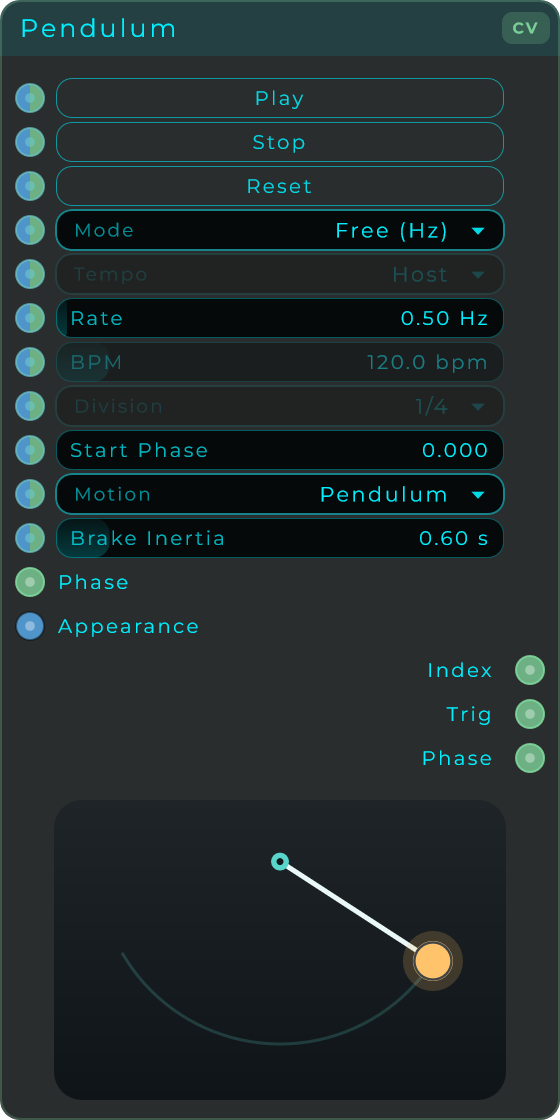
Pendulum
A sequencer you can watch. Its body is a pendulum that swings back and forth on its own clock, and you drop trigger points anywhere along the arc. Each time the swinging tip crosses a point it fires a short pulse on Trig and sends that point's number on Index, with a brief flash so you can see the hit. Run it free in Hz or lock it to a musical division, following your own tempo or the DAW transport. Start Phase sets where the swing begins and where it comes to rest: pressing Stop does not freeze it dead, it winds down to the Start Phase position with the feel set by Brake Inertia. Feed the Phase input from an LFO or envelope to drive the swing from outside, and take the live position from the Phase output. The body is themable and can be placed on the front panel, where you can add, move and remove its trigger points directly when the panel is locked or in Perform.
| Parameter | Range | Default | Description |
|---|---|---|---|
| Mode | Free (Hz) / Sync | Free (Hz) | Swing at its own speed in Hz, or lock each swing to a musical note value. |
| Tempo | Internal BPM / Host | Host | In Sync mode, follow a manual BPM or the DAW transport. |
| Rate | 0.01 - 20 Hz | 0.5 Hz | Swing speed in Free mode. |
| BPM | 1 - 999 | 120 | Manual tempo for Sync mode when Tempo is Internal BPM. |
| Division | 64 Bars to 1/128 | 1/4 | Musical length of one swing in Sync mode, with dotted and triplet variants. |
| Start Phase | 0.0 - 1.0 | 0.0 | Where the swing starts, and where it rests when stopped. |
| Motion | Pendulum / Linear | Pendulum | Pendulum eases at the ends of the arc; Linear sweeps at a steady speed. |
| Brake Inertia | 0 - 5 s | 0.6 s | How long the swing takes to wind down to rest after Stop. |
| Play | Event | n/a | Starts the swing. |
| Stop | Event | n/a | Winds the swing down to the Start Phase position. |
| Reset | Event | n/a | Snaps the swing straight back to the Start Phase position. |
Inputs: Play, Stop, Reset (events), Rate, Mode, Tempo, BPM, Division, Motion, Brake Inertia and Start Phase (all accept a value or CV), Phase (CV, drives the swing position from outside), Appearance. Outputs: Trig (a CV pulse each time the tip crosses a trigger point), Index (the number of the last point crossed, held), Phase (the live swing position, 0 to 1).
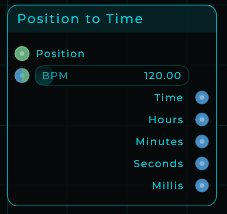
Position to Time
Turns the transport's musical position into a clock time. Feed it a Position (the quarter-note ramp from the Transport, your DAW's or the internal one) and a tempo, and it works out the elapsed time. Time comes out as a HH:MM:SS.mmm string you can wire straight into a Text widget for a readout, and the parts (Hours, Minutes, Seconds, Millis) come out as numbers for value displays or logic. Wire Transport Position and BPM in, or set the BPM on the node. No time signature is needed.
| Parameter | Range | Default | Description |
|---|---|---|---|
| BPM | 1 - 999 | 120 | Tempo used to convert position into time. Accepts a value or a CV stream. |
Inputs: Position (the musical position ramp, from Transport), BPM (tempo, value or CV). Outputs: Time (HH:MM:SS.mmm as text), Hours, Minutes, Seconds, Millis (each as a number).