
Appearance
Filters
Filter nodes shape the tone of your sound by turning certain frequencies up or down: sweeping a cutoff, ringing out resonant peaks, splitting a signal into separate frequency bands, shifting phase, or giving a source a vocal-like colour. Most of their controls accept both a simple value and a live, audio-rate signal (CV), so a knob can be moved automatically by another node while the sound plays. Several of these nodes also have an interactive display you can add to the front panel as a control.
Filter
A stereo filter with several modes: the classic shapes plus warmer, resonant ladder types, with an interactive response curve and a live analyser sitting behind it. Drag the curve to set the cutoff and resonance, or drive the controls from an envelope or LFO.
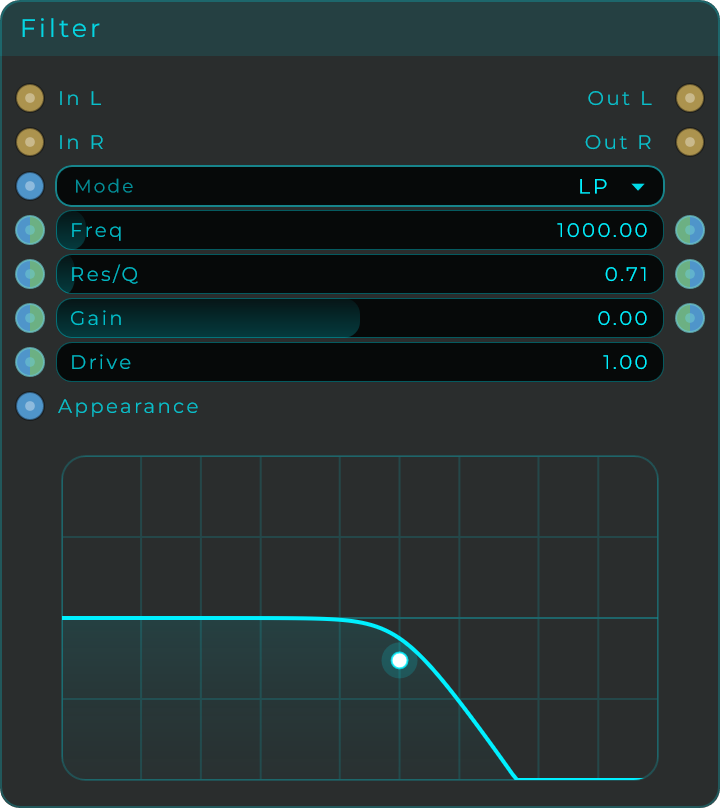
| Parameter | Range | Default | Description |
|---|---|---|---|
| Mode | Choice | LP | Filter shape. One of LP, BP, HP, Peak, Notch, Low Shelf, Hi Shelf, or the ladder variants below. |
| Freq | 20 to 20,000 Hz | 1,000 Hz | Cutoff or centre frequency. Sweeps where the filter acts on the spectrum. |
| Res/Q | 0.10 to 20.0 | 0.707 | Resonance for ladder modes, Q for biquad modes. Higher values emphasise the cutoff, building self-oscillating peaks. |
| Gain | -24 to +24 dB | 0 dB | Boost or cut around Freq. Only affects Peak, Low Shelf, and Hi Shelf modes. |
| Drive | 1.0 to 20.0 | 1.0 | Saturation pushed into the filter. Only used by the ladder modes, for analog-style warmth. |
Modes: LP, BP, HP, Peak, Notch, Low Shelf, Hi Shelf, Ladder LP12, Ladder LP24, Ladder BP12, Ladder BP24, Ladder HP12, Ladder HP24.
Inputs: In L, In R (audio); Mode (Data value only, no audio-rate CV); Freq, Res/Q, Gain, Drive (each a Data/CV pin); Appearance (Data, a JSON object that restyles the body).
Outputs: Out L, Out R (audio); Freq Out, Res/Q Out, Gain Out (Data, echoing the current values for chaining).
Parametric EQ
A six-band stereo EQ for detailed tone shaping, with an interactive response curve and a live analyser behind it. Drag a band's handle right on the display to set its frequency and gain, or dial everything in from the sliders. Each band can be a Bell, a shelf, a cut filter or a Notch, and the six bands start out flat, ready to grab.
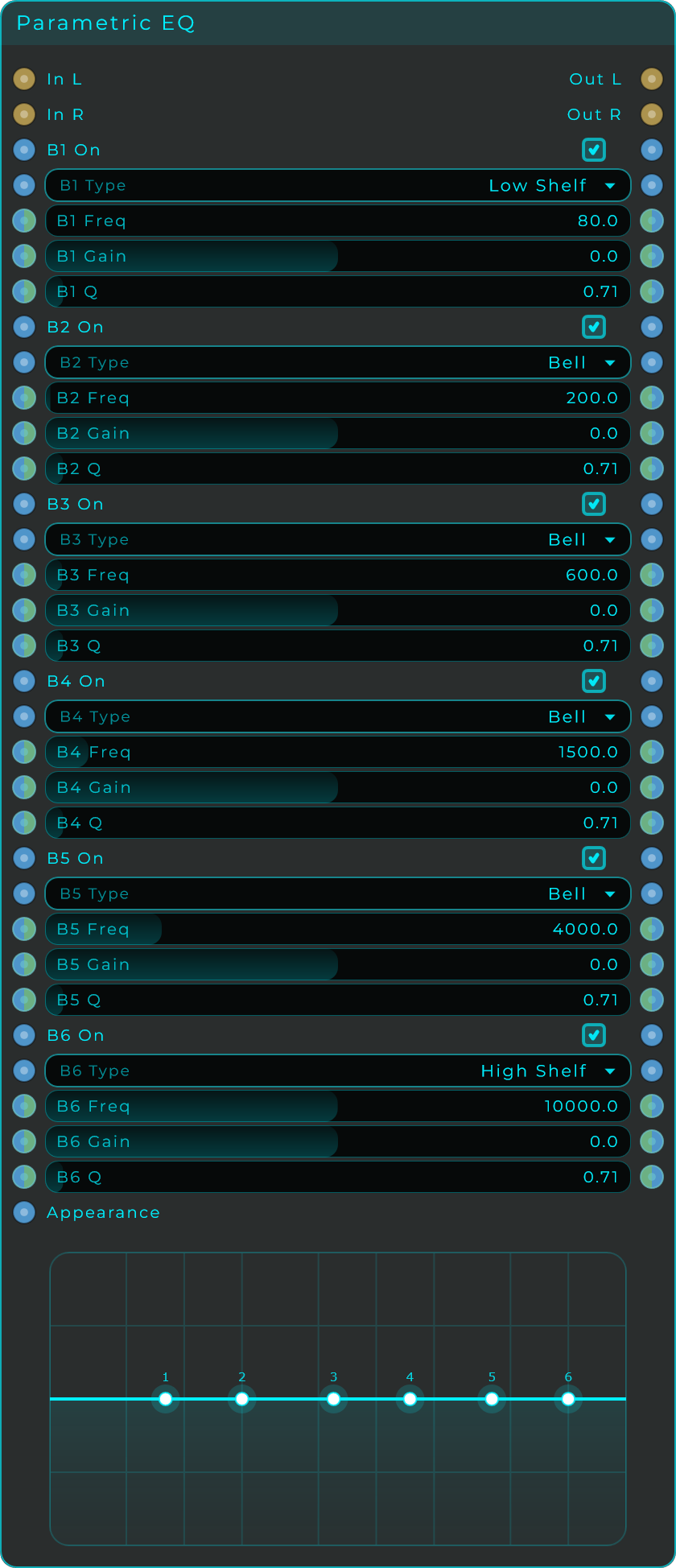
Every band has the same five controls. By default the bands sit at 80, 200, 600, 1,500, 4,000 and 10,000 Hz: a Low Shelf at the bottom, four Bells in the middle and a High Shelf at the top, all at 0 dB.
| Parameter | Range | Default | Description |
|---|---|---|---|
| On (per band) | Off / On | On | Switches the band in or out. |
| Type (per band) | Bell, Low Shelf, High Shelf, High Pass, Low Pass, Notch | Shelves at the ends, Bells in the middle | The band's shape. |
| Freq (per band) | 20 to 20,000 Hz | 80 to 10,000 Hz across the bands | Centre or corner frequency of the band. |
| Gain (per band) | -24 to +24 dB | 0 dB | Boost or cut. Used by the Bell and shelf types. |
| Q (per band) | 0.10 to 20.0 | 0.707 | Width of the band. Higher values are narrower and sharper. |
Each band carries a colour of its own in the inspector, and the display is drawn in those colours: Fill By Band tints the area under the curve with them, blending from one band to the next across the frequency axis, Line By Band does the same to the curve itself, and Number By Band draws each band's number in its own colour. All three start on, and each can be turned off on its own. A band left without a colour follows Handle Colour.
Inputs: In L, In R (audio); for every band: On and Type (Data values), plus Freq, Gain and Q (each a Data/CV pin, so any band can be swept live at full speed); Appearance (Data, a JSON object that restyles the body).
Outputs: Out L, Out R (audio); every band also echoes its On, Type, Freq, Gain and Q as data outputs for chaining.
Resonator
A stereo set of four tuned resonators. Each one rings at its own pitch, and a shared Attack and Decay control how the sound enters and how long the ringing lasts. Use it for metallic tones, pitched ambient textures, or to add body and resonance to drums and other percussive sounds.
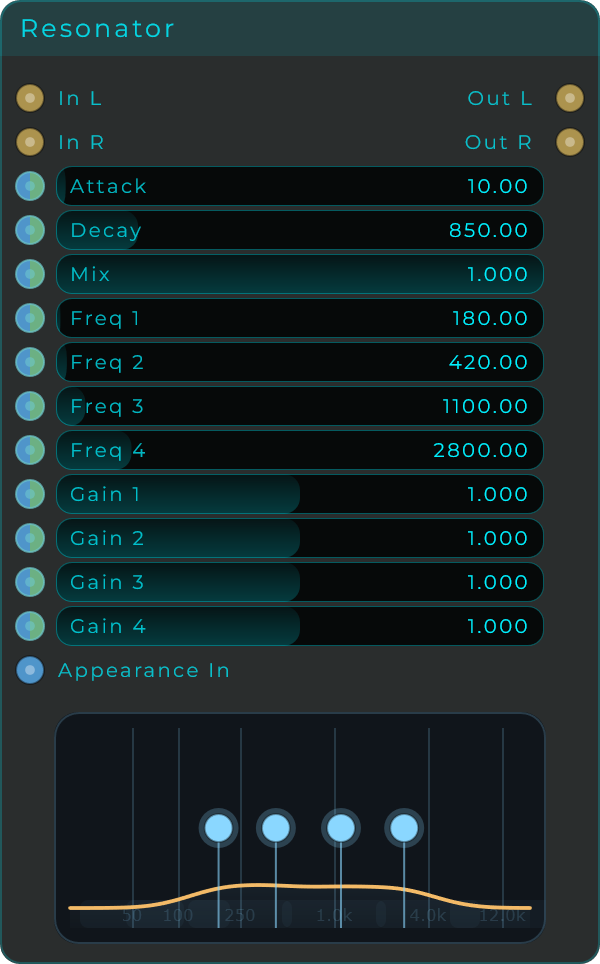
| Parameter | Range | Default | Description |
|---|---|---|---|
| Attack | 0 to 500 ms | 10 ms | How quickly the input excites the resonators. |
| Decay | 10 to 5,000 ms | 850 ms | How long each band rings out. |
| Mix | 0.0 to 1.0 | 1.0 | Blend between the dry input and the resonated signal. |
| Freq 1 | 20 to 18,000 Hz | 180 Hz | Tuning of band 1. |
| Freq 2 | 20 to 18,000 Hz | 420 Hz | Tuning of band 2. |
| Freq 3 | 20 to 18,000 Hz | 1,100 Hz | Tuning of band 3. |
| Freq 4 | 20 to 18,000 Hz | 2,800 Hz | Tuning of band 4. |
| Gain 1-4 | 0.0 to 2.0 | 1.0 | Level of each band in the mix. |
Inputs: In L, In R (audio); a Data/CV input pin for every parameter above (Attack, Decay, Mix, Freq 1-4, Gain 1-4); Appearance (Data, a JSON object that restyles the body).
Outputs: Out L, Out R (audio).
Crossover
Splits one mono input into three frequency bands: Low, Mid and High. The node draws the three bands on a frequency graph, and you set the two split points by dragging them right on it. A Slope control sets how steep the split is. Each band is kept cleanly separated (the High band rejects the lows instead of leaking them through), and the three add back together into the full signal, so you can treat each band on its own and then recombine them. The node is resizable and can sit on the front panel, with its own appearance settings.
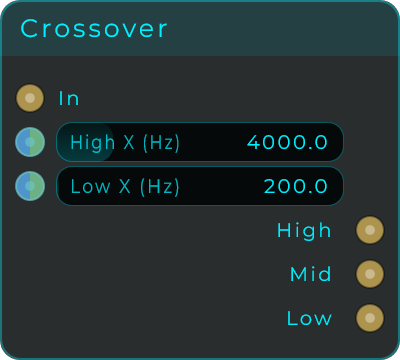
| Parameter | Range | Default | Description |
|---|---|---|---|
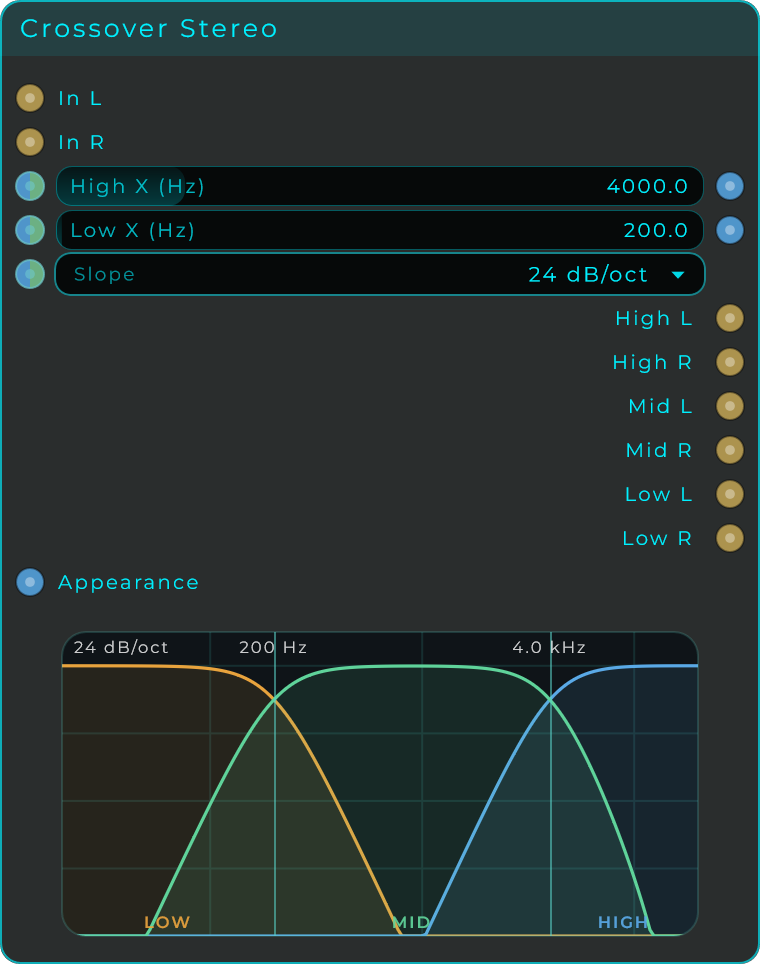
| Low X (Hz) | 20 to 20,000 Hz | 200 Hz | Frequency where the Low and Mid bands split. Drag the left point on the graph or set it here. |
| High X (Hz) | 20 to 20,000 Hz | 4,000 Hz | Frequency where the Mid and High bands split. Drag the right point on the graph or set it here. |
| Slope | 12 / 24 / 36 / 48 dB per octave | 24 dB per octave | How steep the split between bands is. |
Inputs: In (mono audio); Low X, High X, Slope (each a Data/CV pin), plus an Appearance pin.
Outputs: Low (everything below Low X), Mid (between Low X and High X), High (everything above High X), all audio; plus Low X and High X, which emit the current split frequencies as you drag them.
Crossover Stereo
The same three-band splitter for a stereo pair: In L and In R are split into Low, Mid and High left/right pairs (six audio outputs), with the same Low X, High X and Slope controls and the same drag-to-set graph.
AllPass Filter
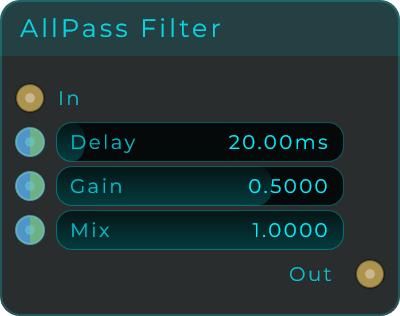
A mono all-pass filter. It shifts the phase (timing) of the signal without making it louder or quieter overall. Use it to build phasers, comb-filtered reverbs, or to gently smear the attack of a sound. Delay sets where the phase shift is strongest, and Gain controls how strong that shift is.
| Parameter | Range | Default | Description |
|---|---|---|---|
| Delay | 0.01 to 200 ms | 20 ms | Length of the internal delay line. Sets the frequency where the phase shifts most. Modulate it with an LFO to build phasers. |
| Gain | -0.999 to 0.999 | 0.5 | All-pass coefficient. Larger absolute values give a more pronounced phase shift; the sign inverts the polarity. |
| Mix | 0.0 to 1.0 | 1.0 | Blend between the dry input and the all-pass output, from subtle phase rotation up to comb-like colouration. |
Inputs: In (mono audio); Delay, Gain, Mix (each a Data/CV pin).
Outputs: Out (mono audio).
Formant Filter
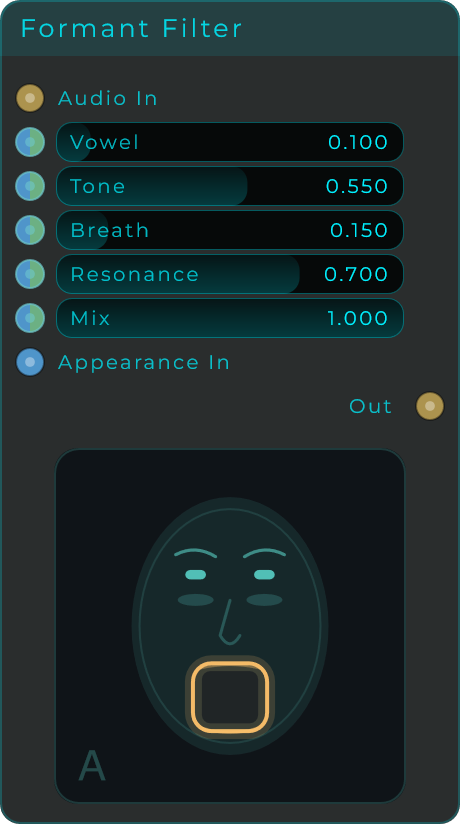
Passes your audio through moving vocal shapes (formants), giving any source a synthetic, talking-like quality. Vowel sweeps between different vowel sounds, while Tone, Breath, and Resonance shape the character of the voice.
| Parameter | Range | Default | Description |
|---|---|---|---|
| Vowel | 0.0 to 1.0 | 0.1 | Sweeps between vowel shapes, moving the formant frequencies. |
| Tone | 0.0 to 1.0 | 0.55 | Brightens the voice and emphasises the upper formants. |
| Breath | 0.0 to 1.0 | 0.15 | Adds airy, breathy noise to the formant. |
| Resonance | 0.0 to 1.0 | 0.7 | Sharpness of the formant peaks. Higher values give a more vocal, pronounced character. |
| Mix | 0.0 to 1.0 | 1.0 | Blend between the dry input and the formant-filtered signal. |
Inputs: Audio In (audio); Vowel, Tone, Breath, Resonance, Mix (each a Data/CV pin); Appearance (Data, a JSON object that restyles the body).
Outputs: Out (audio).
Wavetable Filter
A filter whose curve is a wavetable frame. Each frame of the table is a shape drawn from -1 to +1, and that shape is laid across the band you choose and read as gain: a peak is a boost, a trough is a cut. A playhead walks the table while the sound plays, the curve morphs between frames as it travels, and the filter is never still. Point it at a pad and it breathes; point it at a drum loop with a hard table and it mangles.
Needs: screenshot of the Wavetable Filter node on the graph.
| Parameter | Range | Default | Description |
|---|---|---|---|
| Table | Ripple, Comb, Formants, Sweep, Notches, Overtones, Ridges, Steps, Custom | Ripple | Loads one of the eight built-in fields, or Custom for an imported wavetable. |
| Wavetable File | file | none | A .wav wavetable to import. Only used by the Custom table, and greyed out the rest of the time. Serum / Vital style frames read frame-exact; anything else is cut into 128 slices. |
| Mode | Shape, Harmonics | Shape | What a frame means. Shape reads the drawn line as the curve, clean and EQ-like. Harmonics reads the harmonic content of that same line instead: a smooth frame gives a couple of wide peaks, a jagged one gives a dense resonant comb. |
| Depth | 0 to 1 | 0.6 | How strongly the curve is applied. |
| Floor | -90 to -1 dB | -24 dB | How deep a full cut goes. Shallow settings breathe, deep ones gate a band out completely. |
| Skew | -1 to +1 | 0 | Slides the shaping towards the top of the band (positive) or the bottom (negative). |
| From | 20 to 2,000 Hz | 60 Hz | Bottom of the band the table is stretched across. Below it nothing is touched, and the shaping fades in over the octave above. |
| To | 200 to 22,000 Hz | 18,000 Hz | Top of the band. Above it nothing is touched, and the shaping fades out over the octave below. |
| Motion | Manual, Free (Hz), Sync | Free | What drives the playhead. Manual leaves it wherever Position points, Free runs it in Hz, Sync locks it to a Cycle length. |
| Transport Source | Internal, Transport (DAW) | DAW (Internal in standalone) | What clocks the Sync motion: the node's own BPM, or the DAW transport. |
| BPM | 20 to 300 | 120 | Tempo used by the Internal transport. |
| Cycle | beat divisions | 1 Bar | How long one pass over the table takes when Motion is Sync. |
| Rate | 0.01 to 20 Hz | 0.5 Hz | Playhead speed when Motion is Free. |
| Offset | -500 to +500 ms | 0 ms | Slides the synced playhead in time, for lining it up against a latency-compensated chain. |
| Play Mode | Forward, Reverse, Ping-Pong, Random | Forward | How the playhead travels. Random holds one frame per cycle. |
| Position | 0 to 1 | 0 | Where the playhead sits. Absolute when Motion is Manual, an offset on top of the running playhead otherwise, so a slider, an envelope or a sequencer can always push the filter by hand. |
| Trim Start | 0 to 1 | 0 | First frame the playhead visits. |
| Trim End | 0 to 1 | 1 | Last frame the playhead visits. |
| X-Fade | 0 to 1 | 0.15 | Blends the tail of the table back into its head, so the wraparound stops clicking. |
| Stereo | 0 to 1 | 0 | Offsets the right channel playhead, so the two sides shape differently and the sound widens. |
| Mix | 0 to 1 | 1 | Dry / shaped blend. |
Inputs: In L, In R (audio); Position, Depth, Floor, Skew, From, To, Stereo, Trim Start, Trim End, X-Fade, Rate, Cycle, Offset, Mix, Mode, Motion, Play Mode, Transport Source, BPM (each takes a value or a CV stream); Table and Wavetable File (Data); Appearance (Data, a JSON object that restyles the body).
Outputs: Out L, Out R (audio); Position Out (the live playhead, 0 to 1, as CV).
The body draws the live filter curve over a map of the whole table, with the playhead travelling across it. Drag on the curve to redraw the frame the playhead is standing on, and double-click to flatten it; set Motion to Manual first if you want to stay on one frame while you draw. The body drops onto the front panel like any widget, and every piece of it is an Appearance property. Show picks whether the body carries both halves, the curve alone or the table alone. Background and Curve Fill Type are each Solid, Linear or Radial, with their own two colours, angle, start, end, centre and radius, the same paint controls the widgets carry. On top of that: Table Height (the share of the body the map takes when both are shown), Curve Height, Curve Thickness, Curve Fill opacity, Padding X and Y, Gap, Show Centre Line, Show Playhead, Show Frame, the Curve, Table, Playhead and Frame colours, and the corner radius.
The analysis adds a fixed latency of about 32 ms at 48 kHz, reported to your DAW through the graph's delay compensation.
Wavetable Filter Mono
The same filter on a single channel, with In and Out and identical controls, minus Stereo: there is no second side to offset. Half the analysis, so half the CPU, for anything that was mono to begin with.
Spectral Paint
A filter you draw on the sound. The body is a live spectrogram of what is going through it, and what you paint on it is taken out. It is the most direct filter here: no cutoff, no Q, just the shape you want gone.
With Columns at 1 there is no time axis. The mask is frequency alone and it applies always, which is a filter you draw. Turn Columns up and the mask is swept over the Cycle instead, so what you painted becomes a rhythmic spectral gate that repeats in time with the music.
Depth is not a switch. A spectral gate that only does silence is a special effect, while one that can take six dB out is a tool, so Depth goes from a gentle dip all the way down to -96 dB. Smoothing spreads each band's gain over a slice of an octave, turning the edges of what you painted into slopes instead of steps: that is the control to reach for if this ever sounds metallic.
| Parameter | Range | Default | Description |
|---|---|---|---|
| Depth | -96 to 0 dB | -48 dB | How far a painted band is pushed down. |
| Smoothing | 0 to 2 oct | 0.15 oct | Spreads the gain over this much of an octave, softening the edges of the mask. |
| Columns | 1 to 32 | 1 | How many slices the mask is swept over. 1 means no time axis at all. |
| Cycle | Musical divisions | 1/16 | How long one sweep of the columns takes. Only used when Columns is above 1. |
| Tempo | Internal BPM, Host | Host | Whether the sweep follows the host's position or runs on the internal clock. Following the host is what keeps a painted pattern where you put it. |
| Brush | 1 to 12 | 3 | How many bands one stroke of the mouse covers. |
| Invert | Off / On | Off | Keeps what you painted and removes everything else. |
| Freeze Display | Off / On | Off | Holds the spectrogram still so you can paint on a picture that is not moving. |
| Mix | 0 to 1 | 1.00 | Blend between the untouched sound and the filtered one. |
| Output | -24 to +24 dB | 0 dB | Level after the filter. |
The Clear button empties the mask.
Background, quiet, loud and paint colours are all in the Inspector, and the display can go on the front panel like any other, so a performer can paint during a set.
Inputs: In L, In R (audio; leave R alone and it reuses the left); Depth, Smoothing, Columns, Cycle, Tempo, Brush, Invert, Freeze Display, Mix, Output (each a Data/CV pin); Clear (Data, an event empties the mask); Appearance (Data, JSON that restyles the display).
Outputs: Out L, Out R (audio).