
Appearance
Routing
Routing nodes help you move signals around your patch without running long cables everywhere, and let you choose which signal gets through. "Virtual wires" let you send sound or a control signal from one place and pick it up somewhere else, even when the signal needs to loop back on itself, just by giving both ends the same wire name. You label each wire with a name you type, and both ends that share a name are connected, which makes it easy to see where a send comes from and where it goes. (Older patches that used wire numbers still work: the number simply acts as the name.) A wire name is wiring, not sound, so a State never captures it: recalling a state leaves every send and receive plugged where you put it. Right-click a send or a receive and the menu offers to add the other end for you, with the same name already typed in, placed beside it. The rest of this group are pickers and traffic controllers: grab a value the moment something fires, flip between several inputs, follow whichever source you touched last, make sure a control value and its trigger arrive in the right order, pass a message through untouched, or break one message into separate outputs by type. Reach for these whenever you want tidier wiring or precise control over what goes where, and in what order.
Audio Send
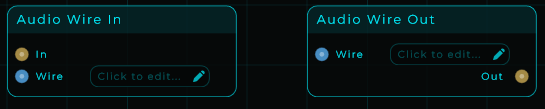
Sends a sound into a named "virtual wire", like dropping it into a labelled mailbox. An Audio Receive with the same name picks it up again, arriving one tiny audio chunk later. Use it to skip long cables, send one sound to many places at once, or build your own feedback loop (where a signal feeds back into itself).
| Parameter | Range | Default | Description |
|---|---|---|---|
| Wire | text | (none) | Wire name. The Audio Receive that reads it must use the same name. |
Inputs: In (audio fed into the virtual wire), Wire (the wire name as text; a plain number also works for older patches). Outputs: none.
The same name connects the wire anywhere in the project: the matching Audio Receive can sit in the main patch or inside any subgraph (a patch nested inside a node). If you want a wire that stays private to one subgraph, use Audio Sub Send and Audio Sub Receive instead.
Audio Receive
Picks up a sound from a named "virtual wire". It plays back exactly what the matching Audio Send put in, arriving one tiny audio chunk later. The very first chunk is silent because the wire starts out empty.
| Parameter | Range | Default | Description |
|---|---|---|---|
| Wire | text | (none) | Wire name. Must match the Audio Send that feeds it. |
Inputs: Wire (the wire name as text; a plain number also works for older patches). Outputs: Out (audio read from the wire, one block behind the Audio Send).
Audio Sub Send
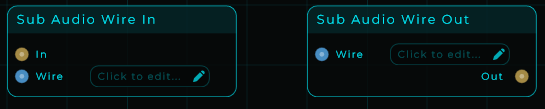
Sends a sound into a local "virtual wire". Local means the wire stays private to the subgraph (the patch nested inside a node) it lives in, or to the main patch if that is where you put it. It never leaks out to the patch around it, to a neighbour, or to a deeper nested patch. If several Audio Sub Sends use the same local wire, their sounds are mixed together.
| Parameter | Range | Default | Description |
|---|---|---|---|
| Wire | text | (none) | Wire name. The Audio Sub Receive must use the same name, in the same subgraph. |
Inputs: In (audio fed into the local virtual wire), Wire (the wire name as text; a plain number also works for older patches). Outputs: none.
To send and pick up across the whole project, use Audio Send and Audio Receive instead.
Audio Sub Receive
Picks up a sound from a local "virtual wire". It plays back what the matching Audio Sub Send put in, arriving one tiny audio chunk later, and stays private to the subgraph (the patch nested inside a node) it lives in. The very first chunk is silent because the wire starts out empty.
| Parameter | Range | Default | Description |
|---|---|---|---|
| Wire | text | (none) | Wire name. Must match the Audio Sub Send in the same subgraph. |
Inputs: Wire (the wire name as text; a plain number also works for older patches). Outputs: Out (audio read from the local wire, one block behind the Audio Sub Send).
CV Sample & Hold
Takes a snapshot of the control signal at the In input the instant the Trigger input crosses 0.5, then keeps that value frozen until the next trigger. This is the classic "sample and hold", great for stepped, jumping modulation, turning noise into random melodies, or freezing a moving value. Everything here runs at full audio speed.
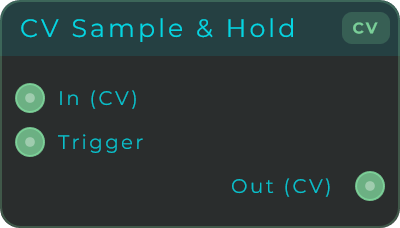
Inputs: In (CV to sample, stream-capable), Trigger (a rising edge past 0.5 captures the input). Outputs: Out (the held CV value, updated on each trigger).
CV Switch
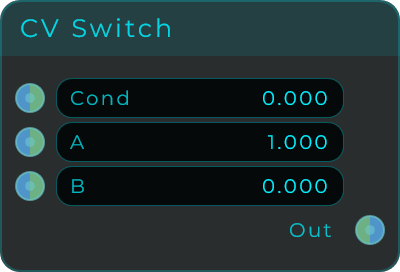
A two-way chooser. When the Cond input is above 0 it sends out A, otherwise it sends out B. Think of it as the basic "if this, then A, else B" building block for control signals. All three inputs run at full audio speed.
| Parameter | Range | Default | Description |
|---|---|---|---|
| Cond | unbounded | 0.0 | Condition. Greater than 0 selects A, 0 or less selects B. |
| A | unbounded | 1.0 | Value sent when the condition is true. |
| B | unbounded | 0.0 | Value sent when the condition is false. |
Inputs: Cond (condition, accepts float, int or bool), A (value when true), B (value when false). All stream-capable. Outputs: Out (the selected value, A or B).
CV Input Select
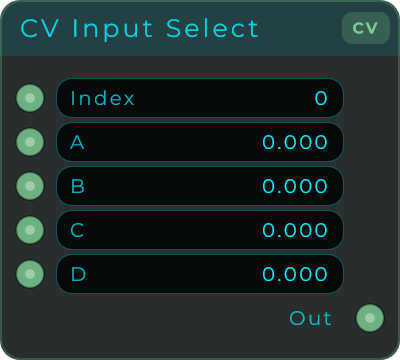
A four-way chooser. The Index input decides which of the four inputs gets passed to the output (0 = A, 1 = B, 2 = C, 3 = D). Handy for switching between different modulation sources on the fly. Index and all inputs run at full audio speed, and if you feed Index a value with decimals it is rounded to the nearest slot and kept within 0 to 3.
| Parameter | Range | Default | Description |
|---|---|---|---|
| Index | 0 - 3 | 0 | Which input is sent to Out (0 = A, 1 = B, 2 = C, 3 = D). |
| A | unbounded | 0.0 | CV input A. |
| B | unbounded | 0.0 | CV input B. |
| C | unbounded | 0.0 | CV input C. |
| D | unbounded | 0.0 | CV input D. |
Inputs: Index (selector, rounded and clamped to 0 to 3), A, B, C, D (the four CV inputs). All stream-capable. Outputs: Out (the selected CV value).
CV Matrix
A patchbay you draw, for control signals. Up to sixteen sources run down the side of the grid, up to sixteen destinations across the top, and clicking a cell connects that source to that destination. Nothing is exclusive: several cells in one row send one modulator to several places, several in one column sum several modulators into the same destination.
That is the difference between this and CV Input Select or Input Select. A Select answers which one, with a number. A matrix answers what goes where, all of it at once, and the answer is a picture rather than a value.
Needs: screenshot of the CV Matrix node on the graph.
Setups are the other half of the node. There are eight, each holding a whole grid, and Setup chooses which one is live, so one number changes every route at once. Click the numbers along the top of the body to move between them; a setup you have drawn something in shows solid and an empty one shows hollow. Show Setup Strip in the Inspector hides the row if one routing is all you need.
Drag across the grid to draw a run of cells rather than clicking them one at a time; the first cell decides whether the stroke is drawing or erasing. Right-drag always erases. The node is resizable and everything in it is worked out from the counts, so the grid stays square and readable from a two by two up to a sixteen by sixteen. It drops onto the front panel like any other widget, and its background, grid, dots and numbers are each an Appearance property.
| Parameter | Range | Default | Description |
|---|---|---|---|
| Setup | 0 - 7 | 0 | Which of the eight grids is live |
| Inputs | 1 - 16 | 2 | How many inputs the node has |
| Outputs | 1 - 16 | 2 | How many outputs the node has |
| Fade | 0 - 50 ms | 5 ms | Ramp on every cell that opens or closes |
Fade matters here for the same reason it does on audio. A control signal is a continuous stream, so a cell that opened instantly would step, and a step in a modulation is a click at the far end of whatever it is driving. Setup is a Data input rather than a CV one, deliberately: a grid that could change every sample would never finish a ramp.
One thing to watch: where several sources meet in one row this sums them, it does not average them. Three sources at 1 arrive as 3.
Inputs: One CV input per source, Setup, Inputs, Outputs, Fade, Appearance (JSON) Outputs: One CV output per destination, Setup Out
Data Matrix
The same grid, for data. A value arriving at an input is handed to every output whose cell in that row is lit, and to nowhere else.
Whatever arrives is what leaves. Numbers, text, an event, a list: a cell is a door rather than a fader, and a router that only understood numbers would be no use for most of what a data cable actually carries.
Needs: screenshot of the Data Matrix node on the graph.
Setups are the other half of the node. There are eight, each holding a whole grid, and Setup chooses which one is live, so one number changes every route at once. Click the numbers along the top of the body to move between them; a setup you have drawn something in shows solid and an empty one shows hollow. Show Setup Strip in the Inspector hides the row if one routing is all you need.
Drag across the grid to draw a run of cells rather than clicking them one at a time; the first cell decides whether the stroke is drawing or erasing. Right-drag always erases. The node is resizable and everything in it is worked out from the counts, so the grid stays square and readable from a two by two up to a sixteen by sixteen. It drops onto the front panel like any other widget, and its background, grid, dots and numbers are each an Appearance property.
| Parameter | Range | Default | Description |
|---|---|---|---|
| Setup | 0 - 7 | 0 | Which of the eight grids is live |
| Inputs | 1 - 16 | 2 | How many inputs the node has |
| Outputs | 1 - 16 | 2 | How many outputs the node has |
Several cells in one row send one value to several places at once. Several in one column mean an output can be fed by more than one source, and it passes on whichever one spoke last, since there is no such thing as adding two events together.
There is no Fade here, unlike the audio and CV matrices: a ramp exists to stop a signal stepping, and there is nothing between sent and not sent to step through.
Inputs: One data input per source, Setup, Inputs, Outputs, Appearance (JSON) Outputs: One data output per destination, Setup Out
Input Select
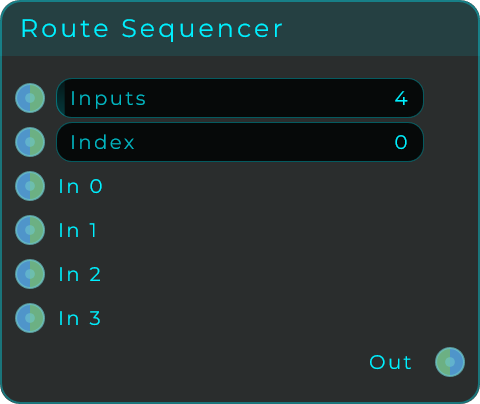
Picks one of up to 128 data or control-signal inputs by number. It works like CV Input Select, but you choose how many inputs it has. That lets you drive the Index with a step counter or sequencer to step through many sources in patterns. The inputs and Index both run at full audio speed, and if you feed Index a value with decimals it is rounded to the nearest slot and kept within the valid range.
This node was called Route Sequencer until 1.0.9, which described one way of using it rather than what it is: the Data member of the Select family, next to Audio Select and MIDI Select. Patches that have one open unchanged.
| Parameter | Range | Default | Description |
|---|---|---|---|
| Inputs | 1 - 128 | 4 | How many source inputs the node shows. |
| Index | 0 - (Inputs - 1) | 0 | Which source input is sent to Out. |
Inputs: Inputs (source count, stream-capable), Index (selector, rounded and clamped to the valid range, stream-capable), and the source inputs In 0 to In N-1 (one per input, stream-capable). Outputs: Out (the selected CV value).
CV Last-Changed
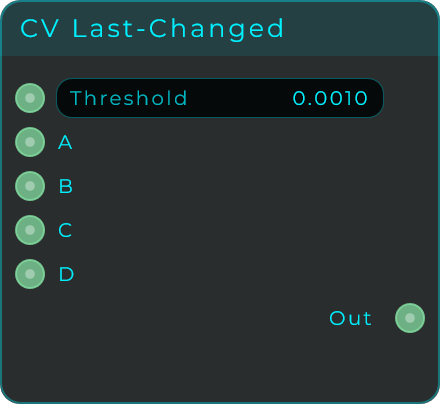
Keeps an eye on several control-signal inputs and passes along whichever one moved most recently. Use it when several sources should control the same thing, but you want only the last one you touched to win, instead of all of them being added together. The active input keeps driving the output until a different one moves by more than the Threshold.
| Parameter | Range | Default | Description |
|---|---|---|---|
| Inputs | 1 - 16 | 4 | How many source inputs the node shows. Set in the inspector. |
| Threshold | 0.0 - 1.0 | 0.001 | Dead-zone for change detection, so jitter on a static input does not steal focus. |
Inputs: Threshold (change dead-zone, stream-capable), and the source inputs A, B, C and so on (1 to 16 of them). Higher-numbered inputs take priority on simultaneous changes. Outputs: Out (the value of whichever input changed most recently).
CV Send
Sends a control signal into a project-wide "virtual wire". A CV Receive with the same name picks it up again, arriving one tiny audio chunk later, so you can build control-signal feedback loops (where a signal feeds back into itself). The same name connects the wire anywhere in the project. If several CV Sends use the same wire, their signals are mixed together.
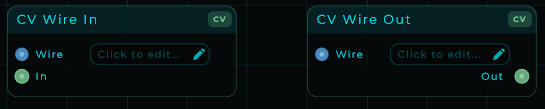
| Parameter | Range | Default | Description |
|---|---|---|---|
| Wire | text | (none) | Wire name. Must match the CV Receive on the other side. |
Inputs: In (CV written into the wire), Wire (the wire name as text; a plain number also works for older patches). Outputs: none.
Control-signal wires and audio wires are kept separate: a CV wire and an audio wire with the same name never share the same storage. A CV wire carries the control value at its full range, so it can pass positions, frequencies or note numbers far outside the -1..1 audio range; audio wires keep a tighter safety range because audio is meant to sit near -1..1.
CV Receive
Picks up a control signal from a project-wide "virtual wire". It plays back exactly what the matching CV Send put in, arriving one tiny audio chunk later. The same name connects the wire anywhere in the project.
| Parameter | Range | Default | Description |
|---|---|---|---|
| Wire | text | (none) | Wire name. Must match the CV Send that feeds it. |
Inputs: Wire (the wire name as text; a plain number also works for older patches). Outputs: Out (CV read from the wire, one block behind the CV Send).
CV Sub Send
Sends a control signal into a private "virtual wire" that belongs only to one subgraph (a patch nested inside a node). It only pairs with a CV Sub Receive with the same name, inside the same subgraph, so the signal never leaves that nested patch.
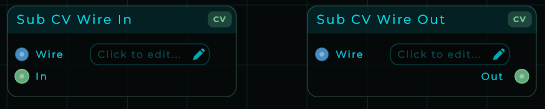
| Parameter | Range | Default | Description |
|---|---|---|---|
| Wire | text | (none) | Wire name. Must match the CV Sub Receive in the same subgraph. |
Inputs: In (CV written into the wire), Wire (the wire name as text; a plain number also works for older patches). Outputs: none.
CV Sub Receive
Picks up a control signal from a private "virtual wire" that belongs only to one subgraph (a patch nested inside a node). It plays back what the matching CV Sub Send put in, arriving one tiny audio chunk later, and only pairs within the same subgraph.
| Parameter | Range | Default | Description |
|---|---|---|---|
| Wire | text | (none) | Wire name. Must match the CV Sub Send in the same subgraph. |
Inputs: Wire (the wire name as text; a plain number also works for older patches). Outputs: Out (CV read from the wire, one block behind the CV Sub Send).
Data Send
Sends a data message into a project-wide "virtual wire". Every Data Receive with the same name receives it immediately, with no cable in between and no delay. Any kind of message passes through unchanged: an event, a number, a true/false, or a text string. The same name connects the wire anywhere in the project.
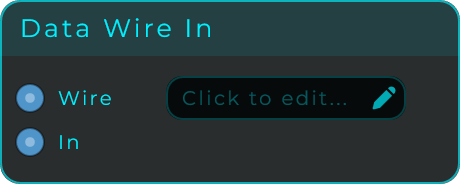
| Parameter | Range | Default | Description |
|---|---|---|---|
| Wire | text | (none) | Wire name. Must match the Data Receive on the other side. |
Inputs: In (the data message sent into the wire), Wire (the wire name as text; a plain number also works for older patches). Outputs: none.
Unlike audio and CV wires, a Data Wire is a direct path with no delay, so it does not build feedback loops: a loop through a Data Wire is rejected just like a normal data cable, unless the receiving end is a Set pin. Data wires keep their own names, separate from audio and CV wires.
Data Receive
Receives the data message sent by a Data Send with the same name, immediately. Any kind of message comes through unchanged. The same name connects the wire anywhere in the project.
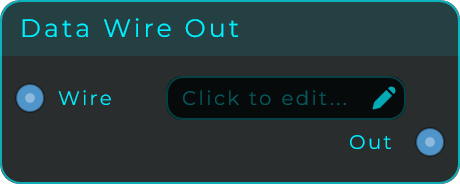
| Parameter | Range | Default | Description |
|---|---|---|---|
| Wire | text | (none) | Wire name. Must match the Data Send that feeds it. |
Inputs: Wire (the wire name as text; a plain number also works for older patches). Outputs: Out (the data message received from the wire).
Data Sub Send
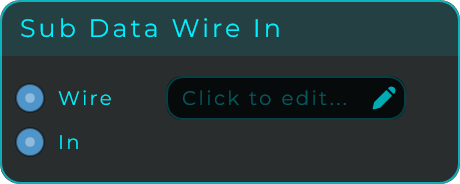
Sends a data message into a private "virtual wire" that belongs only to one subgraph (a patch nested inside a node). It only pairs with a Data Sub Receive with the same name, inside the same subgraph.
| Parameter | Range | Default | Description |
|---|---|---|---|
| Wire | text | (none) | Wire name. Must match the Data Sub Receive in the same subgraph. |
Inputs: In (the data message sent into the wire), Wire (the wire name as text; a plain number also works for older patches). Outputs: none.
Data Sub Receive
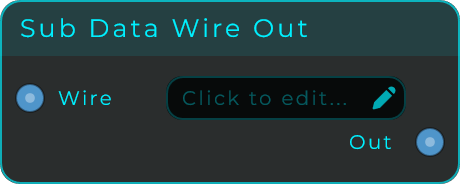
Receives the data message sent by the matching Data Sub Send with the same name, immediately, and only pairs within the same subgraph (a patch nested inside a node).
| Parameter | Range | Default | Description |
|---|---|---|---|
| Wire | text | (none) | Wire name. Must match the Data Sub Send in the same subgraph. |
Inputs: Wire (the wire name as text; a plain number also works for older patches). Outputs: Out (the data message received from the local wire).
CV Order
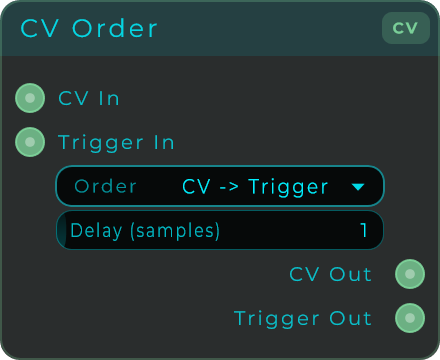
Makes sure a control value and a trigger reach the next node in a chosen order. It fixes timing problems where, say, a sequencer's pitch and its note-on need to land at exactly the right moment. It passes both through but nudges one slightly later. Set the Order so a later oscillator or envelope sees the new value before the trigger, or the trigger before the value, whichever you need.
| Parameter | Range | Default | Description |
|---|---|---|---|
| Order | CV -> Trigger / Trigger -> CV / Same Sample | CV -> Trigger | Which path arrives first. |
| Delay (samples) | 0 - 32 | 1 | Sample offset used for the selected ordering. |
Inputs: CV In (the CV or value to pass through, accepts float, int or bool), Trigger In (the trigger or gate to pass through, accepts an event, float, int or bool). Outputs: CV Out (the CV, optionally delayed relative to the trigger), Trigger Out (the trigger, optionally delayed relative to the CV).
Event Value
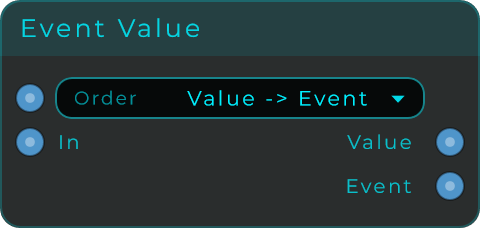
Re-orders the two parts of an incoming message: the trigger (Event) and the number (Value). You choose which one reaches the next node first. Handy when a chain needs to fire something and then receive the number, or receive the number and then fire.
| Parameter | Range | Default | Description |
|---|---|---|---|
| Order | Event -> Value / Value -> Event | Value -> Event | Whether the Event or the Value is emitted first. |
Inputs: In (the message to split into Event and Value), Order (chooses the output order, 0 = Event then Value, 1 = Value then Event). Outputs: Value (the original incoming value; nothing is sent if the input was an Event), Event (one Event for each incoming message).
Pass
A cable in a box. Whatever goes in comes straight back out, unchanged, triggers (Events) included. Useful as a meeting point for cables, to keep your wiring easy to follow, or as a stand-in while you are still building a patch.
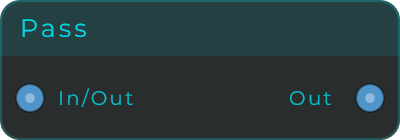
Inputs: In (any message). Outputs: Out (the same message as the input).
CV Pass
A cable in a box for control signals. Whatever control signal goes in comes straight back out, unchanged, at full audio speed. It is the CV counterpart to Sig Pass (audio) and Pass (data): use it as a tidy meeting point to gather or fan out CV connections, or as a stand-in while you are still building a patch.
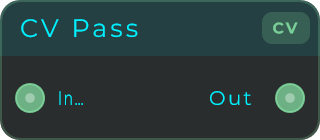
Inputs: In (CV, stream-capable). Outputs: Out (the same CV signal as the input).
TypeSplit
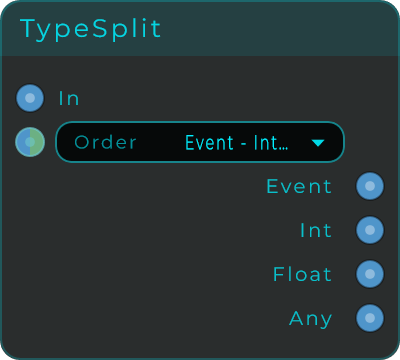
Takes one incoming message and breaks it into separate outputs by type (Event, Int, Float and Any), then sends them in an order you choose. Useful for turning a single value into a little sequence of events, or whenever a later chain needs the outputs to fire in a particular order. The order is checked every time a message arrives, so any change takes effect right away.
| Parameter | Range | Default | Description |
|---|---|---|---|
| Order | Event-Int-Float-Any / Any-Float-Int-Event / Any-Event-Float-Int / Event-Any-Int-Float | Event-Int-Float-Any | The order the outputs fire in. Values outside 0 to 3 are clamped. |
Inputs: In (any message, fires all outputs in the selected order), Order (sets the order preset by sending 0 to 3; stream-capable; an Event does nothing). Outputs: Event (always an Event), Int (input converted to Int, Event becomes 0), Float (input converted to Float, Event becomes 0.0), Any (the original message unchanged).
Output Select
The 1-to-N branch: one value in, up to sixteen outputs, and whatever arrives is sent through the output the Index picks, and nowhere else. It is the natural companion of the ComboBox (wire the combo's Index straight in and each option gets its own branch) and the mirror of the Data Select, which selects between inputs instead.
Needs: screenshot of the Output Select node on the graph.
| Parameter | Range | Default | Description |
|---|---|---|---|
| Index | 0 to Outputs-1 | 0 | Which output the value travels through. |
| Outputs | 2 - 16 | 4 | How many branches exist. |
Inputs: Value (numbers, text and events all travel down the active branch), Index. Outputs: Out 1 .. Out N; only the selected one speaks.
When the Index changes, the last value seen is immediately re-sent down the newly selected output, so the fresh destination catches up the moment it is chosen instead of waiting for the next value. Family note: the If branches two ways by condition (and its Pass Through toggle routes the compared value itself), Output Select branches N ways by index, and the Data Select is the reverse direction.