
Appearance
Claude + MNodes
Use the MNodes extension for Claude Desktop to ask questions about nodes and connections, or describe an instrument or an effect you want to build. It gives Claude a bundled copy of the public documentation and a tool that creates MNodes project files.
Ask in Claude, open the result in MNodes, then play and adjust it. The extension does not control your open MNodes session.
Want to generate directly inside MNodes? See The Lab. This page covers the separate Claude Desktop extension.
Requirements
Have Claude Desktop for Windows or macOS, and MNodes installed to open and play the results. Use the desktop app for this local extension.
The MNodes extension needs no separate Node.js installation or API key. Claude Desktop includes the runtime; your normal Claude account and usage limits still apply. See Anthropic's desktop-extension overview.
Install it
Download the extension
The file is mnodes-docs.mcpb. Keep it as downloaded; you do not need to unzip it or open it in MNodes.
Add it to Claude Desktop
- Open Claude Desktop's Settings → Extensions.
- Open Advanced settings and find Extension Developer.
- Click Install Extension…, choose
mnodes-docs.mcpb, and follow the prompts.
Look for MNodes Documentation among the installed extensions. These steps follow Claude's custom-extension instructions; menu placement can change between Claude versions.
Check that it is working
Start a conversation and try:
text
Use the MNodes extension to look up the Pulse node.
What does its Width parameter do, and what range does it accept?
Look for a documentation lookup in Claude's tool activity, followed by an answer about Pulse. If Claude asks to use the extension, review and allow that request. An answer alone does not show that the extension was used: if there is no lookup, ask it to consult the MNodes reference explicitly.
Compare the answer with Pulse in the node reference. If the tools do not appear, use the checks below.
Ask it things
Include MNodes and the actual node name. You can write in your own language; keeping node and parameter names as they appear in the app makes the answer easier to follow.
- Choose a node: “Use the MNodes reference to find a compressor with a sidechain input. Explain which pins to connect.”
- Understand a control: “Look up Filter. What do Freq and Res/Q change?”
- Make a connection: “Explain how to connect Knob to Filter's Freq in MNodes, step by step.”
- Follow a workflow: “Use the MNodes automation guide to explain how to expose a Knob to my DAW.”
For wiring, ask for source node → output pin → destination node → input pin. Compare the names with your graph. Claude can still make mistakes interpreting the reference.
Ask it to build something
Start with a small, specific instrument:
text
Use the MNodes extension to build a warm subtractive bass.
Use four voices and a short release. Name it Warm Bass 01.
Save it and tell me the full path to the .mnprt file.
The current builder supports bell, pluck, keys, pad, bass and lead shapes, with 1–16 voices. Sources include FM, subtractive, wavetable, supersaw, additive, west coast and formant synthesis. Describe the sound you want; you do not have to enter these options as code.
The project includes a Poly Module, envelope and filter controls, a Front Panel keyboard and an output/effects chain. Velocity modulation, filter key tracking and per-note variation are included. Available controls depend on the source and effects chosen. Treat the result as a starting point to audition and adjust.
Build an effect
Ask for an effect the same way. Name the kind of sound, or list the stages you want in order:
text
Use the MNodes extension to build a dub echo effect. Name it Dub Echo 01.text
Use the MNodes extension to build an effect: a bitcrusher into a flanger
into a reverb, with the reverb mix at 40%. Name it Crushed Space 01.
The builder has tuned starting chains: dub echo, lo-fi tape, dream wash, wide chorus, jet flanger, crunch, glue and tremolo pan. For your own chain it can combine a filter, drive, bitcrush, fold, transient shaper, compressor, OTT, chorus, unison, flanger, phaser, tremolo, vibrato, wow and flutter, tape damage, pitch shift, echo, two reverbs, stereo width and a limiter.
The project has Audio In, the effects in the order you asked for, an output Level and Audio Out. Its Front Panel has one labelled section of knobs for each effect. Load it in MNodes FX on an audio track, or use the standalone app with an audio input selected in Settings.
You can also ask for extra effects on an instrument, for example “add a phaser to it”. Each one gets its own section on the instrument's panel.
Open and play the result
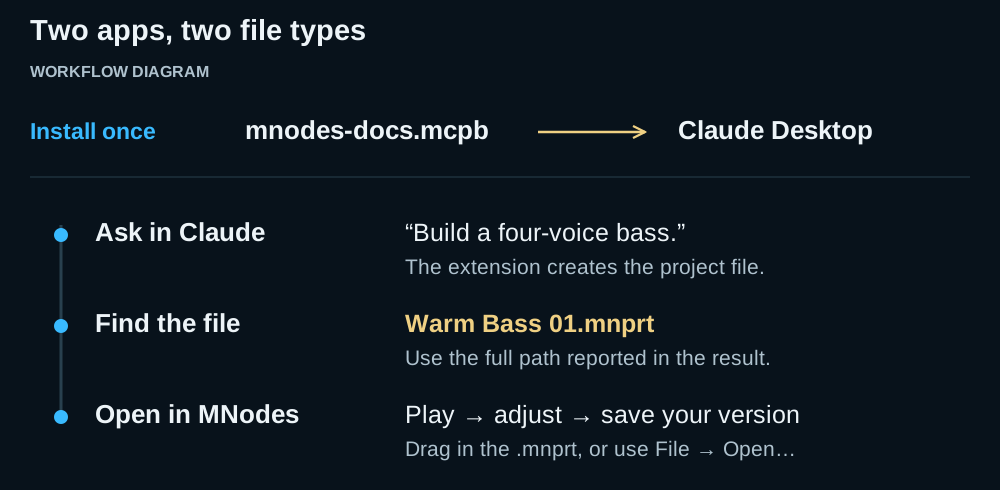
- Wait for the extension to report a saved
.mnprtfile and its full path. A description of a patch is not the project file. - Find the file, normally in Downloads. You can ask Claude: “Show me the Warm Bass 01 file in my file manager.”
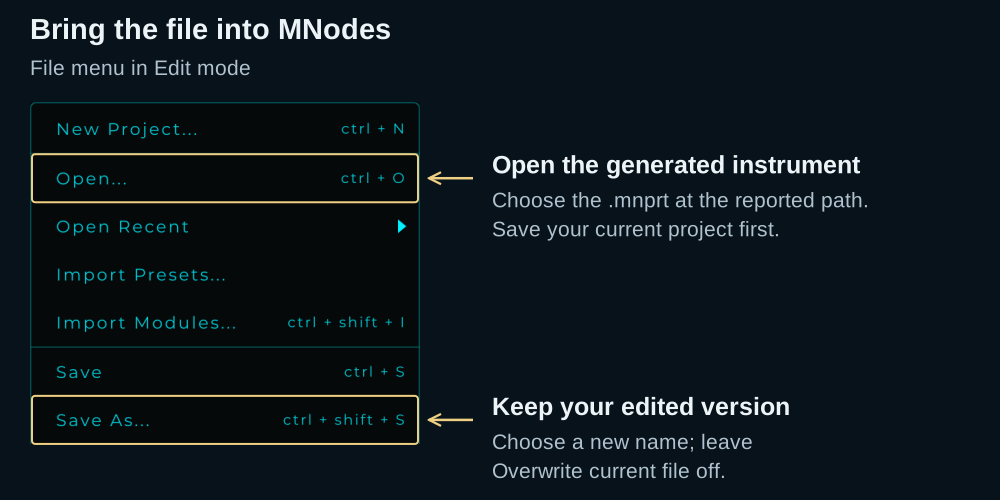
- Save any MNodes project you are working on. Opening the generated file loads another project.
- Drag the
.mnprtonto MNodes, or switch to Edit mode and choose File → Open…. Select the file at the reported path. - Open the Front Panel if hidden. Try its keyboard, then change the filter and envelope controls. For an external keyboard or DAW, follow MIDI and DAW Integration.
.mcpb installs the extension in Claude; .mnprt opens the instrument in MNodes. If Downloads is unavailable, the builder falls back to your home folder. Check the full path in its result.
Make a variation you can compare
After listening, give concrete feedback:
text
Build a second version of that bass with a lower filter cutoff
and less reverb. Name the new file Warm Bass 02.
Use a different name for each generated variation. Generating to the same filename replaces that file. The extension builds another project from the requested settings; it does not read back edits you made in MNodes. Mention those changes if you want them reflected in a new version.
For edits made in MNodes, use File → Save As…, choose a new name, and leave Overwrite current file off. See Presets & Projects.
What it knows, and what it does not
| The extension can… | Use it to… |
|---|---|
| Search its bundled public guide and node reference | Ask about documented controls, node choices and workflows |
| Look up its bundled node schema | Retrieve available pin numbers, parameter IDs and ranges |
| Build a new instrument or effect file | Create a project to open in MNodes |
| Show a generated file in your file manager when asked | Find the file to open or move |
It cannot inspect your active graph, listen to the result, operate MNodes or edit the project you have open. It does not fetch the latest website on every question: its documentation and schema are snapshots packaged with the extension. New or undocumented behavior may be missing.
These limits describe this MNodes extension. Other tools enabled in Claude may have different capabilities.
If something does not work
| What you see | What to try |
|---|---|
| No way to install the file | Use an up-to-date Claude Desktop. Look under Extensions → Advanced settings. Managed accounts may restrict custom extensions. |
| Installed, but no MNodes tools appear | Restart Claude Desktop and check the extension in Settings. Retry the Pulse lookup. |
| An answer with no documentation lookup | Ask Claude to use the MNodes extension and name the node or guide you need. |
| “I built it,” but you cannot find a file | Ask for the extension's saved-file result and full path. If no file was produced, ask it to use the instrument or effect building tool. |
| The file opens but makes no sound | An effect needs sound coming in: play the track it is on, or select an input. For an instrument, try the Front Panel keyboard. Then check the audio output in Settings, or MIDI routing in your DAW. |
| A node or setting is missing from an answer | Check the current website and refresh the extension. Its bundled reference may be older than your MNodes version. |
For installation and missing-tool issues, see Claude's extension troubleshooting.
Privacy
The extension reads its bundled documentation and creates files locally on your computer. Its tools do not upload your open MNodes project or audio. They return information to Claude, including reference text and, when a file is built, its name and full path.
Claude itself is an online service. Running the extension locally does not make the conversation offline. Your messages and tool results are used in the Claude conversation; account settings and Anthropic's policies govern that service. See Anthropic's explanation of chat data and model improvement.
Keeping it current
When a newer extension is available, download mnodes-docs.mcpb again and install it through the same settings. Restart Claude Desktop if needed and repeat the Pulse lookup.
Updating the website or MNodes does not update the reference inside an already installed bundle. Your saved .mnprt projects are separate files; updating the extension does not regenerate them.