
Appearance
Nucli
New in MNodes 1.1.6
Older versions of MNodes do not have Nucli. A project that uses it will not work there until you update.
Everything in one list
Every word, function and limit the code can use is in the Nucli reference, to look things up.
Nucli is a node whose sound is a small program you write. The program runs once for every sample of audio. That lets it do what wiring nodes together cannot: a filter or an echo whose output comes back into its input one sample later, an oscillator of your own, a distortion curve exactly the way you want it, a reverb built from scratch, an effect that works on the sound's frequencies. It runs at the sample rate MNodes runs at, the one your DAW or your audio settings set: 44,100 times a second at 44.1 kHz, 48,000 at 48 kHz, 96,000 at 96 kHz. Write times in seconds with samplerate and the program sounds the same at any of them.
The language looks like JavaScript, so if you have used the Script node you can already read it. Three things are new: param, history, and the inputs and outputs in1 and out1. If you would rather see the program than read it, you can also build it from boxes and wires.
Nucli needs no compiler or anything else installed: a program plays in the standalone MNodes and in MNodes inside any DAW, on Windows and on a Mac, and a project that uses it opens the same on both. MNodes also comes with 73 programs ready to play, from reverbs and resonators to instruments: see Nucli programs.
A first program
js
param drive = 2 (1 .. 20)
param cutoff = 2000 (20 .. 20000)

out1 = lowpass(tanh(in1 * drive), cutoff)
out2 = lowpass(tanh(in2 * drive), cutoff)
This is the program a new Nucli node starts with:
param drive = 2 (1 .. 20)makes a setting called drive that starts at 2 and goes from 1 to 20. It appears as a row in the Inspector and as a pin on the node.in1 * drivetakes the left input and makes it louder, andtanh(...)rounds off its peaks: a soft distortion.lowpass(..., cutoff)takes away the highs above cutoff hertz.out1 = ...is what comes out of the first output. The right channel does the same within2andout2.
Because the code uses in1, in2, out1 and out2, the node has two audio inputs and two audio outputs. Change the code and the pins follow.
The node
| Part | What it does |
|---|---|
| Code, Patch, Split | The tabs at the left: the program as text, as boxes and wires, or both side by side, which is how a new node opens. In Split, drag the handle between them to give one more room, or double-click it for half and half. New, Examples and Reference then work on the side you clicked last. |
| New | Replaces the code with the small program above. When the code is one you wrote, it asks first, and Ctrl + Z brings yours back. |
| Run | Compiles the code and plays it (Ctrl + Enter, or Cmd + Enter on a Mac). With nothing changed, it starts the sound's memory again, for a filter that rings or a feedback that ran away. |
| Save | Keeps the program in your library, with a name, a category and a line about what it does, and the node takes its name. See Your programs in the library. |
| Examples | Shows an example over your code, to read and copy from: echoes, a chorus, a reverb, a wavetable, a limiter, spectral effects and more. Replace puts it in place of your code, asking first when the code is one you wrote, and Ctrl + Z brings yours back. |
| Reference | Everything the code can use, in groups, each with a button that writes it where the cursor is. |
| Live | On, the code plays a moment after you stop typing. |
| Edit Outside | Writes the code to a file and opens it in a code editor on your computer, such as VS Code. See Writing the code in another editor. |
| Arrows, at the right | Open the code and the patch at the size of the graph, for a long program or a big patch. Back to the Graph, or Esc in the code, brings the graph back. Right-clicking the node's header → Edit Full Size does the same. |
| Status line | Says what stopped the code and on which line: click it to go there. When the code works, it says how many steps run every sample and how many once a block, which is what the code costs. While it plays, it also says when something went wrong: a loop that never ended, or a sound that blew up. |
Good to know:
- A new Nucli node, or one a program brings from the Explorer, opens in Split, wide and tall enough for the code and the patch side by side, and taller when its program has many params. A node from a project saved before opens as it was saved.
- The code is in colour: words such as
paramandif, the functions,in1andout1(in gold, as Audio is) and the numbers each have their own. - A mistake never stops the sound: the last program that worked keeps playing until the new one does.
- Changing the code while it plays does not click, as long as its inputs, outputs and params stay the same: the new program takes over what the old one remembered, its echoes included.
- If the sound blows up (a filter that runs away to infinity), the node goes silent for a moment and its memory starts again.
- A param keeps its cables when you add, move or rename the other params.
- Until the node is selected, its code and its patch let the mouse through to the graph: the wheel zooms or scrolls the graph, and a click selects the node and puts the cursor where you clicked. Once it is selected, they take the mouse.
Inputs and outputs
in1 to in16 are the samples arriving on the audio inputs, usually between -1 and 1. out1 to out16 are what leaves the outputs: give them a value with =.
js
out1 = in1 * 0.5      // half as loud
out2 = in1 + in2      // both inputs together
The node has as many inputs and outputs as the highest ones the code uses, and each of its audio pins says which it is: In 1, Out 1 and so on. An output you never write is silent. Once you have written an output, you can read it on the lines after.
Params
js
param cutoff = 1000 (20 .. 20000)
param amount = 0.5

out1 = mix(in1, lowpass(in1, cutoff), amount)
A param is a setting: a row in the Inspector you can turn, and a pin that takes Data or CV. Write its starting value after = and its range in brackets. Without a range it goes from 0 to 1. The code reads a param but cannot change it.
js
param bits = 8 (1 .. 16 step 1)

let steps = 2 ** bits
out1 = round(in1 * steps) / steps
Write step inside the brackets for a param that moves in steps. With step 1 it only takes whole numbers, for something you count: bits, voices, bins. With step 0.5 it moves in halves. The steps count from the lowest value, so (1 .. 9 step 2) gives 1, 3, 5, 7 and 9. A value from its row, from Data or from CV goes to the nearest step, so the code always gets one of them.
A param takes its new value at the start of each block of audio, every few milliseconds. For something that has to move every sample, such as audio-rate modulation, bring it in on an input instead.
Values: let
js
let gain = dbtoa(-6)
let x = in1 * gain
out1 = x
let names a value; const and var work the same way. You can change it later with =, +=, -=, *= or /=. A let lives for one sample: the next sample starts it again.
Nucli works each line out as rarely as it can. let gain = dbtoa(-6) never changes, so it is worked out once, when the code compiles. A line that only uses params, such as let g = tan(pi * cutoff / samplerate), is worked out once a block. Only what depends on the inputs and on the memory runs every sample.
Memory: history
js
history y = 0

y = y + (in1 - y) * 0.05
out1 = y
A history keeps its value from one sample to the next. This one moves a little toward the input every sample, which smooths it: a low-pass filter, written by hand. Several fit on one line: history a = 0, b = 0.
Histories go at the top, outside any { }, or at the top of a function of your own. They are what makes filters, envelopes and feedback possible.
Decisions: if and ? :
js
param limit = 0.5 (0 .. 1)

if (in1 > limit) out1 = limit
else if (in1 < -limit) out1 = -limit
else out1 = in1
if runs the line (or the { } block) after it when its condition is true, and else runs when it is not. For a quick choice, a ? b : c gives b when a is true and c otherwise.
? : works out both sides every sample and keeps one. When a side has memory, such as phasor(), use if so that it only runs when it is chosen.
One of several: switch
js
param shape = 0 (0 .. 4 step 1)

switch (shape) {
  case 0: out1 = in1; break
  case 1: out1 = tanh(in1 * 3); break
  case 2:
  case 3:
    out1 = clamp(in1 * 3, -1, 1)
    break
  default: out1 = fold(in1 * 3, -1, 1)
}
switch picks what to run by a number. It runs the lines after the case with that number, up to its break, and the lines after default when no case has it. Cases written one after another, such as case 2: and case 3: here, share their lines. It does the same as an if and an else if for each case, and costs the same.
- Every case ends with
break, except the last one. Without it, JavaScript would go on into the next case; Nucli tells you instead, so a case never runs into the next one. - The number after
caseis written out, such ascase 2:orcase -1:. The value has to be exactly that number, so a param that picks a case moves in steps, withstep 1. - Like
if, only the case that is chosen runs, so a case can call a spectral block or a function with memory.
Loops: for and while
js
param freq = 110 (20 .. 2000)
param harmonics = 8 (1 .. 32)

let p = phasor(freq)
let sum = 0
for (let k = 1; k <= harmonics; k++) {
  if (k * freq > samplerate / 2) break
  sum += sin(twopi * p * k) / k
}
out1 = sum * 0.3
out2 = out1
A loop runs its lines again and again while its condition holds. This one builds a saw wave from its harmonics, one on each turn: k starts at 1 and goes up by one each turn (k++) while it is at most harmonics. A harmonic above half the sample rate would fold back as a wrong note, so break leaves the loop there.
for (start; condition; step) { ... }andwhile (condition) { ... }work as in JavaScript.breakleaves the loop at once, andcontinueskips to its next turn.- A loop runs every sample, so each turn costs: 32 turns are 32 times the work of the lines inside.
- A loop that never ends cannot freeze MNodes. All the loops of a node share an allowance of turns, 2048 a sample on average; a loop that uses it up stops, the status line says which one it was, and the sound goes on, though not as it should until you fix it.
Functions of your own
js
param cutoff = 800 (20 .. 20000)
param res = 0.6 (0 .. 1)

function ladder(x) {
  history s1 = 0, s2 = 0, s3 = 0, s4 = 0
  let g = 1 - exp(-twopi * cutoff / samplerate)
  let u = tanh(x - 4 * res * s4)
  s1 = s1 + g * (u - s1)
  s2 = s2 + g * (s1 - s2)
  s3 = s3 + g * (s2 - s3)
  s4 = s4 + g * (s3 - s4)
  return s4
}

out1 = ladder(in1)
out2 = ladder(in2)
function gives a name to lines you want to use more than once. Here a warm ladder filter becomes ladder(x), and each channel goes through it.
- Each call has its own memory:
ladder(in1)andladder(in2)are two filters, each with its owns1tos4. The same goes for the delay lines and tables a function declares, and for the oscillators and filters it calls. returngives the function's value, and it is the last line. A function without one gives 0.- Inside, a function sees its own values and what the program declares at the top: params, histories, delay lines and tables.
- A function is written at the top, outside any
{ }, above or below the lines that call it. It can call other functions, but not itself. - A call costs the same as writing its lines out where it is, and nothing more.
A function can give several values. return lists them, and a name takes each one:
js
param crossover = 300 (50 .. 2000)

function split(x, freq) {
  let low = lowpass(x, freq)
  return low, x - low
}

let lo, hi = split(in1, crossover)
out1 = lo + tanh(hi * 4) * 0.3
out2 = out1
split gives the sound's lows and highs, and only the highs are distorted. A function that gives several values is called with a name for each, as on the let line; on its own in a sum, the code says how many it gives.
Delay lines: delay
js
param time = 0.3 (0.01 .. 2)
param feedback = 0.5 (0 .. 0.95)
delay echo(2 * samplerate)

let wet = echo.read(time * samplerate)
echo.write(in1 + wet * feedback)
out1 = in1 + wet * 0.5
A delay line remembers the last stretch of sound: here, two seconds of it. Every sample, the code reads what came in time seconds ago and writes in what comes now, with some of the echo fed back, so each repeat comes round again a little quieter.
delay echo(2 * samplerate)makes a delay line calledechothat holds two seconds. Its size is fixed before the sound starts, so it can only use numbers andsamplerate; a param then chooses how much of it to use. Several fit on one line:delay left(samplerate), right(samplerate).echo.write(x)puts this sample in.echo.read(t)gives the sample fromtsamples ago. A time between two samples gives a value in between, and a time longer than the line gives its oldest sample.echo.cubic(t)reads through a smooth curve, for a time that moves: a chorus, a flanger, a vibrato.echo.sizeis how many samples it holds. A line holds up to about 16 million samples, nearly six minutes at 48 kHz.
Tables: data
js
param freq = 110 (20 .. 2000)
data wave(2048)

init {
  for (let i = 0; i < wave.size; i++)
    wave.write(i, sin(twopi * i / wave.size) + 0.3 * sin(3 * twopi * i / wave.size))
}

out1 = wave.lookup(phasor(freq)) * 0.3
out2 = out1
A table is a row of values the code can write and read in any order. This one holds one cycle of a wave, worked out once when the code starts, and lookup plays it as an oscillator: a wavetable.
data wave(2048)makes a table of 2048 values, all 0 to start. Its size, like a delay line's, uses only numbers andsamplerate.wave.write(i, v)sets value numberi(the first is 0), andwave.read(i)gives it back. Anipast the end wraps round to the start, and one with a fraction is rounded down.wave.lookup(phase)reads the table as one cycle of a wave: phase 0 is its start and 1 its end, and between two values it gives one in between. Withphasor(freq)as the phase, the table plays as an oscillator.wave.sizeis how many values it holds.
Once at the start: init
init { ... } runs once, when the code starts, and again when Run starts the memory again. It is the place to fill tables, so that work is done once instead of every sample, as in the wavetable above.
- It can use the params as they are when it runs. Turning one later does not run it again: press Run for that.
- It cannot use the inputs, the outputs or a delay line, which have no sound yet.
- When you change the code, a table that
initfills is filled again by the newinit, so a change to the wave is heard at once. A table the sound itself writes keeps what it holds, like a delay line.
Effects that look ahead: latency
js
latency 0.005 * samplerate
param ceiling = 0.9 (0.1 .. 1)
param release = 0.2 (0.01 .. 2)
delay left(0.01 * samplerate), right(0.01 * samplerate)
history gain = 1, held = 0, hold = 0

let ahead = 0.005 * samplerate
let peak = max(abs(in1), abs(in2))
if (peak >= held) { held = peak; hold = ahead }
else if (hold > 0) hold -= 1
else held = peak

let want = held > ceiling ? ceiling / held : 1
if (want < gain) gain = max(want, gain - 1 / ahead)
else gain = min(want, gain + 1 / (release * samplerate))

left.write(in1)
right.write(in2)
out1 = left.read(ahead) * gain
out2 = right.read(ahead) * gain
Some effects need to hear what is coming. This limiter turns the sound down before a peak arrives, so no peak goes past ceiling. The only way is to make the sound late: it holds the sound back 5 milliseconds in two delay lines and watches what comes in while that goes out.
latency 0.005 * samplerate tells MNodes how late the code makes the sound, in samples. MNodes then holds back everything that runs alongside this node by the same amount, so the paths still meet in time, and tells your DAW, which does the same with the other tracks. Like a delay's size, it can only use numbers and samplerate.
- Say it only when the code really makes the sound late, and by just that much: a wrong number puts the paths out of step.
- When the code changes its latency, the node starts again with an empty memory, so MNodes can line everything up anew.
- A spectral block makes the sound late on its own, and says so without
latency: see below.
Spectral effects
js
param cutoff = 2000 (50 .. 20000)

spectral lp(1024, 4) {
  if (freq > cutoff) mag = 0
}

out1 = lp(in1)
out2 = lp(in2)
A spectral block works on the sound's frequencies instead of its samples. It cuts the sound into short frames that overlap, splits each frame into bins, one for each band of frequencies, runs its code once for every bin, and puts the sound back together. This one silences every bin above cutoff: a low-pass filter as steep as a wall.
spectral lp(1024, 4) { ... }makes a spectral block calledlp. The first number is the frame, in samples: 64, 128, 256, 512, 1024, 2048, 4096, 8192 or 16384. A longer frame tells frequencies apart more finely but smears quick sounds in time. The second number is the overlap, 4 or 8: 8 sounds smoother and costs twice as much.lp(in1)sends a sound through the block and gives back the result. Each call has frames of its own, solp(in1)andlp(in2)are the left and right channels.- Inside the block,
binsays which bin this is, from 0 tobins - 1, andfreqis its frequency in hertz.magis how strong that frequency is, andphasewhere its wave is in its turn, from -π to π. Changemagandphaseto change the sound. - The block sees the params and the tables, so a table can keep one value per bin from frame to frame: the Spectral Freeze example does that. It cannot use the inputs, the outputs, a history or a delay line, because inside it the sound is its bins.
- A block makes the sound one frame late, 1024 samples here. Nucli tells MNodes on its own, which lines everything up. If the code also says its
latency, that number is used instead.
Inside the code, the sound that does not go through the block is not late. To mix the two, hold the dry sound back by one frame first:
js
param amount = 0.5 (0 .. 1)
delay dry(1024)

spectral robot(1024, 4) {
  phase = 0
}

dry.write(in1)
out1 = mix(dry.read(1024), robot(in1), amount)
Setting every bin's phase to 0 makes a voice flat and robotic, and amount blends it with the voice as it was, both one frame late.
Boxes instead of text
The same programs can be built from boxes wired together, the way the rest of MNodes is. Click the Patch tab at the left of the node's toolbar. Each box is a small node: its name on top, after a small mark in the colour of what it gives (a wave when it changes every sample, steps when it changes once a block at most), its inputs on the left, its output on the right, and a field for each value it takes.
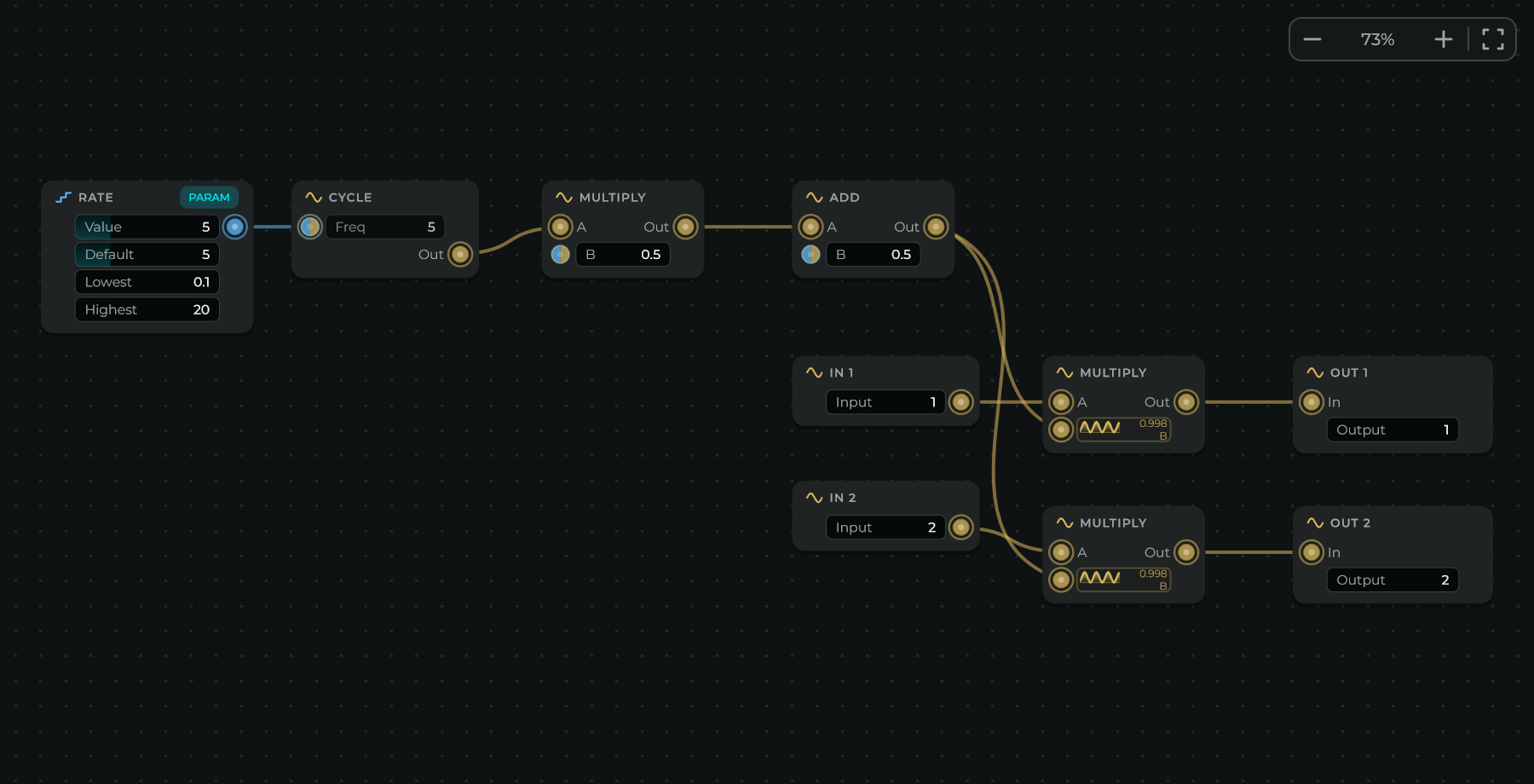
You work in it as in the graph:
- Right-click an empty spot for the list of boxes, with a search field, and pick one. Letting go of a cable on an empty spot opens the same list, and the box you pick is wired to the cable.
- Drag from a pin to another pin to connect them: letting go near the pin is enough. Drag a cable, from anywhere along it, to move it to another pin: the end nearest the mouse comes off, and it goes into the pin you let go near. Let go of it far from any pin, or double-click it, to remove it.
- Drag a field to change its value (hold Shift for small steps), or double-click it to type one. The sound follows as you drag. While a cable comes into a value's input, its field steps back: the cable gives the value.
- Drag a box to move it: it lands on a fine grid, unless you hold Ctrl + Shift (Cmd + Shift on a Mac). Drag on an empty spot to select the boxes it touches, and Shift-click to add a box or take it out. Ctrl + drag (Cmd on a Mac) moves a copy. Delete removes what is selected, and Ctrl + A, C, X, V and D select everything, copy, cut, paste and duplicate.
- Move around with the middle button, or by holding Space and dragging. The wheel zooms or scrolls as it does in the graph, F shows the selection or the whole patch, and double-clicking an empty spot goes back to 100% there. The buttons at the top right do the same: smaller, back to 100% (click the percentage), bigger, and everything in view.
- Every change is one step of Ctrl + Z.
Each box is a piece of the language: In 1 and Out 1 are in1 and out1, Multiply is *, Cycle is cycle(), and so on. A Param box is a param: its name is its title (double-click it to rename), and the node gets its row in the Inspector and its pin. Its Value is where the param is now, the same number as its row on the node: turn either one and the other follows, and the sound changes as you drag. Default is where it starts when the program goes into a new node, the number after = in its line of code. Lowest and Highest are its range. A param that moves in steps, such as (1 .. 16 step 1) in its line of code, also has a Step row; set it to 0 for one that takes any value.
Inside the patch there are two kinds of cable, not four. Gold is Audio: anything that changes every sample, whether you hear it or it moves something else, so a Cycle used as an LFO is gold too. Blue is Data: what changes once a block at most, such as a param, a number, or maths done only on them. There is no CV in here, and any cable goes into any input.
- An input with a field takes either, so its pin is half blue and half gold. When gold comes in, the pin turns gold and the field shows the signal as it moves. When blue comes in, the field shows the value it brings.
- So is the input of maths or a choice, such as a Multiply's A: the box gives what it takes, Data while only Data comes in and Audio as soon as Audio does.
- The input of a box that works on every sample whatever comes in, such as the In of a Low-pass, a Delay or an Out, takes a sound, and its pin is gold. Into a Low-pass, a param comes out as Audio that glides to each new value, which is how a param is smoothed.
- Data can go into any gold pin, one that takes a sound or one that Audio already comes into. There it becomes the same number every sample, a level that stays put, added to the Audio if any comes in. Its cable shows where it turns into Audio: blue up to a small mark beside the box, with steps turning into a wave, and gold from there into the pin.
- Sample Rate is blue for the same reason a param is: it does not change while the sound plays.
- Hover over a pin and the line at the bottom of the node says what it carries.
- Several cables into one input add up, whatever their colour: a param and an LFO into the same Freq give the param plus the LFO.
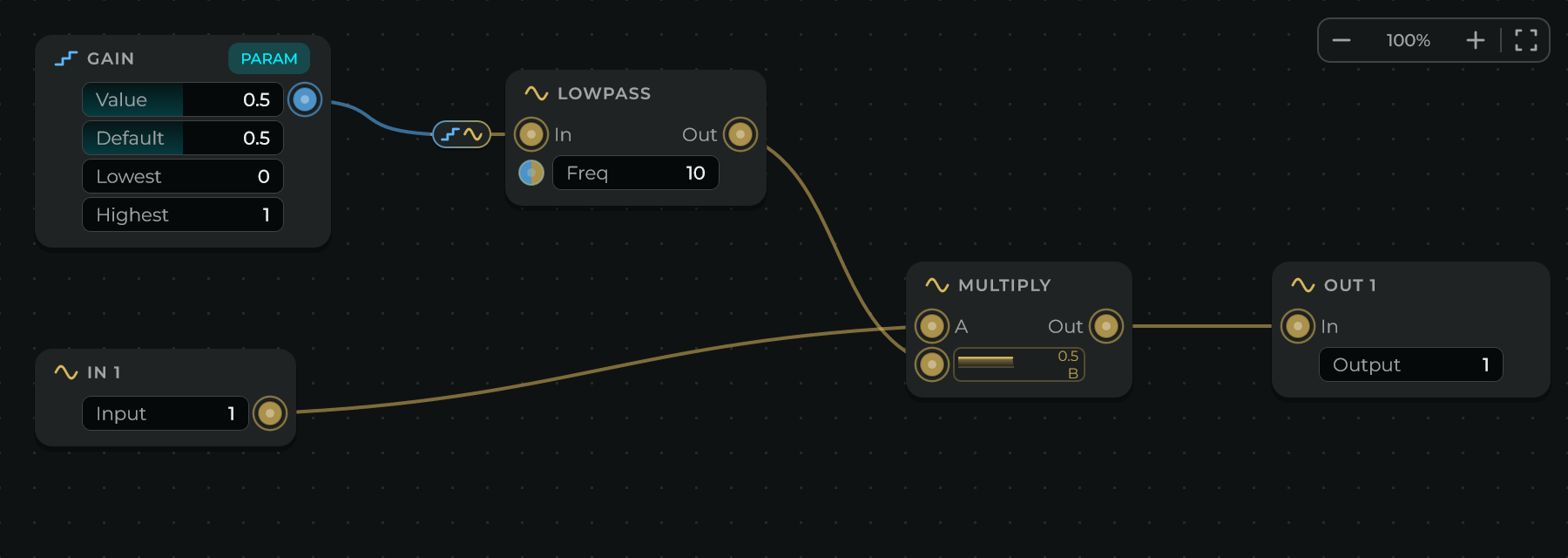
Outside the node nothing changes: its inputs and outputs are audio pins, and each param's pin takes Data or CV, as on any node.
Feedback works as it does in the code: through memory. A cable may go back to an earlier box only into a History, which gives what came into it one sample ago, or into the In of a Delay, which plays back what came in Time seconds ago and holds up to Holds seconds. Those cables are dashed. A loop with neither in it is a mistake: the status line says so, and its boxes are marked.
The Code tab shows the code the patch makes, which is what plays. This is the one the Echo example makes:
js
// Made by the patch. Change the boxes or this code: the other follows.

param time = 0.3 (0.01 .. 2)
param feedback = 0.5 (0 .. 0.95)

delay line1(2 * samplerate)

let tap1 = line1.read(max(time * samplerate, 1))
let mul1 = tap1 * feedback
let add1 = in1 + mul1
out1 = add1
out2 = add1

line1.write(add1)
The code and the patch are two views of the same program, and you can work in either. Change a box and the code is written again from the boxes. Type in the code and the boxes are drawn again from it, each one where it was, so the patch you laid out stays as you left it. The view you changed last is the one that counts, and every change is one step of Ctrl + Z. The Split tab shows both at once, so you can watch one follow the other.
- Code written from the boxes is written its own way: comments and names you typed in the code are not kept once you change a box.
- While the patch is shown, New starts a patch with each input wired to its output, Examples has patches to start from, and Reference lists every kind of box, with a button that adds one. New and the examples ask first when they would take the place of a patch or code you made; over an example as it came, they go in at once.
Code in the patch
Some things have no box of their own: an if, a loop, a table, a function of your own. In the patch they are code, in a code box.
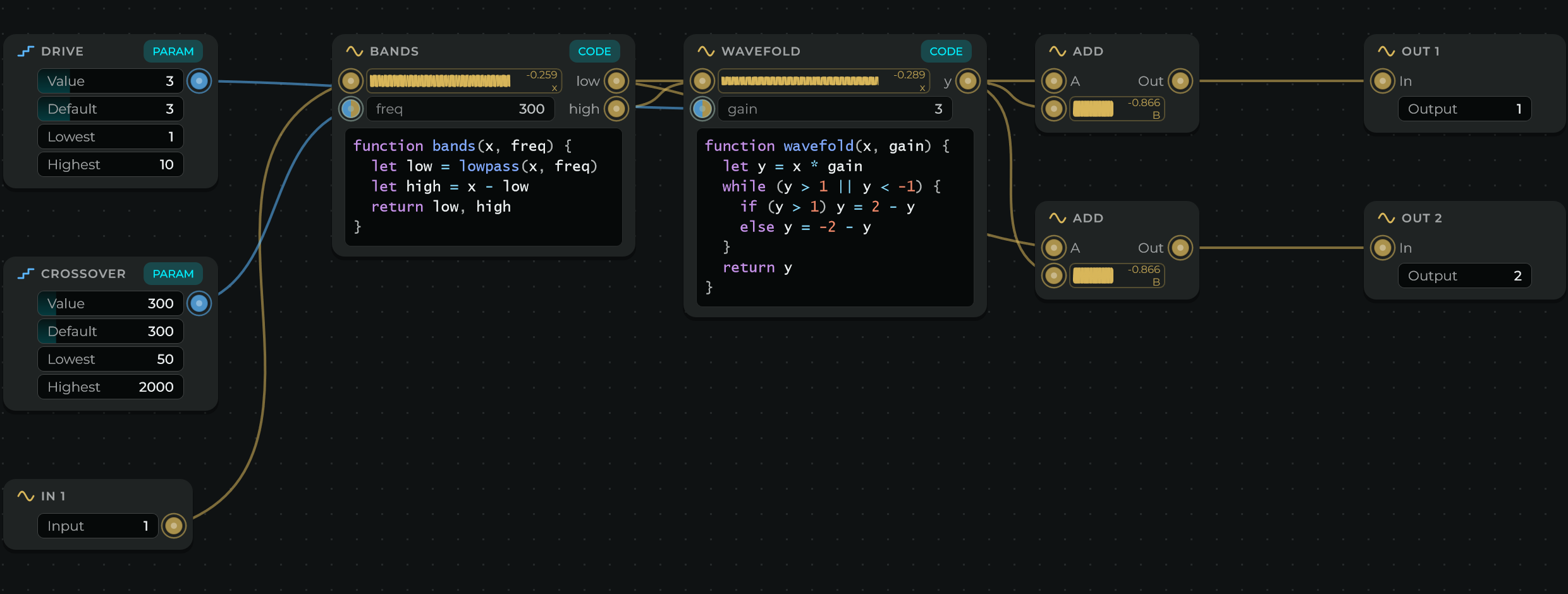
- A code box holds a function of your own. Its name is the box's title, its values are its inputs, each with a field as a filter's Freq has, and what it returns are its outputs. In the code it is the function and the line that calls it.
- Double-click its code to type in it. Ctrl + Enter or Esc keeps what you typed, as one step of Ctrl + Z. For a new one, pick Code from the list of boxes.
- The box grows with the code as you type. Drag its right edge, its bottom or the corner between them to give it the size you want: code that does not fit is cut, and its last line says how many more lines there are. Double-click that edge, or right-click it and choose Fit to Its Code, and it is as big as its code again.
- Every program can be drawn. What a box says becomes boxes. A call of a function of your own or of a spectral block becomes a code box with its code. A line no box says, such as an
ifor a loop, becomes a code box of its own, with a function made from that line (choice,loop,block) that takes the values the line reads and gives back the ones it changes. Tables,init,latencyand the functions no box calls go in the At the Top box, as they were written. - Right-click a code box and choose Turn into Boxes to draw its function as boxes in its place, wired as it was. Select some boxes, right-click and choose Turn into a Code Box to make them one code box: a value for each cable coming in, an output for each cable going out. In, Out and Param boxes stay as they are: one selected with the others is left out, and a param wired into them becomes one of the function's values, with its name.
- Code boxes that use the same table or delay line take turns in the order they were made, which in a patch drawn from code is the order of the code.
- One thing is not drawn: a function that uses a
letor ahistoryof the program around it, as its box would not show where that value comes from. The patch says which, and on which line: give that value to the function as one of its own, and it is drawn.
Your programs in the library
A program you like can be kept, found again and used in any project:
- Save, on the node's toolbar, asks for a name, a category (such as Filters) and a line about what it does, and keeps the program in your library. The node takes its name. Right-clicking the node's header → Save to the Library... does the same. Saving again with the same name and category asks before it replaces the one you had.
- The Nucli section of the Explorer, its own icon in the strip at the left, lists the programs that come with MNodes and the ones you saved, by category. Search them, or pick a category above the list. Mine shows only yours.
- Besides the node's own examples, the Factory content brings 73 more programs, each one described with its settings in Nucli programs. Resonators that make whatever comes in ring in a key: on a note's harmonics, on the notes of a scale, or on a chord that moves on by itself. Textures: Superstretch, which stretches what comes in many times slower without changing its pitch, a granular cloud and a spectral blur. Reverbs: plate, hall, spring, shimmer, freeze and a small room. Pitch: a pitch shifter, a harmonizer, a sub octave and a doubler. Filters, distortion, delays (tape, reverse, multi-tap, beat repeat, tape stop), modulation (chorus ensemble, rotary speaker, phaser, flanger and more) and dynamics (compressor, gate, multiband, de-esser, a pump in time with a tempo). Generators that play by themselves: an ambient drone, a music box, an arpeggiator, bubbles and a drum machine. And instruments to play: pluck, bass, FM keys, marimba, pad and organ, each taking MIDI To CV's Note Number, Gate and Velocity into its note, gate and velocity. They go in the Nucli/Factory folder of your library, apart from yours.
- Drag a program onto the graph and it is a Nucli node with that program. Drag it onto a Nucli node and it takes the place of that node's program: when that program is one you wrote, it asks first, and Ctrl + Z brings yours back. A double-click, or right-click → Add to Patch, puts it in the middle of the graph.
- Each program you save is a .mndsp file, in the Nucli/User folder of your library, in a folder for its category. The folder button in the Explorer opens it. A .mndsp file you put there, from a friend for example, shows in the list too. Right-click one of yours to show it in your file manager or to delete it (it goes to the bin).
- Dropping a .mndsp file from your computer onto the graph, or onto a Nucli node, does the same as dragging it from the Explorer.
A .mndsp file is plain text, so any code editor opens it: a few lines at the top say its name, its category and what it does, then comes the code, and, when it was saved as a patch, the patch at the end, inside a comment.
Writing the code in another editor
The editor on the node is made for short programs. For a longer one, write it in a code editor such as VS Code, and the node follows it:
- Edit Outside, on the node's toolbar, asks where to keep the code (next to the project, unless you pick another place), writes it there as a .mndsp file and opens it in your code editor: VS Code, Cursor or VSCodium if you have one, else Notepad++ or Sublime Text, else Notepad on Windows or TextEdit on a Mac. Once the file is linked, Edit Outside opens it again. In VS Code, click the file's language at the bottom right and set .mndsp files to JavaScript to see the code in colour.
- Or give File, in the Inspector, a .mndsp, .dsp or text file you already have: drop it on File, pick it with the folder button, or type its full path. Of a .mndsp, the node takes the code: the lines at the top and a patch at the end are left out.
From then on, every time you save the file, the node plays it, whatever Live says, and a mistake shows on the status line while the last code that worked keeps playing. The status line says which file the node follows. While it follows one, the editor on the node shows the file and cannot change it, New does nothing, and a program dragged onto the node is not taken. The file's code is the program, and the patch follows it. Clear File to write on the node again: the code stays as the file left it.
The code is saved in the project too, so the project opens the same where the file is not, and Collect All & Export puts the file in the bundle. On the File input, a path links a file, an empty one stops following, and an Event reads the file again.
Numbers and operators
| Write | Means |
|---|---|
+ - * / | add, subtract, multiply, divide |
% | what is left after dividing |
** | to the power of: 2 ** 3 is 8 |
< <= > >= == != | compare: 1 when true, 0 when not |
&& || ! | and, or, not |
++, -- | one more, one less: k++ |
true, false | 1 and 0 |
pi, twopi, halfpi | π, 2π and π/2 (also Math.PI, and Math.E for e) |
samplerate | samples per second, such as 48000 |
Built-in functions
You can write them the JavaScript way too: Math.sin(x) is sin(x).
| Function | Gives |
|---|---|
sin cos tan asin acos atan sinh cosh tanh | the usual trigonometry; tanh is also a smooth soft clip |
atan2(y, x), hypot(x, y) | an angle, and a length |
exp exp2 log log2 log10 sqrt, pow(x, y) | powers and logarithms |
abs floor ceil round trunc fract sign | size, rounding, the part after the point, the sign |
min(a, b, ...), max(a, b, ...) | the smallest or the largest |
clamp(x, lo, hi) | x kept between lo and hi |
mix(a, b, t) | from a (t = 0) to b (t = 1) |
wrap(x, lo, hi) | x wrapped round into lo to hi |
fold(x, lo, hi) | x folded back into lo to hi |
mtof(note), ftom(hz) | a MIDI note to hertz, and back |
dbtoa(db), atodb(gain) | decibels to a gain, and back |
These have a memory of their own, so each one you write is a separate oscillator or filter:
| Function | Gives |
|---|---|
phasor(freq) | a ramp from 0 to 1, freq times a second |
cycle(freq) | a sine wave |
noise() | white noise, from -1 to 1 |
lowpass(x, freq), highpass(x, freq) | a gentle (one-pole) filter |
dcblock(x) | x without its offset |
delta(x) | how much x changed since the last sample |
sah(x, trigger) | holds x each time trigger goes above 0 |
lowpass(in1, 1000) and lowpass(in2, 1000) are two different filters, one for each channel.
Examples
The node's Examples button has more, ready to try: a ping-pong echo, a chorus, a wavetable, an additive saw, a lookahead limiter and three spectral effects.
A sine wave
js
param freq = 220 (20 .. 2000)
param level = 0.3 (0 .. 1)

out1 = cycle(freq) * level
out2 = out1
Tremolo
js
param rate = 5 (0.1 .. 20)
param depth = 0.5 (0 .. 1)

let lfo = 0.5 + 0.5 * cycle(rate)
out1 = in1 * (1 - depth * lfo)
out2 = in2 * (1 - depth * lfo)
Bit crusher
js
param bits = 6 (1 .. 16)

let steps = 2 ** bits
out1 = round(in1 * steps) / steps
out2 = round(in2 * steps) / steps
A resonant low-pass filter
The state variable filter many synths use, with a resonance you can push.
js
param cutoff = 1000 (20 .. 20000)
param q = 2 (0.5 .. 20)
history ic1 = 0, ic2 = 0

let g = tan(pi * cutoff / samplerate)
let k = 1 / q
let a1 = 1 / (1 + g * (g + k))
let a2 = g * a1
let a3 = g * a2

let v3 = in1 - ic2
let v1 = a1 * ic1 + a2 * v3
let v2 = ic2 + a2 * ic1 + a3 * v3
ic1 = 2 * v1 - ic1
ic2 = 2 * v2 - ic2
out1 = v2
A stereo echo
Each repeat a little darker than the one before.
js
param time = 0.3 (0.01 .. 2)
param feedback = 0.5 (0 .. 0.95)
param tone = 4000 (200 .. 18000)
param wet = 0.4 (0 .. 1)

delay left(2 * samplerate), right(2 * samplerate)

let l = left.read(time * samplerate)
let r = right.read(time * samplerate)
left.write(in1 + lowpass(l, tone) * feedback)
right.write(in2 + lowpass(r, tone) * feedback)
out1 = in1 + l * wet
out2 = in2 + r * wet
A reverb from scratch
For each side, eight echoes that feed back into themselves (combs) side by side, then four that smear the sound (allpasses) in a row: the classic recipe, written with two functions.
js
param size = 0.84 (0.7 .. 0.98)
param damp = 0.3 (0 .. 0.9)
param wet = 0.3 (0 .. 1)

function comb(x, length) {
  delay line(4000)
  history store = 0
  let y = line.read(length)
  store = y * (1 - damp) + store * damp
  line.write(x + store * size)
  return y
}

function allpass(x, length) {
  delay line(2000)
  let b = line.read(length)
  line.write(x + b * 0.5)
  return b - x
}

function side(x, spread) {
  let c = comb(x, 1116 + spread) + comb(x, 1188 + spread) + comb(x, 1277 + spread) + comb(x, 1356 + spread)
        + comb(x, 1422 + spread) + comb(x, 1491 + spread) + comb(x, 1557 + spread) + comb(x, 1617 + spread)
  return allpass(allpass(allpass(allpass(c, 556 + spread), 441 + spread), 341 + spread), 225 + spread)
}

let x = (in1 + in2) * 0.015
out1 = in1 * (1 - wet) + side(x, 0) * wet * 3
out2 = in2 * (1 - wet) + side(x, 23) * wet * 3
Each call of comb and allpass has its own delay line, so this is 24 delay lines from three short functions.
What it costs
The status line says how many steps run every sample, and with a spectral block, how many for every bin of every frame. A filter like the ones above takes around a tenth of one percent of a computer core, the reverb above about three percent, and a spectral effect one to two percent. Nucli is slower than a node built into MNodes, from two times for a filter to ten times for a reverb, so dozens of small programs are fine, and the heaviest work, such as long convolution reverbs, is better left to the built-in nodes.
Messages
| The status line says | What to do |
|---|---|
| There is nothing called 'x' | Declare it first with let, param or history, or check the spelling. |
| 'in1' is an input: the code only reads it | Write to an output, such as out1. |
| 'cutoff' is a param: its knob or its pin sets it | Use a let for a value the code changes. |
| The code writes no output | Give out1 a value. |
| sin takes 1 value, not 2 | Check the values in the brackets. |
| A history is declared at the top | Move it out of the { }, or to the top of a function. |
| A delay's size can only use numbers and samplerate | The size is fixed before the sound starts. Write the longest time you need, such as 2 * samplerate, and choose the time with a param in read. |
| A function cannot call itself | A function can call others, but not itself, not even through another one. Write the repeat as a loop. |
| return has to be the last line of the function | Work the value out on the lines before and end with return. |
| break only works inside a loop | break and continue go inside a for or a while. |
| init runs before any sound | Leave the inputs and outputs to the rest of the code; fill tables in init. |
| A spectral frame is 64, 128, 256... samples | Write one of those numbers as it is, without working it out. |
| Inside a spectral block the sound is its bins | Send the sound in from outside, such as lp(in1), and change mag and phase inside. |
| A loop ran out of turns and was stopped | The loop on that line never ended, or the loops took more turns than a node is allowed. Check the condition that ends it. |
| The sound blew up and started again | A value ran away to infinity, usually a feedback of 1 or more. Lower the feedback or the resonance. |
| These boxes feed back into each other with no history or delay in the loop | Put a history or a delay in the loop, so it knows which sample comes first. |
| The patch has no out box | Add one, such as out 1. |