
Appearance
Your own style in Assist
Assist builds what you describe. A style tells it how you like things made, once, so you do not have to say it again in every message: your colours, your font, how controls are named, what a panel must never have.
A style is a folder on your computer with a text file and, if you want, a few pictures. Assist reads it with every request while the style is on. With no style, nothing changes: Assist picks a look for each new panel, as it always did.
An example
Here is the same request, made three times at Crafted:
Build a flagship polysynth named Solstice. Two oscillators with wave morphing, a sub and noise, with a mixer. A filter with a screen that shows its curve over the live spectrum. Two envelopes, each dragged on its own screen. An LFO with its wave shown moving, routed to pitch, filter and amp. Chorus, delay and reverb at the end. A live scope of the output and an output meter. Make the panel rich and alive: every section shows something that moves with the sound. No numbers beside the section names.
With no style
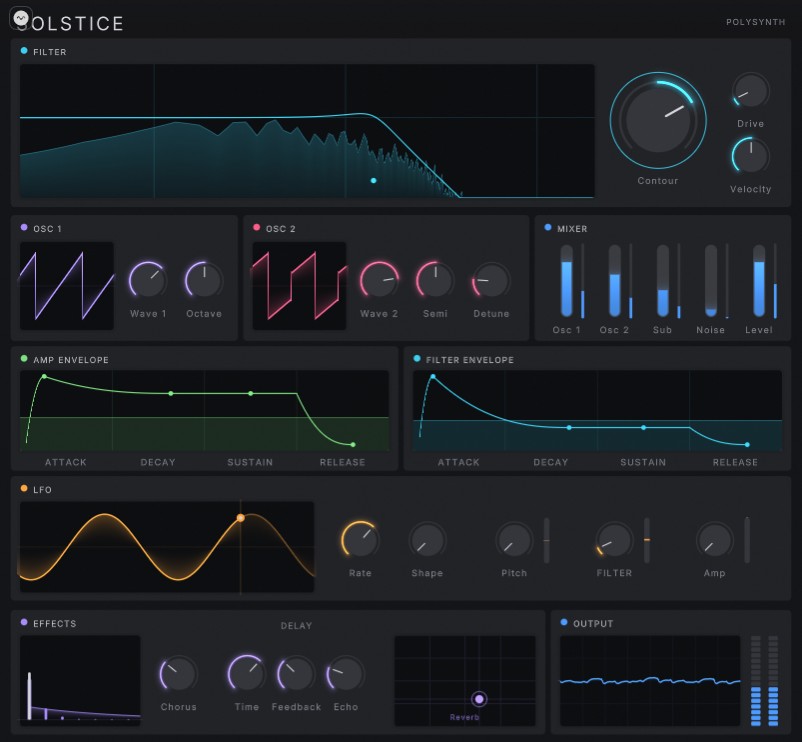
Assist picks the look itself: here a dark panel with a colour of its own for each section.
With a style called Night lab
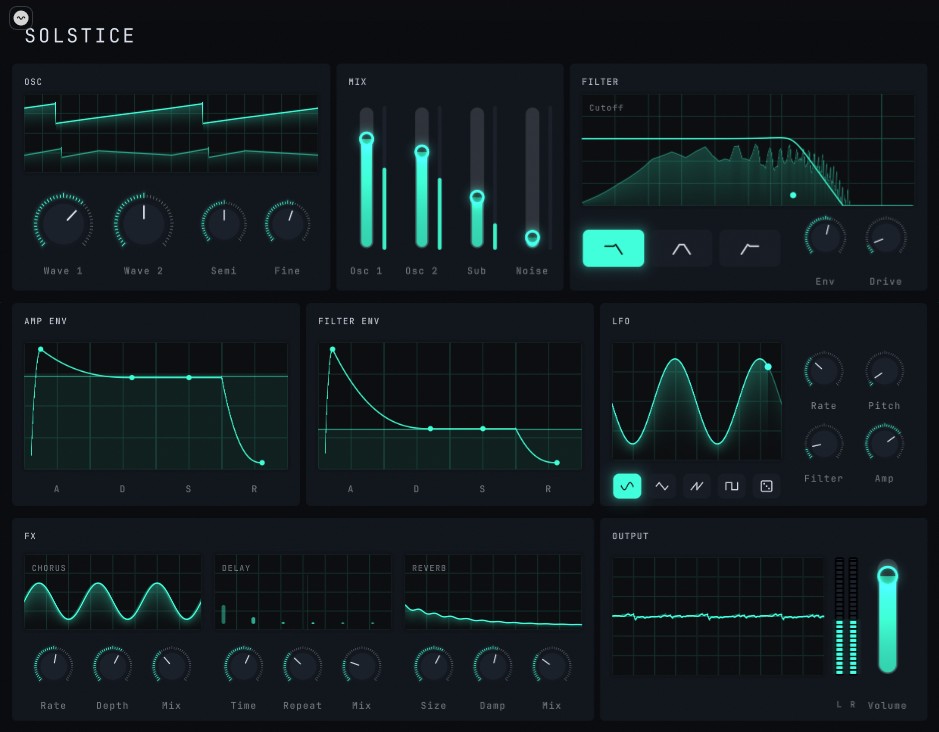
One accent only, every screen black glass with a fine grid, short names, and a limiter at the end of the sound. This is its whole style.md:
background: #0A0C10
plates: #12161D
text: #DDE5F0
light: #3CF0C8
knobs: #1B212B
font: JetBrains Mono
look: software

One accent colour only, the light above. Everything else on the panel is grey.
No numbers, dots or badges beside the section titles.
Section titles in capitals, small, at the top left of each section.
Screens are black glass with a fine grid, and what they draw glows in the accent.
Every section shows something that moves with the sound.
Short names on the controls, one word where it can be.
End every sound with a limiter, so nothing clips.
With a style called Seventies console
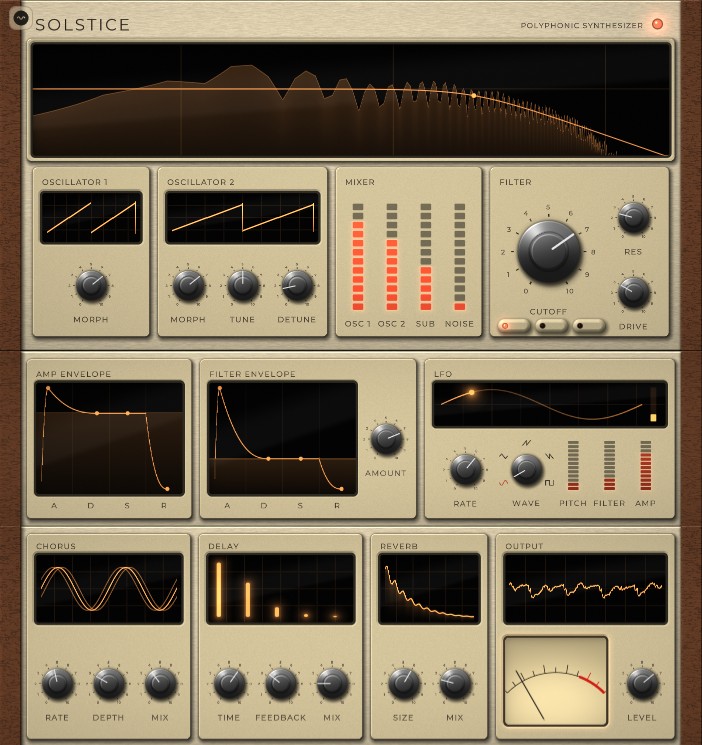
Cream metal with wooden cheeks, black knobs with a printed scale, one red lamp, switches for the filter, a needle on paper for the output, and names in capitals. Its style.md:
background: #D8C9A8
plates: #C8B88F
text: #2A231B
light: #D9472B
knobs: #1B1A19
font: Montserrat
look: hardware

The panel looks like a studio synthesizer from the seventies: cream metal, wooden cheeks at both ends, black knobs, one red lamp.
Knobs have a printed scale with numbers around them. The ones that matter most are big.
Meters are needles on warm paper, lit from behind, not bars.
A switch instead of a menu when there are two or three choices.
Names in capitals, as printed on hardware.
No numbers or badges beside the section titles.
Sounds are warm: a little saturation before the output, and never a harsh top end.
The sound, the sections and what moves are the same request in all three. What changes is what each style.md says.
At Quick and Standard a style changes less, the colours, the font and the names only: see What a style changes.
Set it up
- Open Assist in the left sidebar and click the account button at the top right of its panel.
- Choose Style → New style folder..., pick where it goes and give it a name.
- MNodes makes the folder and shows it to you. Open style.md with any text editor, write your rules and save.
The style is on straight away. A Style pill appears beside Effort, with the name of your folder. Click it to turn the style off, to show its folder or to choose another one.
To use a folder you already have, choose Style → Choose a folder... instead.
What is in the folder
| In the folder | What it is for |
|---|---|
| style.md | Your rules, in your own words. Its first lines can name your colours and your font |
| references | Up to four pictures of the look you are after |
| examples | Three complete styles to copy from. Assist never reads this folder |
Only style.md and the pictures in references are used. You can keep anything else in the folder.
The new style.md comes with notes that explain each part. Notes sit between <!-- and -->: they are for you, and Assist never sees them. Write your own lines outside the notes.
Colours and font
The first lines of style.md can name the colours and the font of your panels. Each goes on its own line, and all of them are optional.
background: #15171B
plates: #1F2228
text: #D9DCE3
light: #4DA3FF
knobs: #2E323A
font: Inter
look: software| Line | What it sets |
|---|---|
| background | The colour of the panel |
| plates | The colour of the sections that group the controls |
| text | Names, titles and numbers |
| light | The accent: what lights up, moves or shows a value |
| knobs | The caps of the knobs and other controls |
| font | One of Montserrat, Inter, Poppins, JetBrains Mono or Orbit |
| look | software for the face of a modern software synth, vector for flat shapes, hardware for metal, light and shadow |
Colours are written as # and six digits, the way colour pickers show them. If you name only some, Assist works out the rest from them, so one colour of yours never ends up among colours that do not suit it.
These lines must come first in the file. As soon as Assist meets a line that is something else, it stops looking for colours and reads the rest as rules.
Rules
Under the colours, write your rules as plain sentences, one per line. Any language works, and Assist still answers in the language you write your request in.
Rules can be about how things look:
One accent colour only. Nothing else on the panel is coloured.
Section titles in capitals, small, at the top left of each section.
No decoration: no screws, no logos, no lines under the titles.
About how things are named and laid out:
Short names on the controls, one word where it can be.
At most six controls on a panel.
Name every control in Spanish.
And about how the sound is built:
End every sound with a limiter, so nothing clips.
Reverb stays light: its mix never above a fifth.
A dozen clear rules work better than a full page. Assist reads the first 6,000 characters of the file.
The examples folder has three complete styles: Dark studio, Warm hardware and Light and flat. To start from one, copy its text into style.md and change what you like.
Reference pictures
Put up to four PNG or JPG pictures in the references folder: screenshots of panels you like, a photo of a piece of hardware, a colour board. If there are more than four, Assist uses the first four by name.
Assist takes the look from them: colours, materials, shapes, lettering, how full or how bare the panel is. It does not copy their layout, their names or their brand.
MNodes makes the pictures smaller before sending them, so a large screenshot costs no more than a small one.
What a style changes
How much a style can change depends on the Effort of the request.
| Effort | What your style sets |
|---|---|
| Quick and Standard | The colours and the font of the panel, which controls it has and what they are called. MNodes lays these panels out itself, so rules about how a knob or a switch is drawn have nothing to act on |
| Crafted | Everything. Assist draws the panel itself, so every rule about how it looks counts, and so do your pictures |
Rules about names and about the sound work at every Effort. So does a style when you ask for one part on its own, such as a single control or a shader.
A style is used on what Assist builds or changes from now on. Turning it on does not change the projects you already have: to give one your style, open it and ask Assist to restyle it.
One thing a style cannot do yet: use files of your own from the folder as part of what is built, such as a film strip for the knobs or a picture for the background.
What it costs
Your rules add very little to what a request spends. Each picture adds a few credits to every request while the style is on. Every answer shows what it cost, as always.
If you only want your pictures for some requests, turn the style off from the Style pill when you do not need it.
Privacy
The folder stays on your computer. While the style is on, each request carries the name of the folder, the text of style.md without its notes, and the pictures in references. They go the same way your project does: to the AI, only with a request, and the MNodes server does not keep them once the request ends. With the style off, or with no folder chosen, nothing from it is sent.
If Assist does not follow your style
- Check the pill. If there is no Style pill beside Effort, the style is off. Turn it on from the account button, under Style.
- Colours not used. The colour lines must be the first lines of style.md, each on its own line, and outside the notes. Check each colour has
#and six digits. - A rule about drawing does nothing. In Quick and Standard, rules about how controls are drawn have nothing to act on. Ask again in Crafted.
- Pictures not used. They must be PNG or JPG files inside references, not in the folder itself.
- You changed style.md. Save the file: the next request reads it. There is nothing to restart.
- The folder was moved or renamed. The Style menu says the folder is not found. Choose it again.